Ultripower User Guide (v4.0) DashBoard Interface Overview • 31
Log Tab
The read-only information displayed in the Logs tab is used by Ross Technical Support for diagnostic and
troubleshooting purposes. Ta bl e 7.6 summarizes the possible messages in the Log tab.
The roll-over for entries is approximately 50 days.
Setup Tab
Table 7 .6 summarizes the options in the Setup tab.
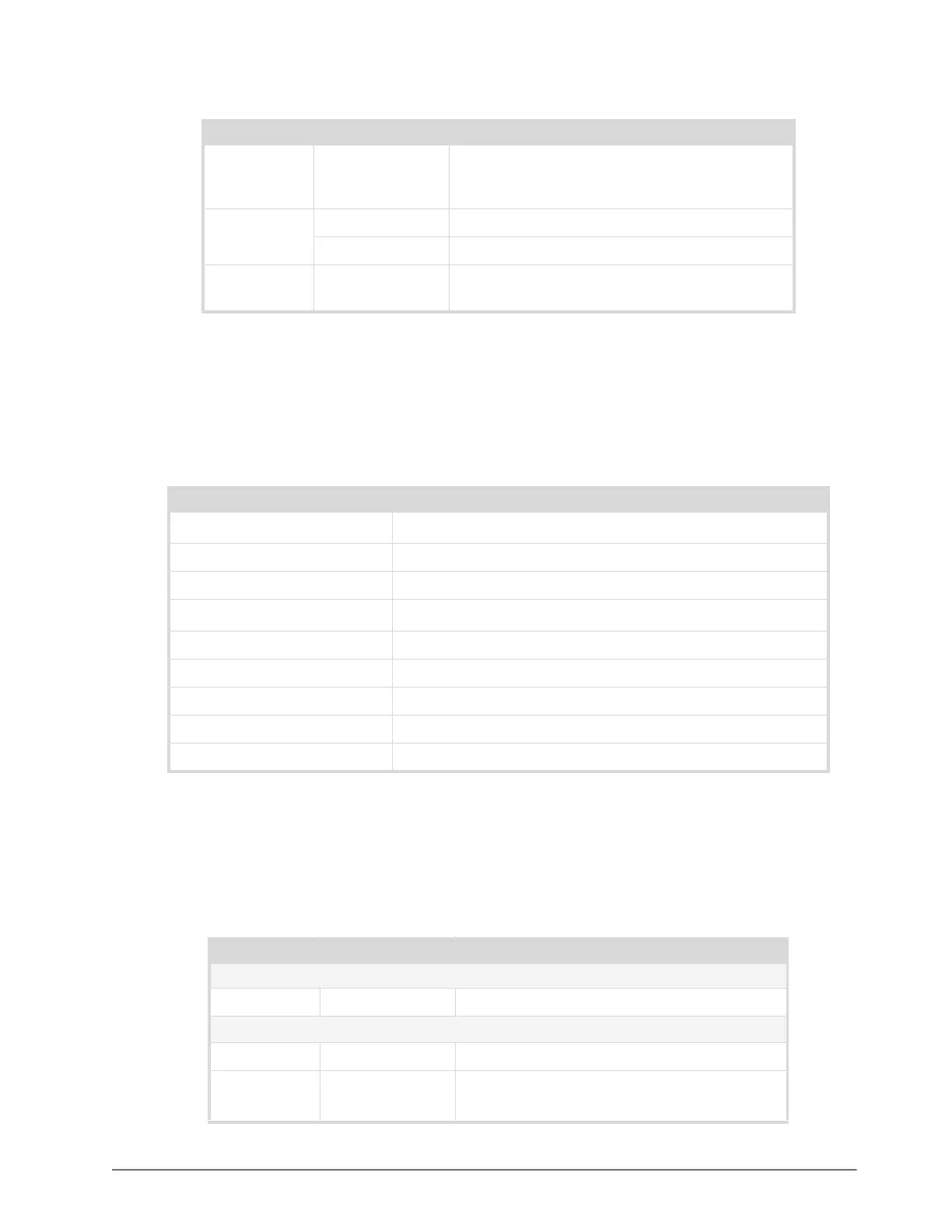
Table 7.4 Control Tab
Item Parameters Description
Device <name> Displays the device label as defined in the Setup tab.
The default is Ultrix-FR5 and is assigned to all
output ports.
Power Selected The power state for the external device is enabled
Cleared The power state for the external device is disabled
Device Power
State
Change Toggles the device power state
Table 7.5 Log Tab
Message Description
Outx overcurrent
a
a. Where x is output 1 to 4.
the device connected to output port x is drawing too much current
Outx undervoltage the output port x is under voltage
Outx fault the output port x has another undefined fault
Sloty uninstalled
b
b. Where y is power module 1 or 2.
the module not present
Sloty vin fault the power module AC input is out of range
Sloty fan fault the power module has a blocked or faulty fan
Sloty vout fault the power module DC output is out of range
Sloty temp fault the power module is
Sloty fault undefined error
Table 7.6 Setup Tab
Item Parameters Description
Device Labels
Device Labels <text> User-defined identifier for the device
Connected Device
Output Port # Assign a specified Output Port to a defined device
Device
Assignments
Apply Apply any changes to the port assignment
This may change device power state


 To Next Page