22
Master Station Safe Use, Installation and Maintenance Manual
Host Serial Type Selection
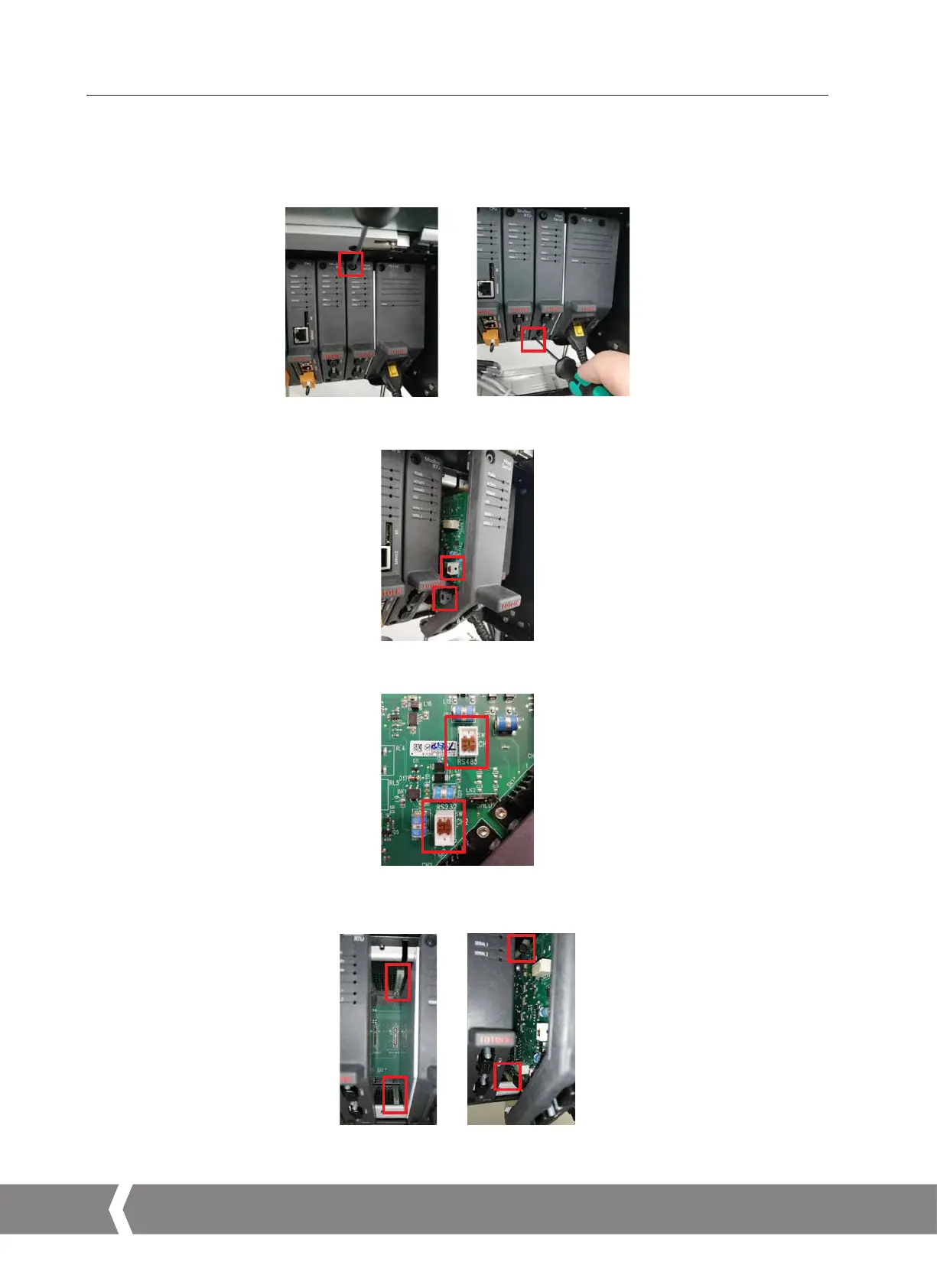
1. Open the Master Station display door to access the fitted modules.
2. Isolate the Master Station power supply using the switch on the PSU module.
3. Unscrew the top and bottom fixings that hold the module in place. Screws are captive so will not unscrew fully.
4. Pull the tab outwards away from the Master Station to remove the module. It is important to pull outwards in a smooth linear
motion to avoid twisting the module and potentially damaging PCB components.
5. Adjust the DIP switches to the desired position for each serial port. SW1 (CH1) determines the setting for Serial 1. SW2 (CH2)
determines the setting for Serial 2. Move the switch up to set RS-232 or down to set RS-485.
6. After both switches are configured for the correct communication type, refit the module by performing the reverse of disassembly.
Each AIM slot includes plastic guides to ensure the PCB aligns correctly with the Master Station. Check the top and bottom of the
PCB are within the plastic guides before fully inserting the AIM into the Master Station.
7. Tighten the fixing screws and power on the Master Station. After a few minutes, check the Host Serial AIM is communicating with
the Master Station.
6. Basic Commissioning continued
A4US
US
A4
US A4
US
A4



 To Next Page