3 Phase Power Analyser / EN
09/30/16 Version No. 00 10
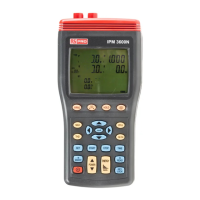
1. Input for voltage terminals (U1, U2, U3, N).
Note the 3 inputs are not galvanically isolated, they have the common reference point “N”
(neutral).
2. Input sockets for current probes (I1, I2, I3, I4).
3. Plug for external AC adaptor power supply input.
CAUTION:
Use only the mains adaptor supplied with the instrument
4. Optical USB interface output.
5. LCD display.
6. WIRING key : Press “WIRING” to select the type of electrical system under test:
1P2W -To measure single-phase two-wire power lines
1P3W -To measure single-phase three-wire power lines
3P3W2M
-To measure three-phase, three-wire power lines without neutral, use
this when measuring three-phase power with 2-current probe
measurement only
3P3W3M - To measure three-phase three-wire power line without neutral, using
the three power meter method, use this when measuring
three-phase power with 3-current probe measurement only
3P4W -To measure three-phase four-wire power lines with neutral
7. key : Phase sequence detection function key. In the 3P4W mode, press and hold
down this key, it will display phase detection results as follows :
Normal phase
Reverse phase
8. HOLD key : Data hold function key, press “HOLD” key to hold data, the “ HOLD ” symbol is
displayed, press “HOLD” key again to exit Hold function.
9. key : Backlight function key, press “ ” key to turn on and off the backlight. The
backlight will switch off automatically after 30 seconds.
10. MAX key: Active power (P), reactive power (Q), and apparent power (S) Maximum / Minimum
recording measurement.
In the power measurement screen mode, press ⊳ or key to select (P1, Q1, S1), (P2,
Q2, S2), (P3, Q3, S3) or (Pt, Qt, St) which one measured value to do the
maximum/minimum recording measurement.
Press “MAX” key to enter this mode, the “REC” mark is displayed.
Press “MAX” key to cycle through the
a). Maximum reading the “ REC MAX ” mark is displayed.
Press
key to cycle through the
Maximum reading for Active power (“P” mark is blinking) with its Q, S, V, A reading and
its PF, Θ, Hz, I4 reading by press “PFΘ” and “Hz I4” keys.


 To Next Page