5.2 Emergency stop
7. Problems You May Encounter
Copyright ©2023 Ruko All Rights Reserved.6
1. To Prevent Flying Lost
1) It is better for beginners to fly the aircraft within real-time image
transmission range on your phone's APP for safety.
2) During flight, DO NOT turn off GPS signal (Do not long press this
button on the left upper corner , otherwise GPS will turn off), the
aircraft would fly unsteadily, or lose the direction or will be lost com-
pletely.
3) During flight, if picture freezes, the reason is Wi-Fi disconnection,
please RETURN THE DRONE first, change to another new environment
or check if there is interference around, then connect again.
4) This button on the right upper corner after long pressing is
only for emergency stop.
DO NOT use it casually while flying, otherwise it will crash.
2. Camera Guidelines
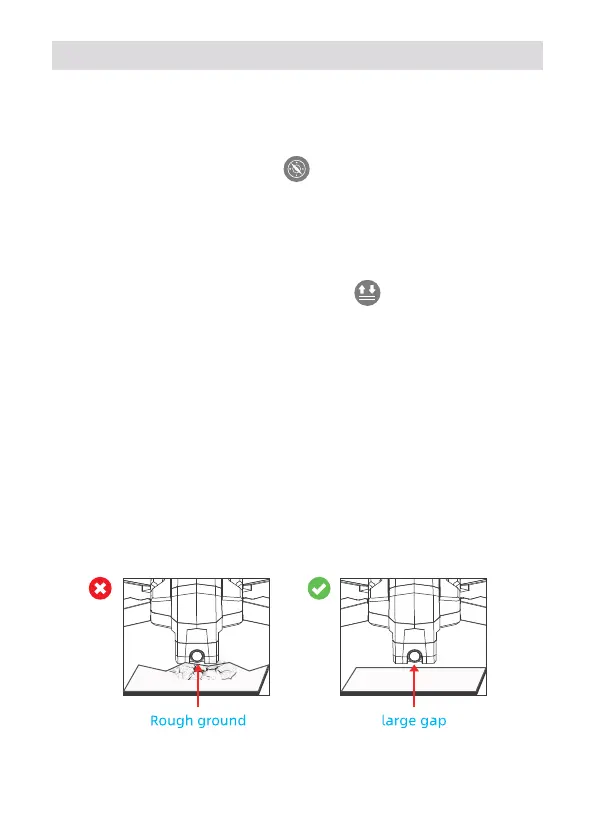
1) Do not place the aircraft on rough ground and turn on, coz camera
will adjust up and down for self-calibration, please place it in a horizon-
tal position to make sure there is enough gap under the camera, other-
wise camera would be stuck.
2) If camera is stuck, please place the drone on horizontal position
without obstacles and restart the aircraft. then check if it can make
self-calibration, or make avroscope calibration to check camera
self-calibration.
3) If not, turn off the aircraft, then move camera up and down by hand.
If still stuck, please contact us for technical support.



 To Next Page