EasyManua.ls Logo

RUPTELA FM-Eco4+ E S - External GNSS Antenna Cable Reconnection (FM-Eco4+ E S Only)

RUPTELA FM-Eco4+ E S
49 pages
Print Icon
To Next Page IconTo Next Page
To Previous Page IconTo Previous Page
Loading...
27
5.3.4 External GNSS Antenna Cable Reconnection (FM-Eco4+ E S only)
In some cases, you may need to disconnect the antenna from the device during installation. It is
important to disconnect and reconnect the antenna properly to maintain the integrity of the housing.
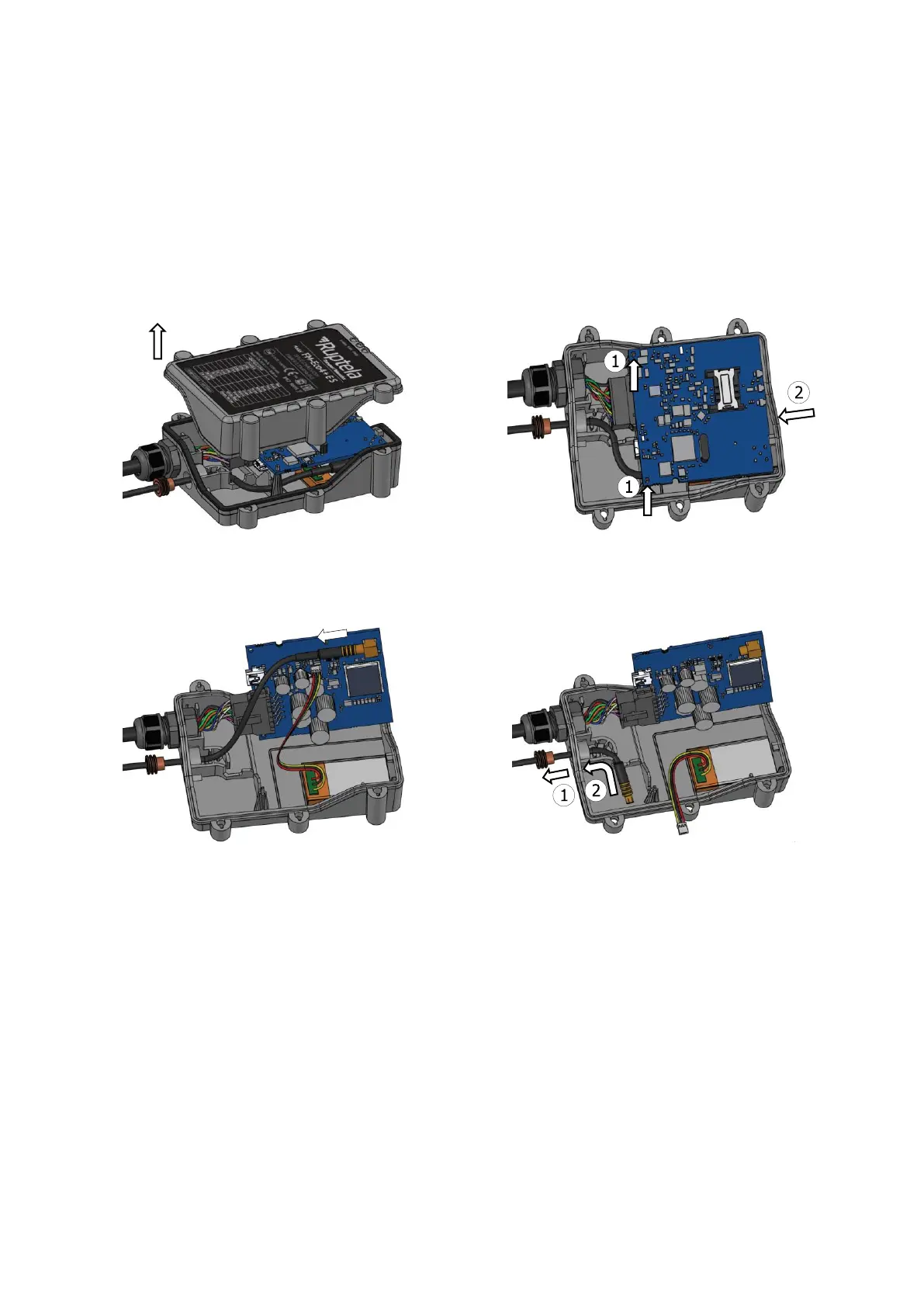
Follow these steps to disconnect the antenna:
1. Unscrew the housing screws and remove the
top (see the picture in section 5.1).
2. Carefully remove the PCB from the holding
points.
3. Disconnect the antenna cable from the PCB.
4. Move the antenna gasket (1) out of the housing
and remove the antenna cable (2) from the
housing.

Table of Contents

Related product manuals