29
6 Driver Installation
Before configuring the device, you must install the VCOM drivers and the latest version of Microsoft
Framework, otherwise your computer will not recognize the device. You can download the VCOM
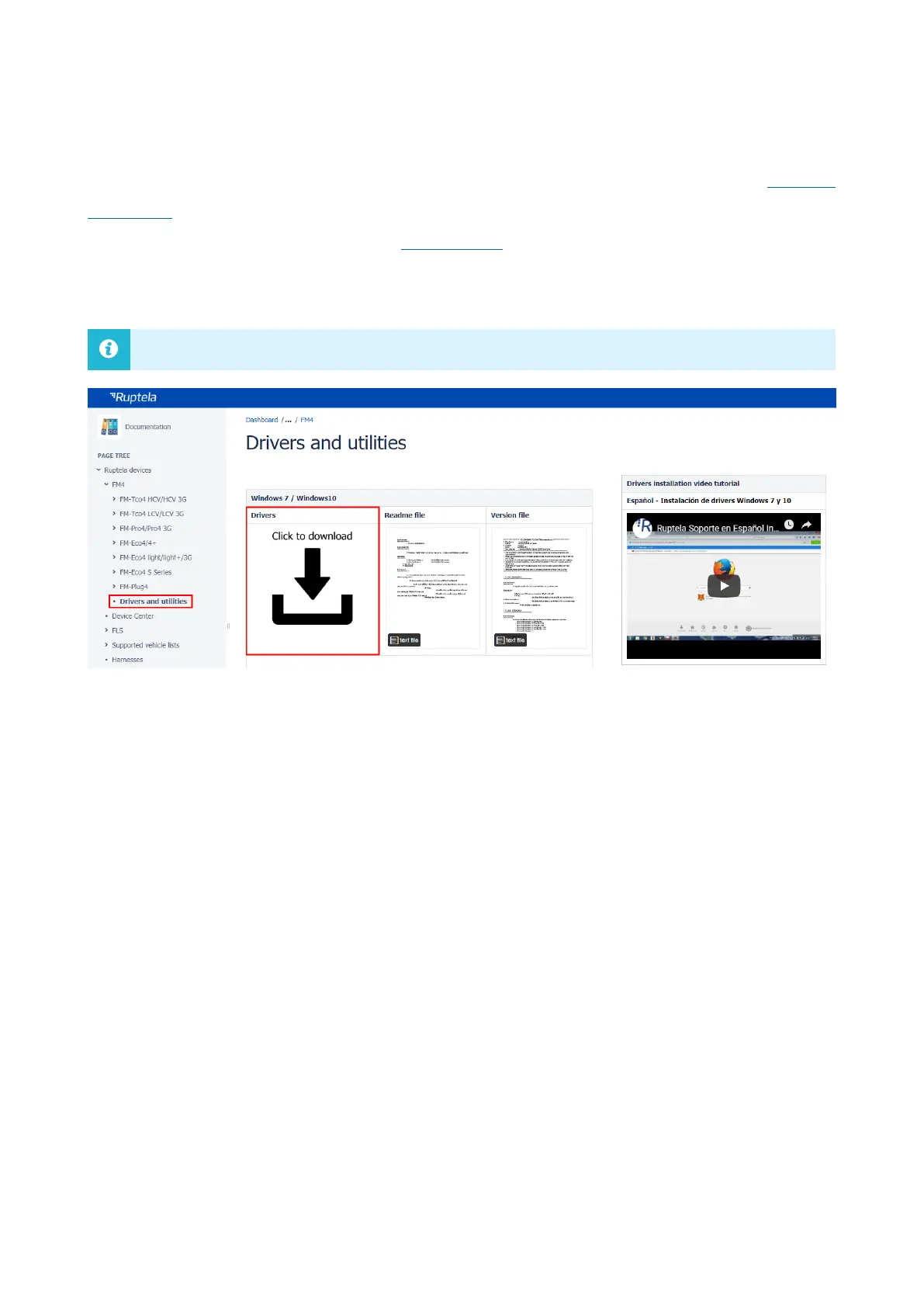
drivers from our documentation website: VCOM drivers.
Select a suitable driver file for your operating system as shown in the image below.
6.1 Driver Installation Procedure
Follow these steps to install the VCOM drivers:
1. Uninstall any previous VCOM drivers:
Windows 7: Start -> Settings -> Control Panel -> Add or remove programs
Windows 10: Start -> Settings -> Apps -> Apps & features
2. Extract the downloaded driver archive to your desired location. Launch the appropriate
installation file for your operating system:
32-bit operating system: launch dpinst_x86.exe
64-bit operating system: launch dpinst_amd64.exe
3. Follow the instructions in the installation wizard. Once it is finished, the drivers are installed
and operational.



 To Next Page