15
2
1
2
1
BEVERAGE PROGRAMMING
BEVERAGE PROGRAMMING MENU
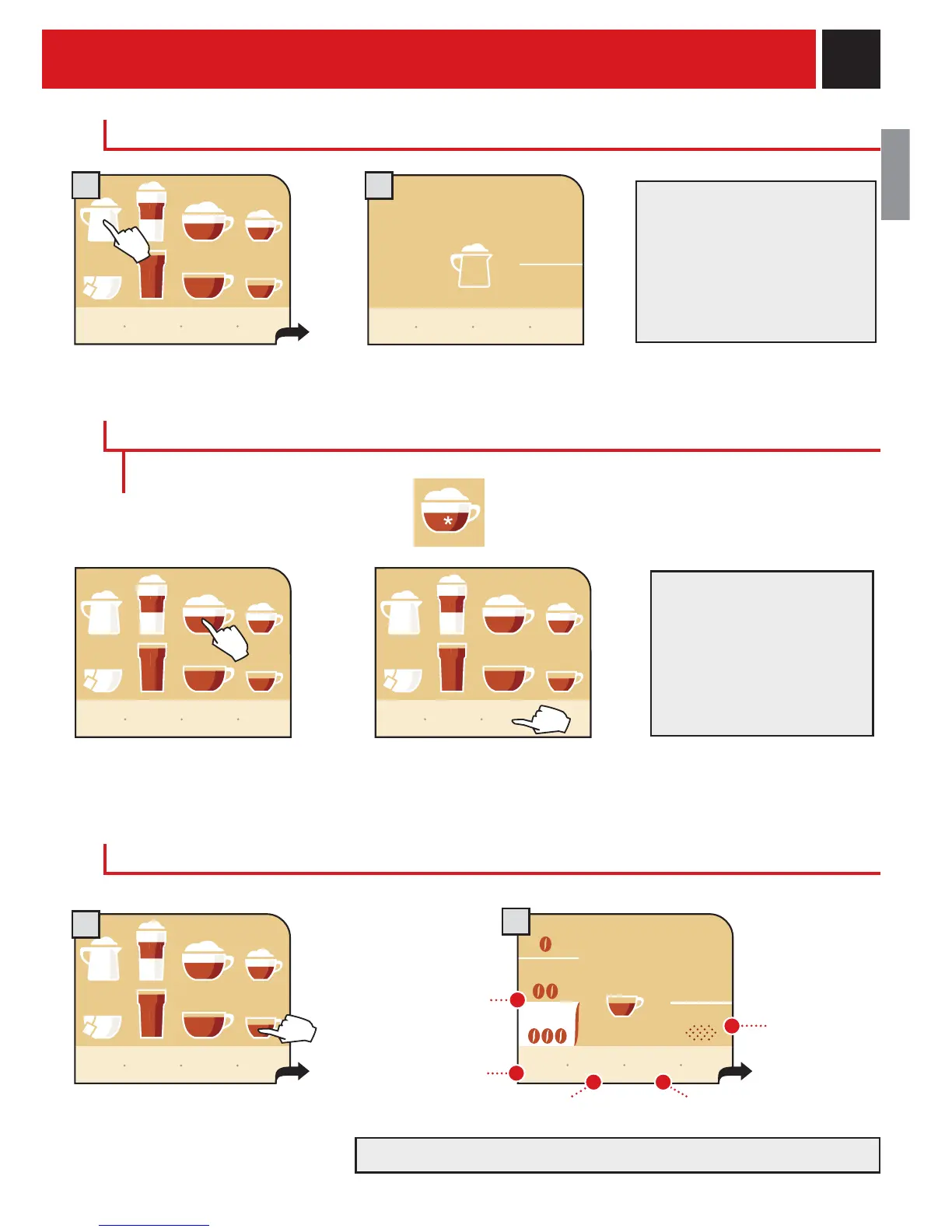
Hold down the beverage button for
two seconds
Press the button "my coffee" and
within two seconds, press the
beverage button
Each beverage can be programmed according to your individual taste. Customization is shown on the
display with the addition of an asterisk.
To program the desired beverage:
or
ESPRESSO / COFFEE / LONG COFFEE PROGRAM
Enter the menu of the beverage to
be customized by pressing and
holding the button for 2 seconds.
In this menu you can:
save settings.restore factory settings.
return to the
previous
window.
select the quantity
of coffee to be
ground (aroma).
go
back
save
settings
restore
settings
strong
preground
my
espresso
medium
light
start!
Once a beverage has been
customized it will only
dispense that type of
beverage. To change or modify
the beverage a new customi-
zation must be done.
Selecting a different quantity of coffee changes the aroma of the beverage.
show icon
explanation
my custom
coffee
program-
ming
menu
show icon
explanation
my custom
coffee
program-
ming
menu
show icon
explanation
my custom
coffee
program-
ming
menu
select the use
of pre-ground
coffee.
hot
milk
DISPENSING HOT MILK
Press the hot milk icon once. The hot milk is dispensed.
Fill the milk container
To dispense another cup of milk,
repeat this operation.
When the "milk rinsing" symbol
fl ashes, clean the milk circuits as
described for latte macchiato
(see page 12, Step 6).
show icon
explanation
my custom
coffee
program-
ming
menu
stop
milk
dispensing










 To Next Page