16
1
5
6 7
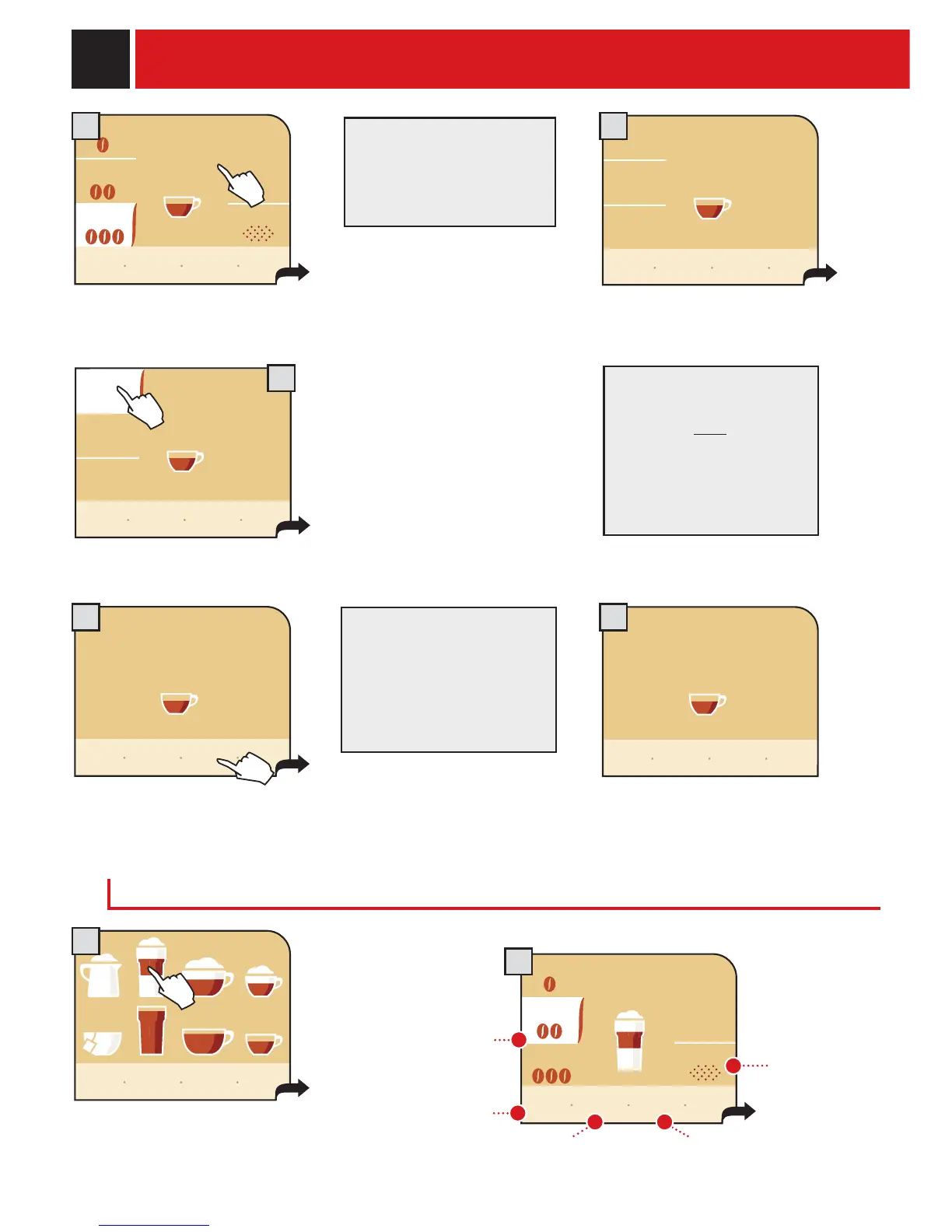
BEVERAGE PROGRAMMING
To brew an amount of coffee greater
than that preset by the
manufacturer, press “custom
coffee amount” before the end of
the brew cycle in progress. When
the quantity is reached,
press “stop coffee dispensing”.
Pressing start! allows the
machine to brew coffee.
The machine automatically starts and
fi nishes brewing the coffee, according to
the standard settings.
The brew cycle may be
interrupted only by pressing
“stop coffee dispensing”.
If the button is not pressed,
the coffee can overfl ow in
the cup.
Once the brew cycle fi nishes,
press "save settings" within fi ve
seconds.
If the "save settings" button
is not pressed the machine
returns to the main menu
and the customized settings
will not be saved.
saved!
The display shows the confi rmation of
the memorized settings, and the
machine automatically returns to the
main menu.
PROGRAMMING MILK BEVERAGES
Enter the menu of the beverage to
be customized by pressing and
holding the button for 2 seconds.
In this menu you can:
select the
quantity of
coffee to be
ground.
select the use
of pre-ground
coffee.
save settings.restore factory settings.
return to the
previous
window.
my
espresso
custom
coffee
amount
my
espresso
my
espresso
my latte
macchiato
Fill the milk tank
After pressing the start!
button, the brew cycle will
start.
my
espresso
my
espresso
show icon
explanation
my custom
coffee
program-
ming
menu
go
back
save
settings
restore
settings
strong
preground
medium
light
start!
go
back
save
settings
restore
settings
strong
preground
medium
light
start!
stop
coffee
dispensing
custom
coffee
amount
stop
coffee
dispensing
save
settings
go
back
3 4
2










 To Next Page