5
1 2 3
4
7
65
INSTALLATION
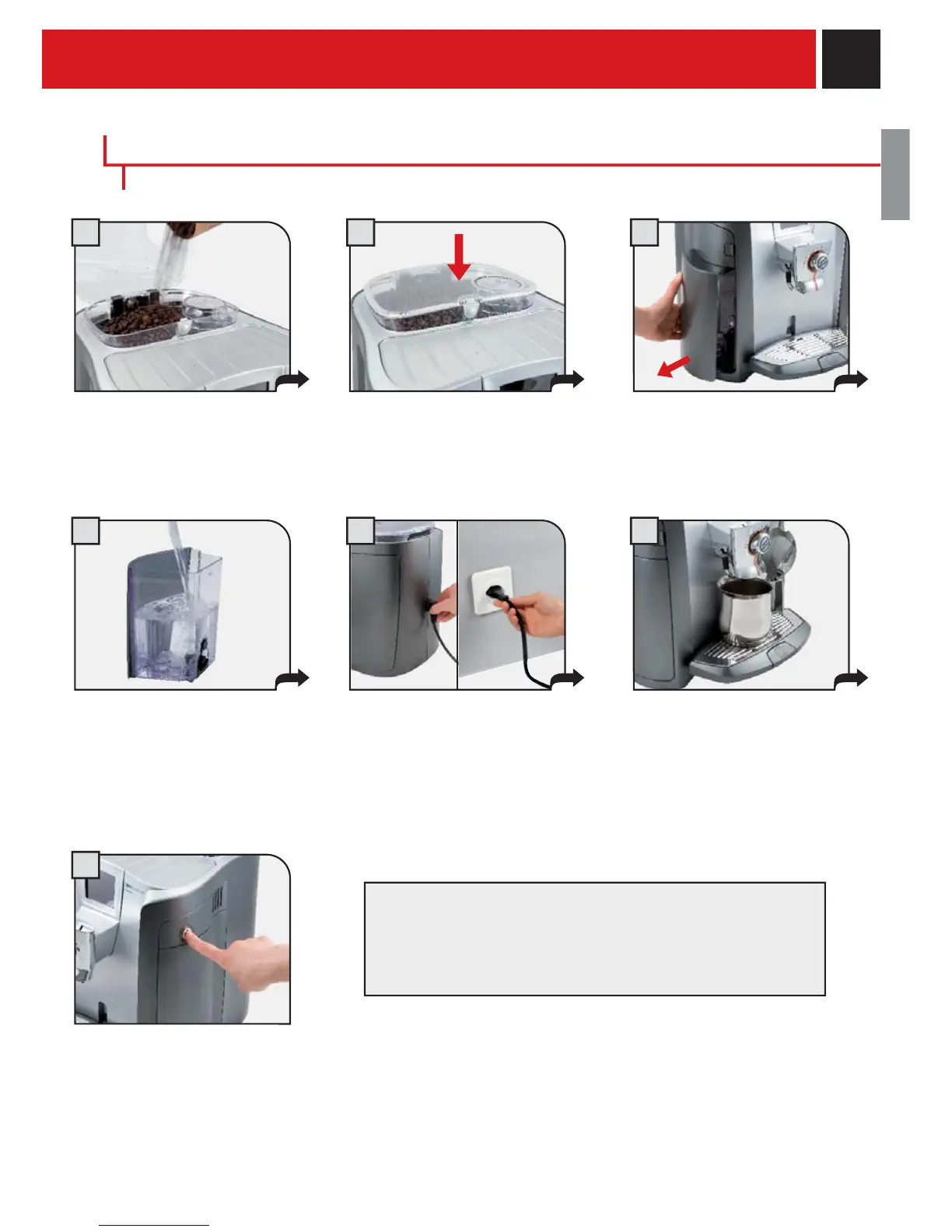
Attach the female end of the
power cord to the machine. Insert
the male end into the power
outlet.
Place a container beneath the hot
water spout.
Press the button on the coffee
hopper to open the cover. Fill the
hopper with coffee beans.
Close the cover pushing it down
completely.
Remove the water tank.
We recommend installing the water
fi lter (see page 7).
Press the main switch once to turn
on the machine. The appliance
automatically performs a diagnosis
of its functions. This test is
performed each time the machine
is turned on.
The machine automatically primes the water circuit.
The machine is now ready for use.
Water may not be dispensed into the glass.
This should not be considered a malfunction.
Make sure that the main power button is not switched to the “ON” position.
Fill the tank with fresh drinking
water. Do not exceed the “max”
level indicated on the water tank.
Once fi lled place the tank back
into the machine.
STARTING THE MACHINE
TO ADJUST THE WATER HARDNESS LEVEL AND SET
THE INTENZA AROMA SYSTEM SEE THE «WATER
HARDNESS MENU» ON PAGE 20.










 To Next Page