20
1
2
1234
A
B
C
Intenza Aroma System
Machine water hardness setting
PROGRAMMING THE MACHINE
rinsing
on
off
“RINSE” MENU
To clean the internal circuits for coffee brewing in order to guarantee that beverages are brewed with fresh water
only.
In this menu you can:
deactivate the rinse cycle. activate the rinse cycle.
Note: This rinse cycle is
performed every time the
machine is turned on when it
is cool.
water
hardness
rinsing
water
hardness
«WATER HARDNESS» MENU - INTENZA AROMA SYSTEM
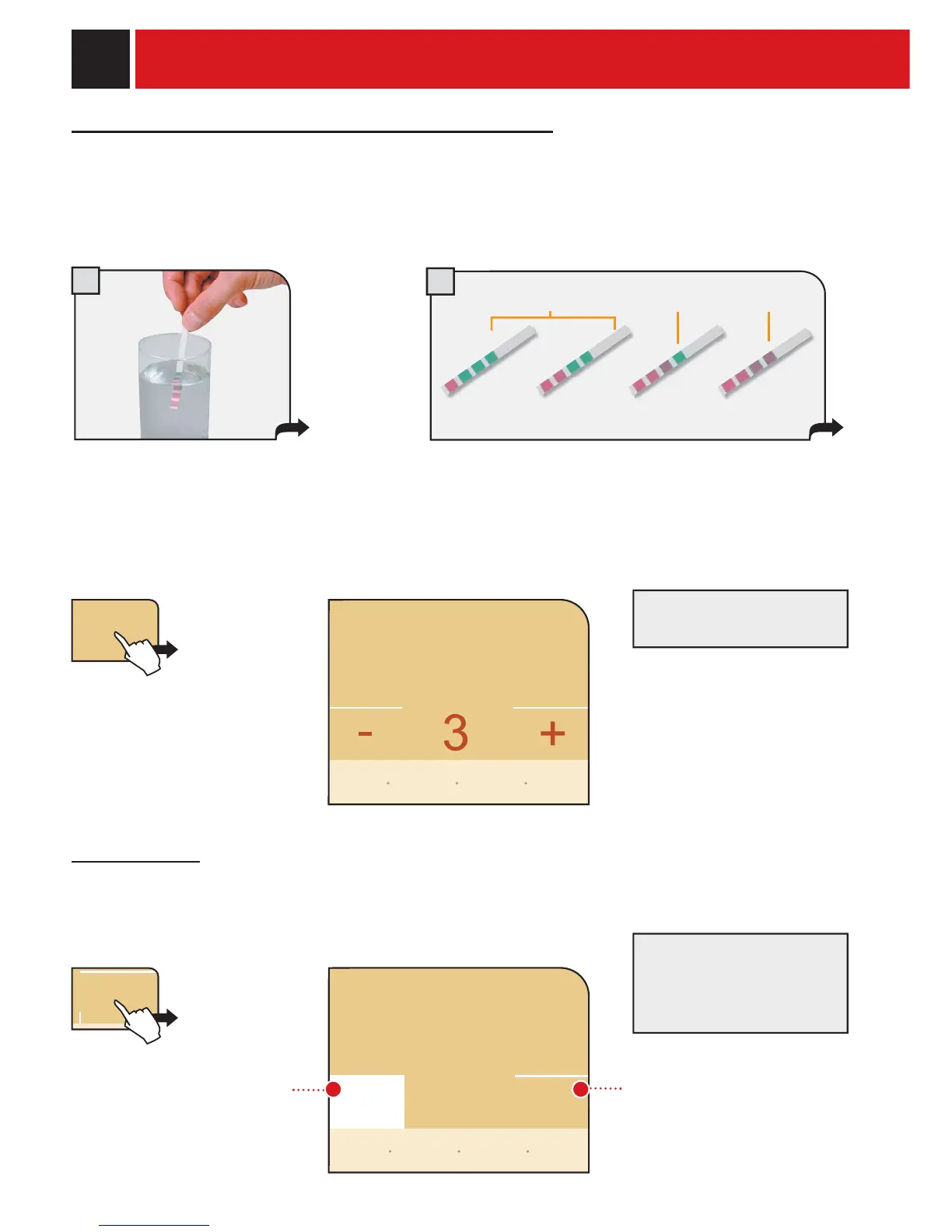
With the “Water hardness” function you can adjust your machine and the Intenza water fi lter to the level of hardness
of the water you use, so that the machine will request descaling at the right moment.
The water hardness in the Intenza water fi lter is expressed on a scale from A to C.
The water hardness in the machine is expressed on a scale from 1 to 4.
Immerse the water hardness strip included in
the welcome pack for one second in water.
Set the water hardness on the
machine by pressing + or -
Check the water hardness level obtained from the test.
The measurement can be used to set the Intenza Aroma
System correctly (see page 7). Matching parameters are
described on the upper part.
The test can be used only for
one measurement.
Press the "water hardness" button.
go back
restore
default
settings
back to
menu
save
settings
go back
restore
default
settings
back to
menu
save
settings










 To Next Page