33
1
ciclo di risciacquo
3
2
65
4
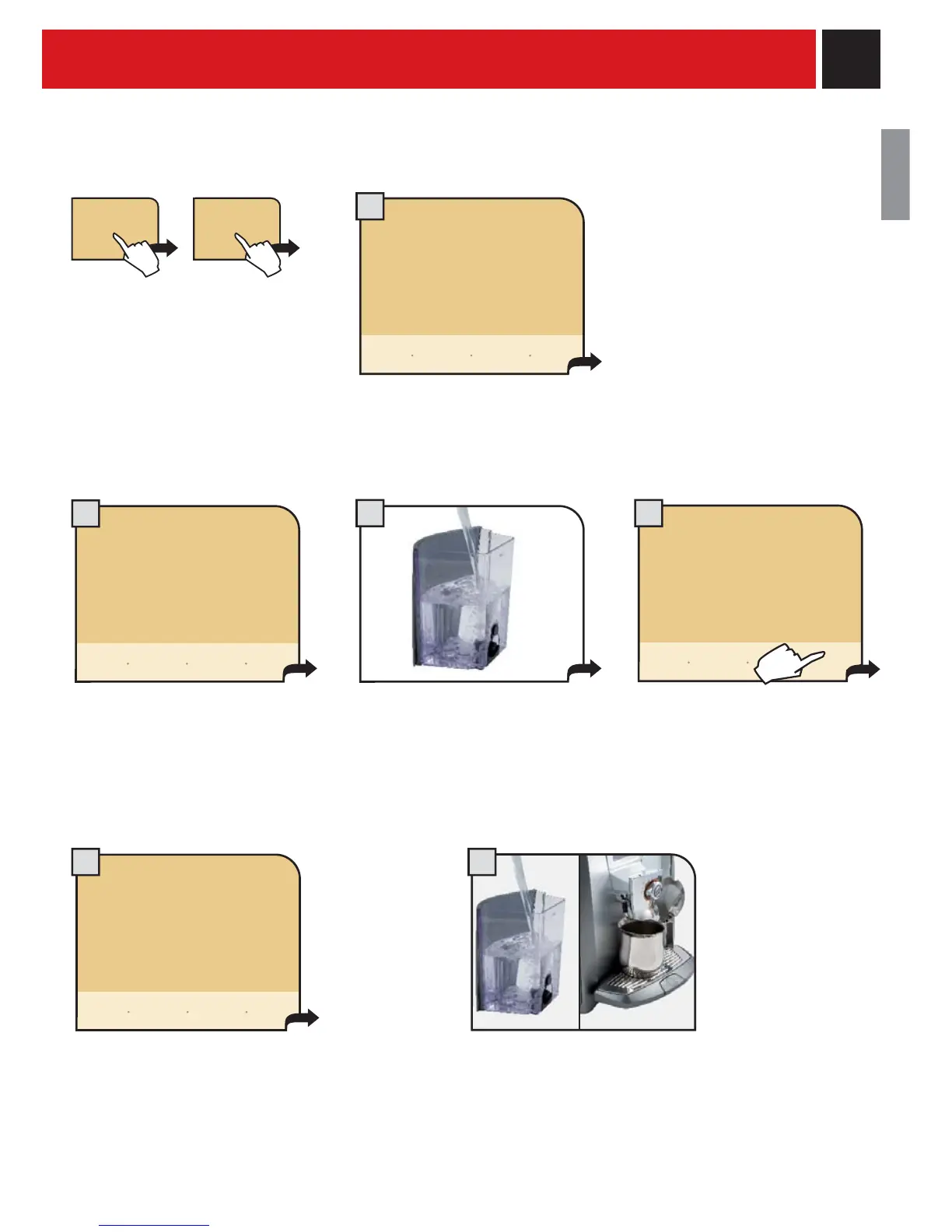
The machine begins to dispense the descaling solution through the hot
water spout. The dispensing occurs at preestablished intervals, in order to
allow the solution to be more effective.
In order to run a descaling cycle before the machine indicates the necessity to do so, press the button "descaling
cycle" and then "start descaling" to start the descaling cycle.
When the solution is fi nished the
following message appears on the
display:
Remove the water tank and rinse
with fresh drinking water to
eliminate traces of descaling
solution.
Then, refi ll with fresh drinking
water and reinsert water tank.
Rinse the machine circuits by
pressing "start rinsing".
start
rinsing
The machine performs the rinse cycle.
At the end of the rinse cycle fi ll the
tank with fresh drinking water. Before
fi lling the tank reinsert, if desired, the
water fi lter again, or reinsert the small
white fi lter (see page 7).
Put a container under the water spout.
When the water tank is inserted the
machine automatically proceeds to
prime the water circuit. If this operation
is not successful, consult "manually
priming the circuit" (see page 6)
rinsing...
descaling
cycle
start
descaling
insert the water tank
with fresh water
pause
rinsing
descaling cycle
please wait
descaling...
pause
descaling
rinsing
cycle
descaling cycle
please wait
descaling cycle
please wait
descaling cycle
please wait










 To Next Page