EasyManua.ls Logo

SAJ Suntrio Plus Series - Page 43

SAJ Suntrio Plus Series
64 pages
To Next Page IconTo Next Page
To Previous Page IconTo Previous Page
Loading...
Suntrio Plus Series
-
42
-
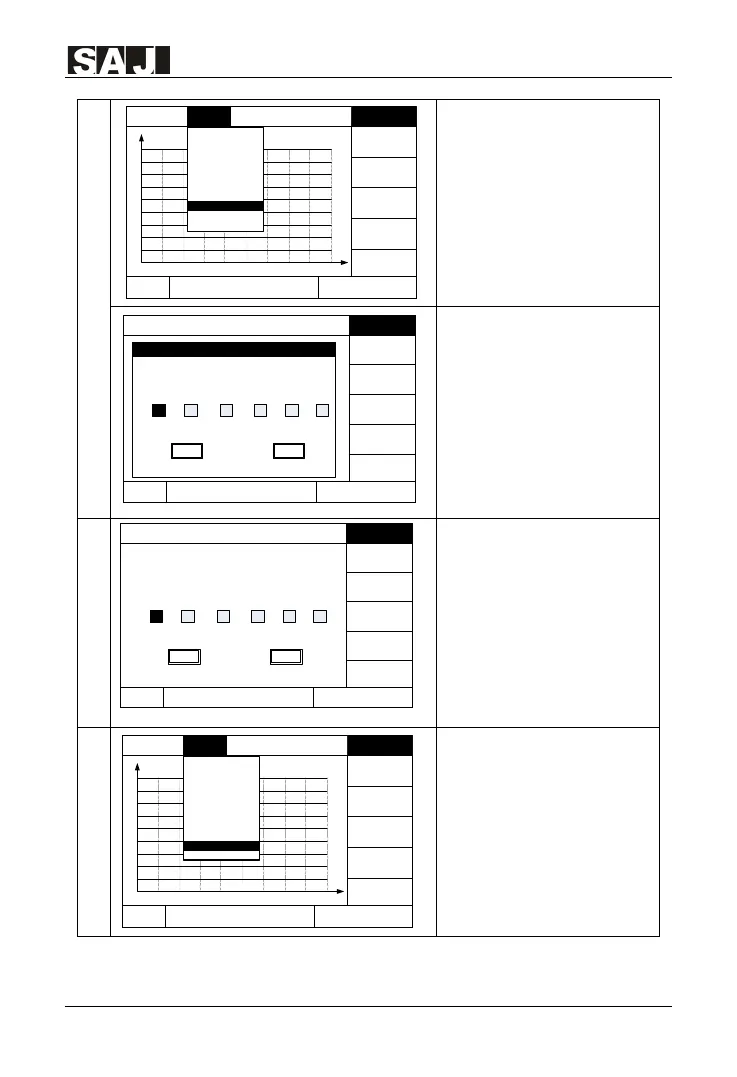
Change Password
1. In the main LCD interface,
press “ENT” button, then
press
to enter into “Setting”.
2. Press▼and then press
ENT to enter password, and
then enter into Reset
Password.
Attention: Please contact SAJ
if you need password.
Change Password
3. Enter the new password
and click OK to save the
change.
PV Mode Setting
1. In the main LCD interface,
press “ENT” button, then
press to enter into
“Setting”.
Power
1230W
E-
Today
11.33
kWh
T-Today
1.7 h
T-Total
4.6 h
15-07-09 1547
Graph
Setting Run-Info
About
E-Total
14
.35
kWh
E-today 11
.33 kWh
Normal
Cancel
Verify
Please enter
0
0 0
0 0
0
Ok
Power
1230W
E-Today
11.33 kWh
T-Today
1.7 h
T-Total
4.6 h
15-07-09 1547
Graph Setting Run-Info
About
E-Total
14.35 kWh
Chang PasswordNormal
Cancel
Please enter the new password :
0
0 0
0 0
0
Ok
Power
1230W
E-
Today
11
.
33
kWh
T
-Today
1.
7 h
T-Total
4
.6 h
15-
07-
09 15
47
Graph Setting
Run-
Info
About
0
3
.7
7
.4
11
.1
14
.
8
18
.
5
22.
2
25.
9
29
.
6
kW
33
.3
3
5 7 9 11 13 15 17 19 21h
E
-Total
14
.35
kWh
E-Today
11.33 kWhNormal
Communicate Set
Language
& Time
Grid Compliance
Clear Error
Clear Energy
LCD Setting
Factory Reset
PV Mode Setting
Exit
Change Password
Power
1230W
E-Today
11.33
kWh
T-Today
1.7
h
T
-Total
4.6 h
15-07-09 1547
Graph Setting Run
-Info
About
0
3.7
7
.4
11.1
14.8
18
.5
22.2
25.9
29.6
kW
33.3
3 5 7 9 11 13 15 17 19
21h
E-Total
14.35 kWh
E-Today
11.33 kWhNormal
Communicate Set
Language &
Time
Grid Compliance
Clear Error
Clear Energy
LCD Setting
Factory Reset
Change Password
Exit
PV Mode Setting

Related product manuals