024
PRG
PRG
ENTER
ENTER
ENTER
ENTERENTER
ENTER
ENTER
50.00
F0.00 F0.01
F0.01
0.0
F0.00 F0.00
00000
00000 55555
22222
-
En
--
F1.02
F1.02
F1.03
-----
1s
▲ ▼ ▲ ▼
▲ ▼
▲ ▼▲ ▼
▲ ▼
Escape
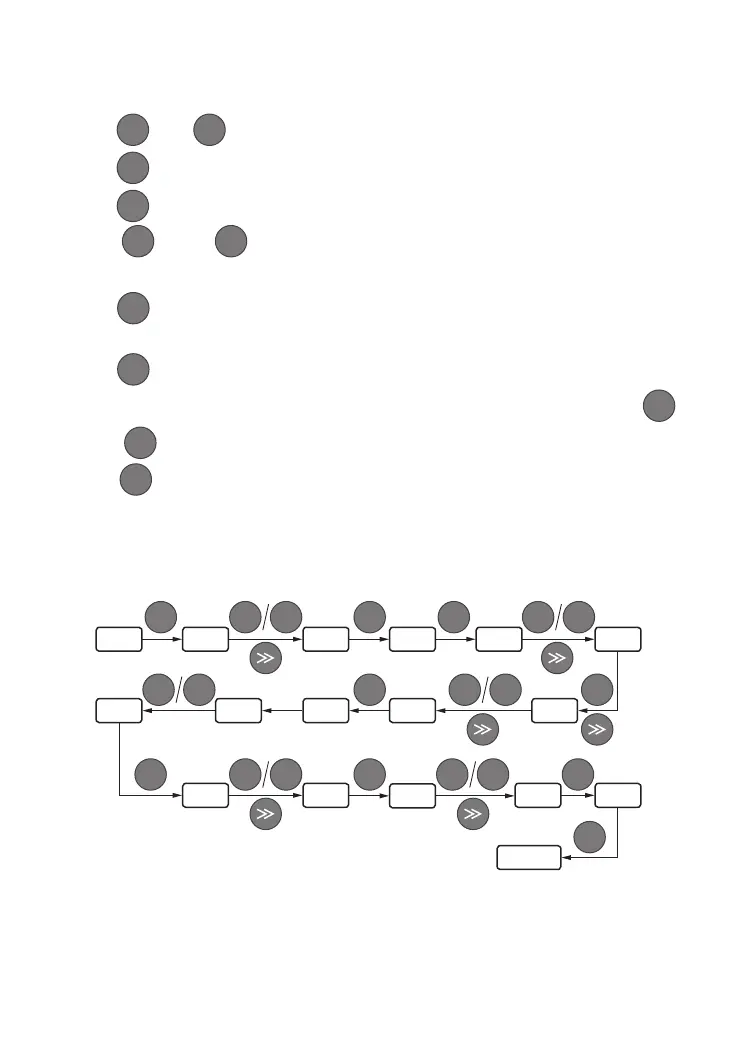
Press key or key to modify the digit in the according digit place. LED displays F1. 02.
Press , the according data "-----" of F1. 02 is displayed.
Press to enter F1.03, repeat step 2 and step 3, check according data "00000" of F0.00.
Press key or key to modify the digit in the according digit place, LED displays
"22222", and the password is set up.
Press , it displays"-En--", meanwhile function code displays F0.01.
Repeat step 2 and step 3, check the according data "00000" of F0.00 and modify it to "55555",
press to end the password changing, enter F0.01 item.
Repeat step 2 and step 3, check the according data "0.0" of F1.02, conduct modifying by
key or key.
Press , escape from edit status.
3.9 User Password Setting and Function Code Edit
PRG
▲
▲
▲
▼
▼
▼
ENTER
ENTER
ENTER
ENTER
③
④
⑤
⑥
⑦
⑧
⑨
⑩


 To Next Page