023
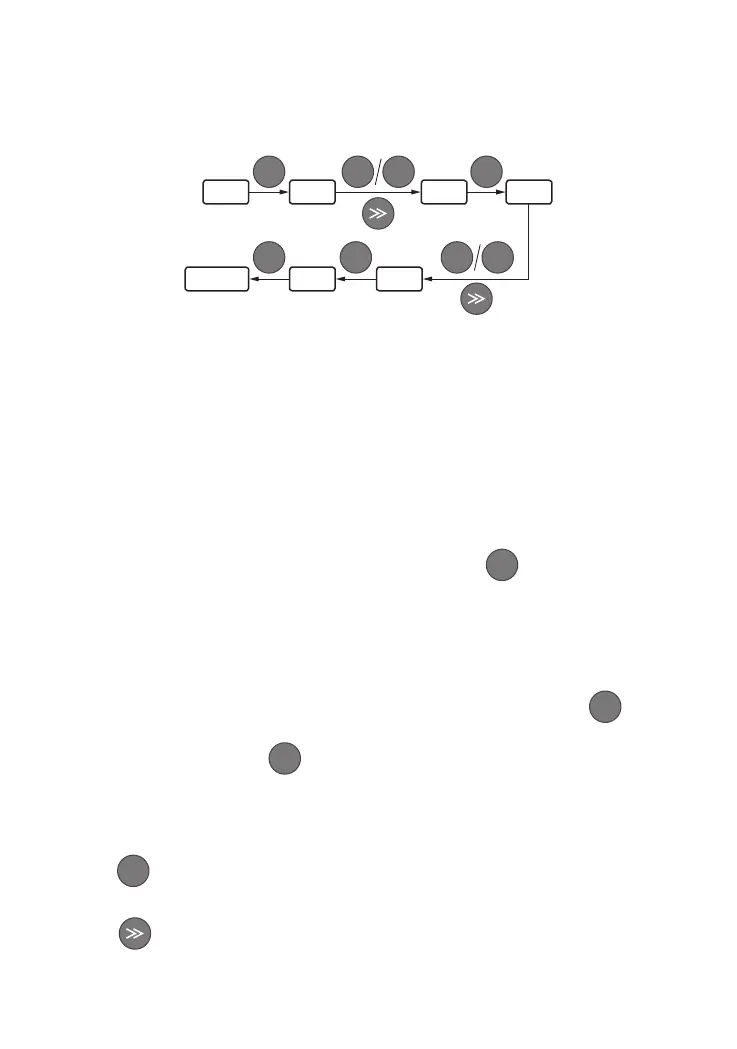
PRG
PRG
ENTER
ENTER
0.00 F0.00 F1.20
F1.21
5.00
10.00
▲ ▼
▲ ▼
Escape
3.9 User Password Setting and Function Code Edit
User password setting is used for preventing unauthorized people form checking and modifying
function parameter. Factory set of user password F0.00 is "00000", user can conduct parameter
setting in this interface (parameter set here is only not restricted by password protection, but
is restricted by conditions like whether is revisable during running, the monitoring parameters,
etc.).
When setting the user password, press ve-digit number and press to conrm, the password
will take eect automatically 3 minutes later, or just power down to make it eective. After that,
if the password is not set right, keypad will display "-Err-", and when checking function codes, All
will display "-----" except the password item (displays "00000"). These function codes parameters
can't be checked and modied until the password is set right and the keypad displays"-En--".
When password modifying is required, choose function code F0.00, and press to enter
password authentication status. Move to modifying status after password veried successfully.
Input a new password and press to conrm.
Power-down or wait for 3 minutes, the new password will take eect.
Example 1: change user password "22222" to "55555", check function code F1.02.
Press to enter programming status, LED displays function code F0.00, icker bit stays in
the ones place.
Press , move icker bit among hundreds place, tens place and ones place of function
items.
ENTER
ENTER
ENTER
PRG
①
②


 To Next Page