5-5
Module 5 – Connected Fan Coil Controls
SC102ZB Wireless Fan Coil Controller /
ST103ZB Wireless Fan Coil Remote
Section 5
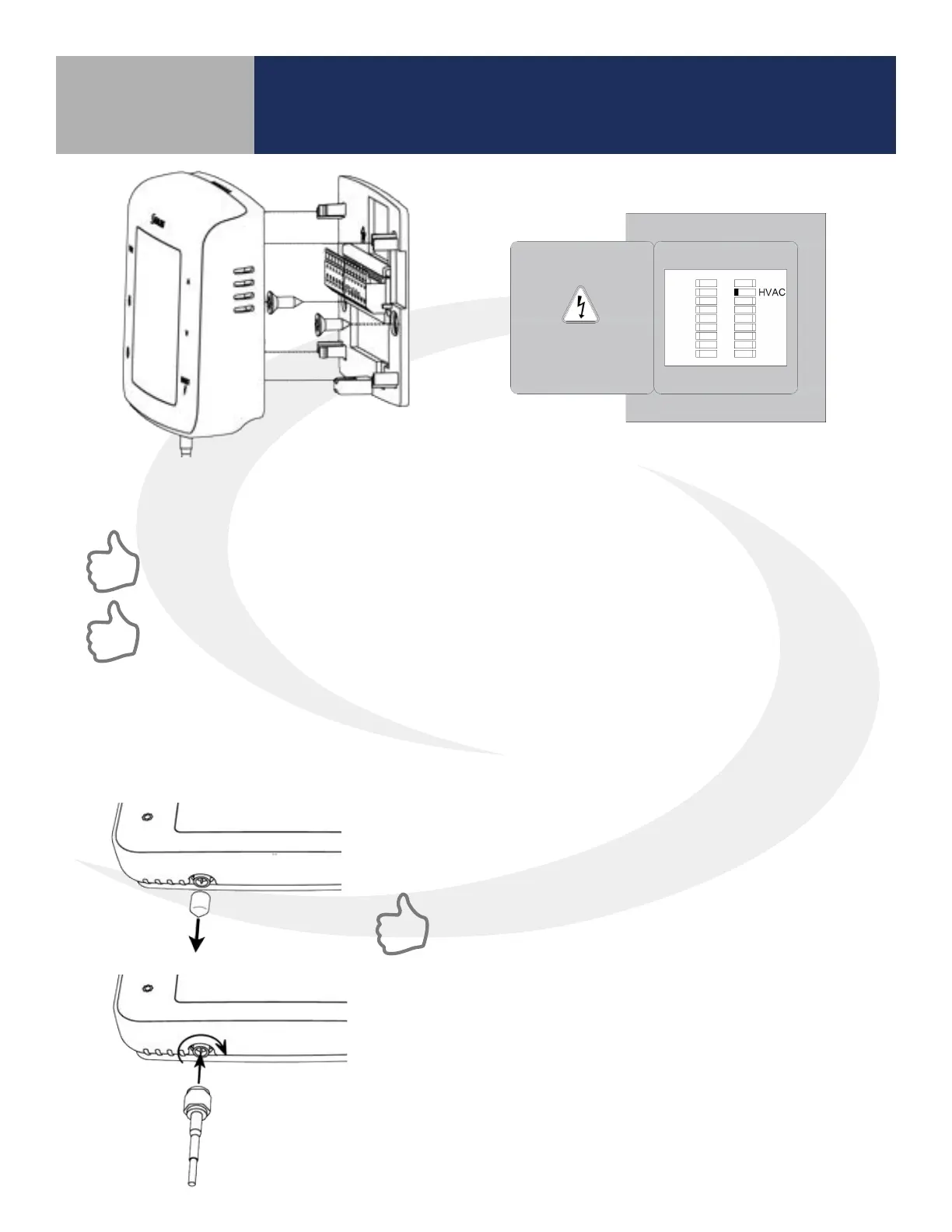
Step 3. Attach Thermostat to the Wiring Mount
by aligning the connector pins.
Step 4. Turn on power to the fan coil system
and thermostat.
Make sure the connector pins are not bent and that the Thermostat is fully seated on the
wiring mount.
If an external antenna (sold separately) is required due to insucient radio coverage, attach
the antenna, as follows, before attaching the controller to the wiring mount.
Step 1. Remove the antenna connector cover located on the
bottom of the SC102ZB Fan Coil Controller.
Avoid locations that place large metal enclosures, piping
or dense electrical wires between the SC102ZB Fan Coil
Controller and the ST103ZB Wireless Fan Coil Remote.
Step 2. Attach the external antenna to the connector, making
sure the nut is nger tight.
DO NOT OVERTIGHTEN the nut.
Optional External Antenna (Sold Separately):
Use the ANT10RF External Antenna if there is insucient radio signal at the ST103ZB Wireless Remote
or SS909ZB Remote Temperature Sensor.



 To Next Page