5-6
Module 5 – Connected Fan Coil Controls
SC102ZB Wireless Fan Coil Controller /
ST103ZB Wireless Fan Coil Remote
Section 5
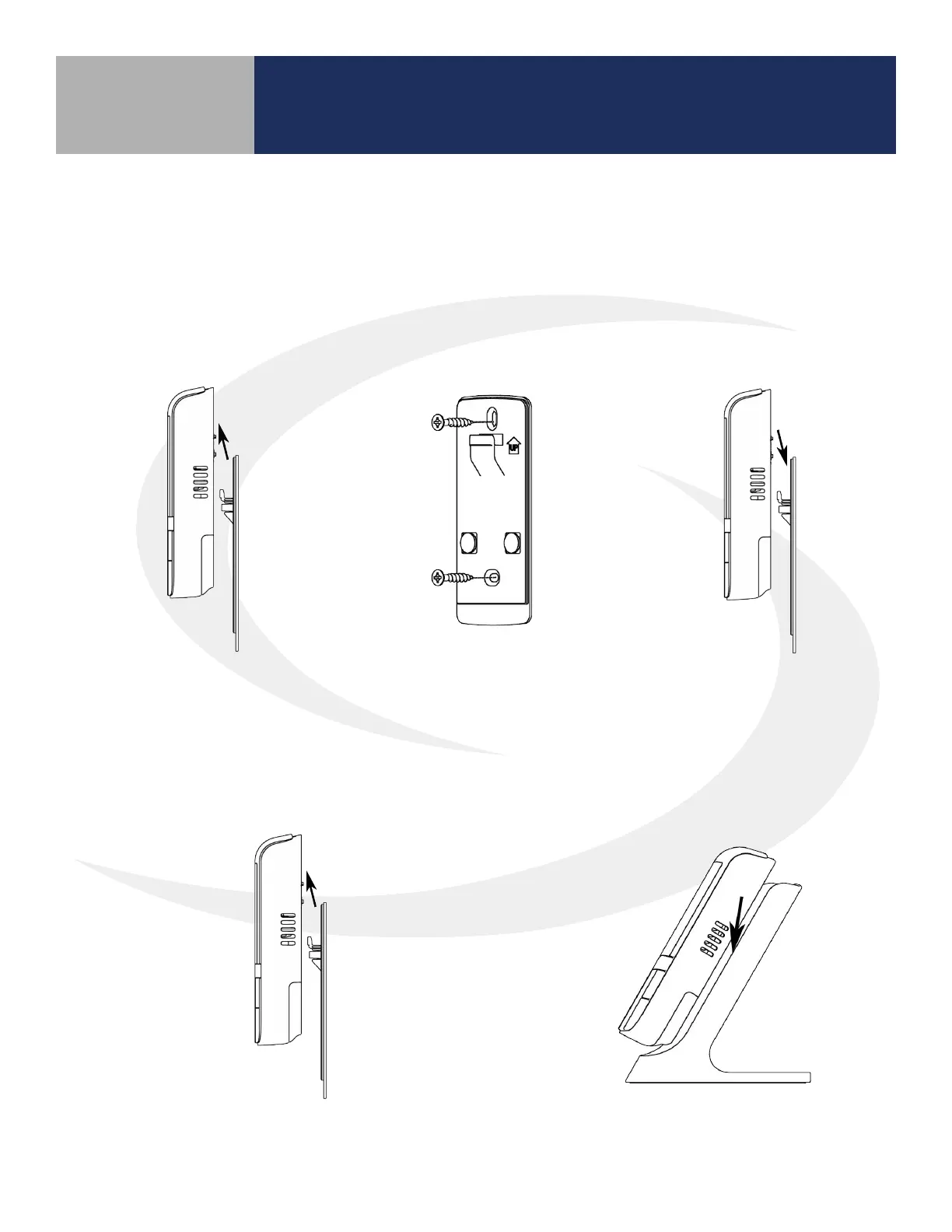
ST103ZB Wireless Fan Coil Remote Installation
The ST103ZB Wireless Fan Coil Remote acts as a remote thermostat which can be wall mounted
or placed in a stand for desk or cabinet top operation. The Wireless Remote can be paired prior to
mounting (see Section 6, Pairing Instructions for details). For desk top operation, the ST103ZB can be
moved to a dierent location at any time.
Wall Mounting
Desk or Cabinet Top Mounting
Step 1. Remove the Wall Mount
from the back of the
ST103ZB Wireless Fan
Coil Remote.
Step 2. Attach the Wall Mount
in the desired location
using the screws and
anchors provided.
Step 3. Slip the ST103ZB
Wireless Fan Coil
Remote onto the Wall
Mount.
Step 3. Remove the Wall Mount from the back of
the ST103ZB Wireless Fan Coil Remote.
Step 4. Slip the ST103ZB Wireless Fan Coil
Remote onto the Desk Stand.



 To Next Page