7-5
Module 5 – Connected Fan Coil Controls
Device Configuration – Fan Coil Controls
Section 7
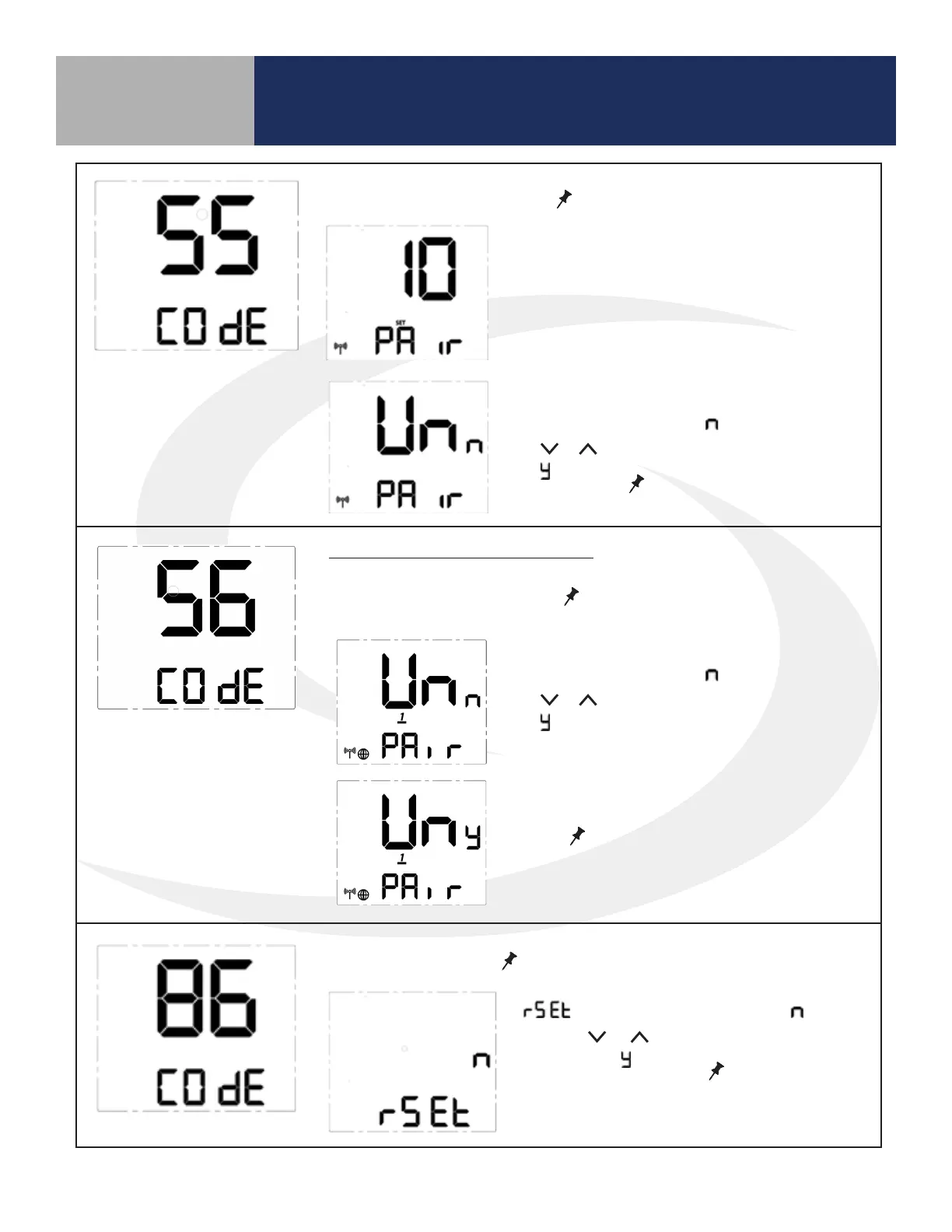
Join/Leave Network – Press
SELECT
to join or leave a network.
Unpair from Remote - Press
SELECT
Press to initiate unpairing with
ST103ZB while remaining on the network.
If the thermostat has not joined a network,
the display will enter the pairing sequence.
Follow the steps under Pairing in Section 3.
If the thermostat is paired with a network,
UnPAir is displayed with “ ” flashing. Press
the or key to change the flashing letter
to “ ”. Press
SELECT
to remove the thermo-
stat from the network.
Factory Reset - Press
SELECT
to initiate a factory reset.
SC102ZB Fan Coil Controller Only
UnPAir is displayed with “ ” flashing. Press
the or key to change the flashing letter
to “ ”.
Press
SELECT
to disconnect from the
ST103ZB Fan Coil Remote.
is displayed with a flashing “ ”.
Use the or key to change the flash-
ing letter to “ ”. Press
SELECT
to reset the
thermostat to all of the factory default
settings.



 To Next Page