7-1
Section 7
SC102ZB/ST103ZB Installation and Operation Manual
Device Joining & Pairing
SC102ZB Fan Coil Controller
Preparation for Joining Network
After installing the SC102ZB Fan Coil Controller, the
ST103ZB Wireless Fan Coil Remote and any optional
SS909ZB Remote Temperature Sensors, turn on
electrical power to the fan coil system and SC102ZB
Fan Coil Controller.
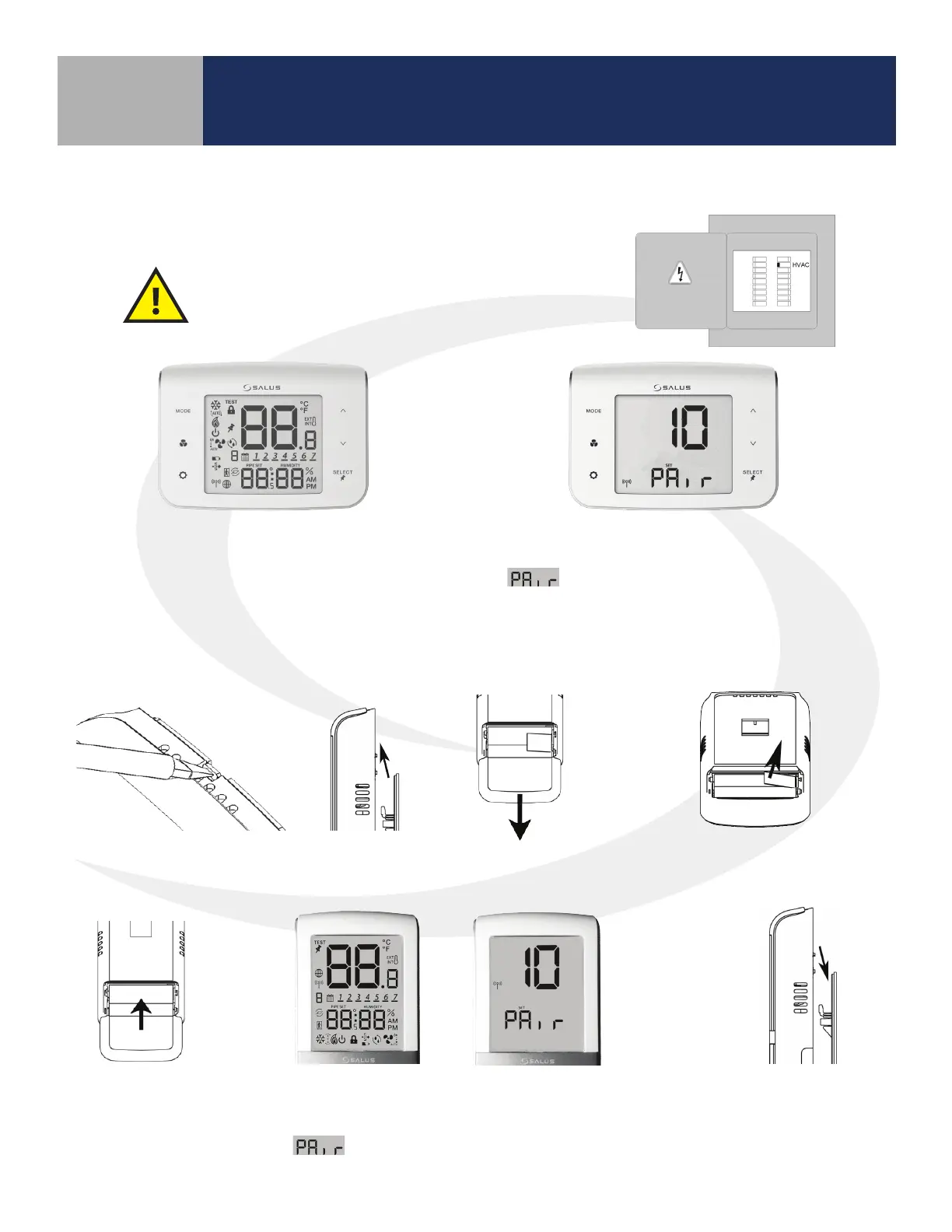
When the SC102ZB Fan Coil Controller
is rst powered, all xed segments will
bebriey displayed. The display will
then show the rmware version.
If the Fan Coil Controller is not connected
to a network, the devices will display
and a countdown timer will start.
ST103ZB Wireless Fan Coil Remote
Preparation for Joining Network
Open the battery
compartment
Remove the ST103ZB Wireless Fan Coil
Remote from the Wall Plate or Desk Stand.
Remove the battery tab to power
the Wireless Fan Coil Remote
The screen will briey display all xed segments before
showing the rmware version. If the ST103ZB Wireless Fan
Coil Remote is not connected to a network, the device will
display
and a countdown timer will start.
Close the battery
compartment
Re-attach the ST103ZB
Remote to the Wall
Plate or Desk Stand



 To Next Page