28 KA 5578-E EN
Operation
5.6 Operating the controller in manual mode
Switch to manual mode to congure all controller outputs.
System damage caused by frost when manual operating mode is active!
The frost protection function is deactivated in the manual operating mode.
Î Do not run the heating during cold weather in the manual mode for long periods of time.
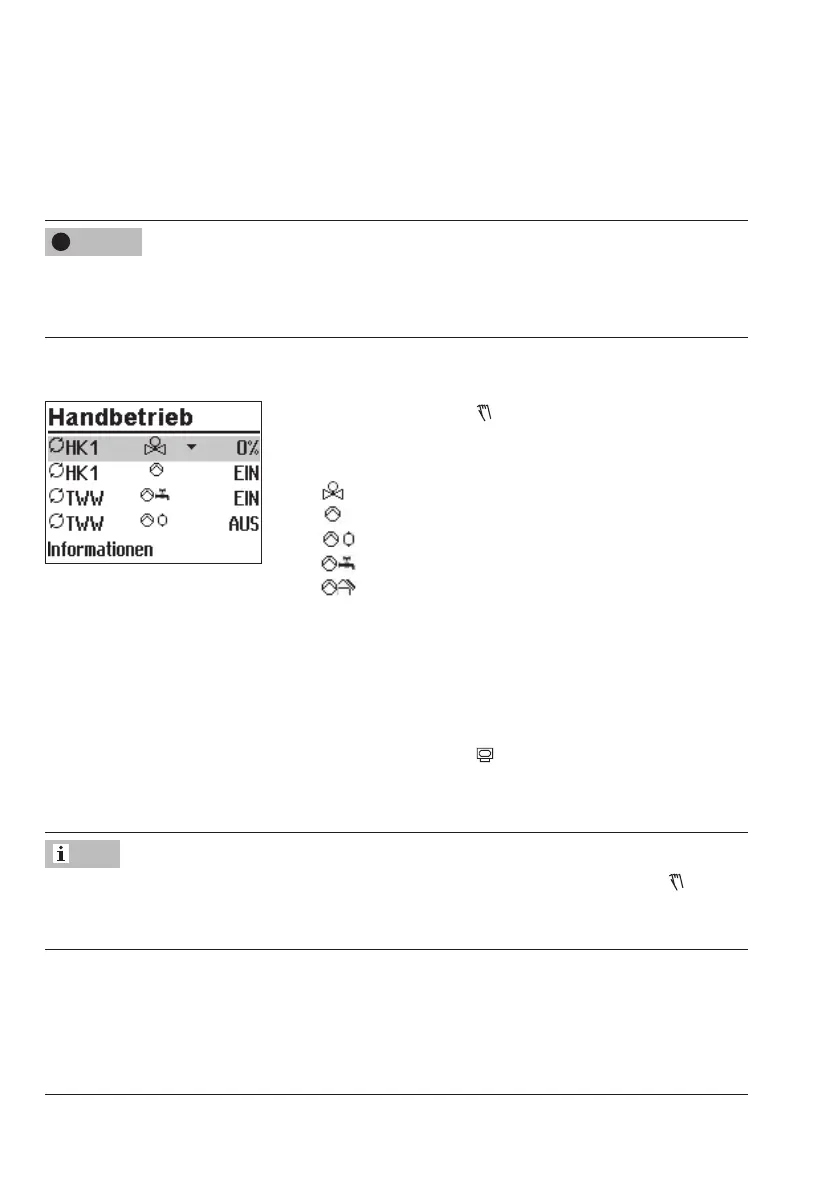
Manually changing the positioning value/switching state:
Turn the rotary switch to (manual mode). The outputs of
the congured system are listed on the display.
q Select the output
Positioning value
Circulation pump (heating)
Storage tank charging pump
Circulation pump (DHW)
Solar circuit pump
q Activate editing mode for the output.
q Change the positioning value/switching state.
q Conrm the positioning value/switching state.
The modied values remain active as long as the control-
ler is in manual mode.
Turn the rotary switch to
(operating level). The manual
mode is deactivated.
The outputs of the controller are not affected by merely turning the rotary switch to
(manu-
al mode). The outputs are only changed by entering or changing the positioning values or
switching states.
NOTICE
!
Note



 To Next Page