EasyManua.ls Logo

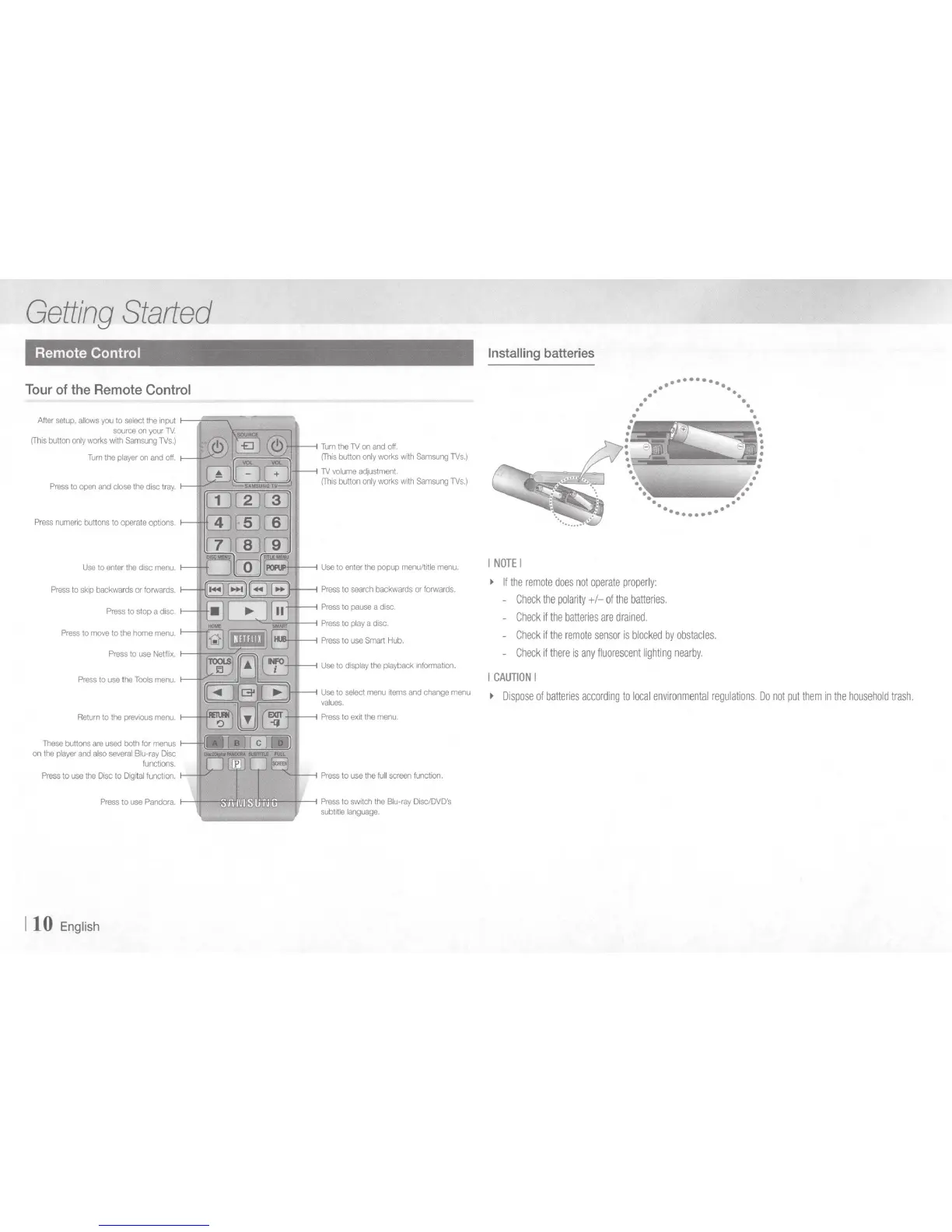
Samsung BD-E5700 - Getting Started: Remote Control Usage; Remote Control Button Functions; Installing Remote Control Batteries

Samsung BD-E5700
89 pages
Print Icon
To Next Page IconTo Next Page
To Previous Page IconTo Previous Page
Loading...
Getting
Started
Remote Control
Tour
of
the
Remote
Control
After
setup,
allows
you
to
select
the
input
f---J.:::::::::;:-----,
source
on
your
TY.
(Thrs
button
only
works
with
Samsung
lVs.)
Turn
the
player
on
and
off.
f--J
~
':/·J;::::.=
~
~
~
JI
Press
numeric
buttons to
operate
optrons
Use
to
enter
the
drsc
menu.
Press
to
skrp
backwards
or
fOIWards.
Press
to
use
the
Tools
menu.
These
buttons
are
used
both for
menus
on
the
player
and
also
several
Blu-ray
Disc
funct1011s.
Press
to
use
the
Disc
to
Digrtal
function.
Press
to
use
Pandora.
1
10
Engl
i
sh
Turn
the
lV
on
and
off.
(This
button
only
works
with
Samsung
lVs.)
lV
volume
adjustment.
(This
button
only
works
wrth
Samsung
lVs.)
Use
to
select
menu
items
and
change
menu
values.
Press
to
exrt
the
menu
Press
to
use
the
full
screen
function.
Press
to
swrtch
the
Blu-ray
Disc/DVD's
subtrtle
language.
Installing
batteries
I
NOTE
I
~
If
the
remote
does
not
operate
properly:
-
Check
the
polarity
+I-
of
the
batteries.
-
Check
if
the
batteries
are
drained.
-
Check
if
the
remote
sensor
is
blocked
by
obstac
l
es.
-
Check
if
there
is
any
fluorescent
lighting
nearby.
I
CAUTION
I
~
Dispose
of
batteries
according
to
local
environmental
regulations.
Do
not
put
them
in
the
household
trash.

Other manuals for Samsung BD-E5700

Related product manuals