EasyManua.ls Logo

Samsung BD-E5700 - Getting Started: Disc and Format Compatibility; Supported Disc and File Formats; Unsupported Disc Types

Samsung BD-E5700
89 pages
Print Icon
To Next Page IconTo Next Page
To Previous Page IconTo Previous Page
Loading...
G
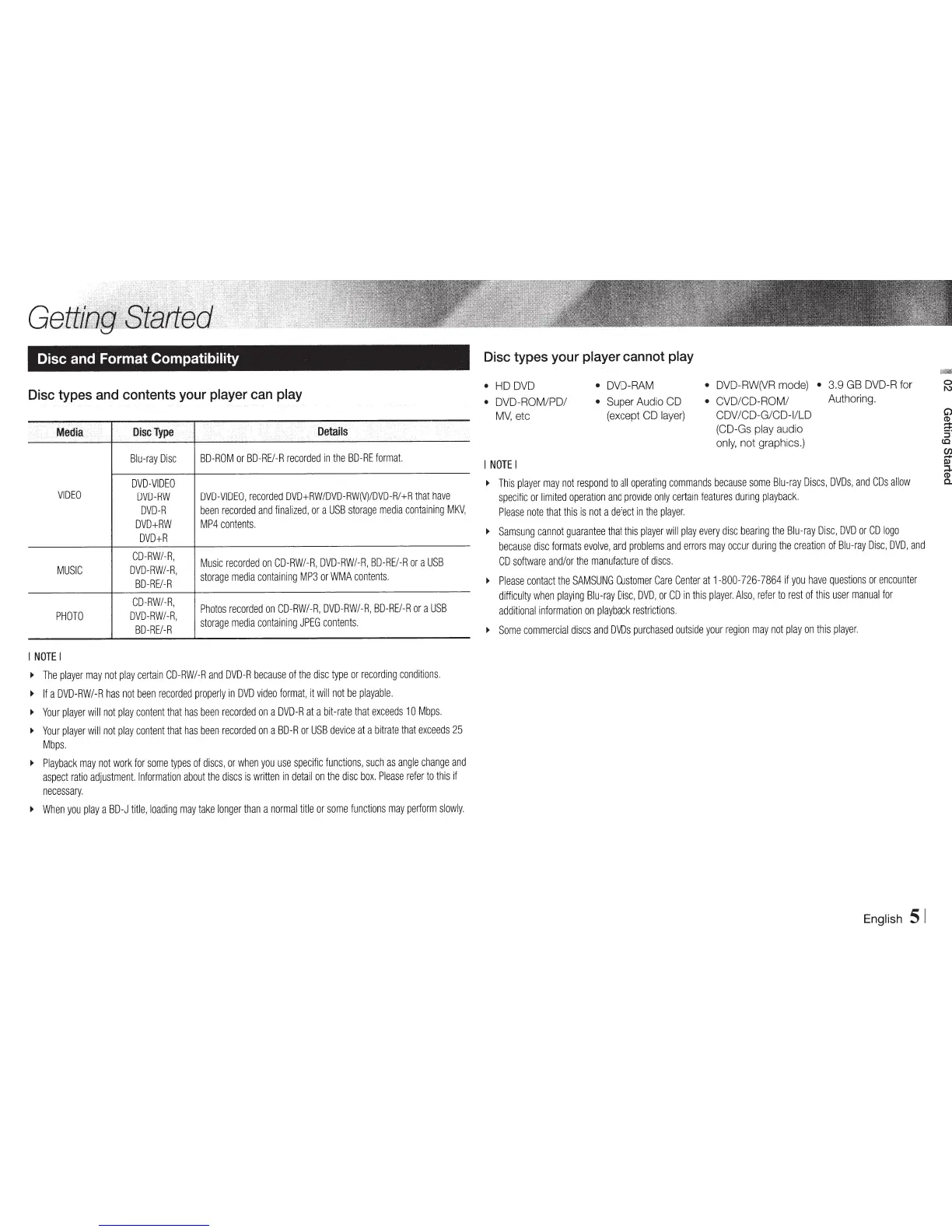
Disc
and
Format Compatibility
Disc
types
and
contents
your
player
can
play
...
Media
Disc
Type
Details
Blu-ray
Disc
BD-ROM
or
BD-REI-R
recorded
in
the
BO-RE
format.
DVD-VIDEO
VIDEO
DVD-RW
DVD-VIDEO,
recorded
DVD+RW/DVD-RW(V)/DVD-R/+R
that
have
DVD-R
been
recorded
and
finalized,
or
a
USB
storage
media
containing
MKV,
DVD+RW
MP4
contents.
DVD+R
CD-RW/-R,
Music
recorded
on
CD-RW/-R,
DVD-RW/-R,
BD-RE/-R
or
a
USB
MUSIC
DVD-RW/-R,
storage
media
containing
MP3
or
WMA
contents.
BD-RE/-R
CD-RW/-R,
Photos
recorded
on
CD-RW/-R,
DVD-RW/-R,
BD-RE/-R
or
a
USB
PHOTO
DVD-RW/-R,
storage
media
containing
JPEG
contents.
BD-RE/-R
I
NOTE
I
.,
The
player
may
not
play
certain
CD-RW/-R
and
DVD-R
because
of
the
disc
type
or
recording
conditions.
~
If
a
DVD-RW/-R
has
not
been
recorded
properly
in
DVD
video
format,
it
will
not
be
playable.
~
Your
player
will
not
play
content
that
has
been
recorded
on
a
DVD-R
at
a
bit-rate
that
exceeds
10
Mbps.
~
Your
player
will
not
play
content
that
has
been
recorded
on
a
BD-R
or
USB
device
at
a
bitrate
that
exceeds
25
Mbps.
~
Playback
may
not
work
for
some
types
of
discs,
or
when
you
use
specific
functions,
such
as
angle
change
and
aspect
ratio
adjustment.
Information
about
the
discs
is
written
in
detail
on
the
disc
box.
Please
refer
to
this
if
necessary.
~
When
you
play
a
BD-J
title,
loading
may
take
longer
than
a
normal
title
or
some
functions
may
perform
slowly.
Disc
types
your
player
cannot
play
HD
DVD
DVD-ROM/PD/
MV,
etc
I
NOTE
I
DVD-RAM
Super
Audio
CD
(except
CD
layer)
DVD-RW(VR
mode)
3.9
GB
DVD-R
for
CVD/CD-ROM/
Authoring.
CDV
/CD-G/CD-1/LD
(CO-Gs
play
audio
only,
not graphics.)
~
This
player
may
not
respond
to
all
operating
commands
because
some
Blu-ray
Discs,
DVDs,
and
COs
allow
specific
or
limited
operation
and
provide
only
certain
features
during
playback.
Please
note
that
this
is
not
a
defect
in
the
player.
~
Samsung
cannot
guarantee
that
this
player
will
play
every
disc
bearing
the
Blu-ray
Disc,
DVD
or
CD
logo
because
disc
formats
evolve,
and
problems
and
errors
may
occur
during
the
creation
of
Blu-ray
Disc,
DVD,
and
CD
software
and/or
the
manufacture
of
discs.
~
Please
contact
the
SAMSUNG
Customer
Care
Center
at
1-800-726-7864
if
you
have
questions
or
encounter
difficulty
when
playing
Blu-ray
Disc,
DVD,
or
CD
in
this
player.
Also,
refer
to
rest
of
this
user
manual
for
additional
information
on
playback
restrictions.
~
Some
commercial
discs
and
DVDs
purchased
outside
your
region
may
not
play
on
this
player.
English
51

Other manuals for Samsung BD-E5700

Related product manuals