EasyManua.ls Logo

Samsung BD-E5700 - Smart Hub: Service Account Registration for Apps; Registering Service Accounts for App Subscriptions

Samsung BD-E5700
89 pages
Print Icon
To Next Page IconTo Next Page
To Previous Page IconTo Previous Page
Loading...
20 - English
5
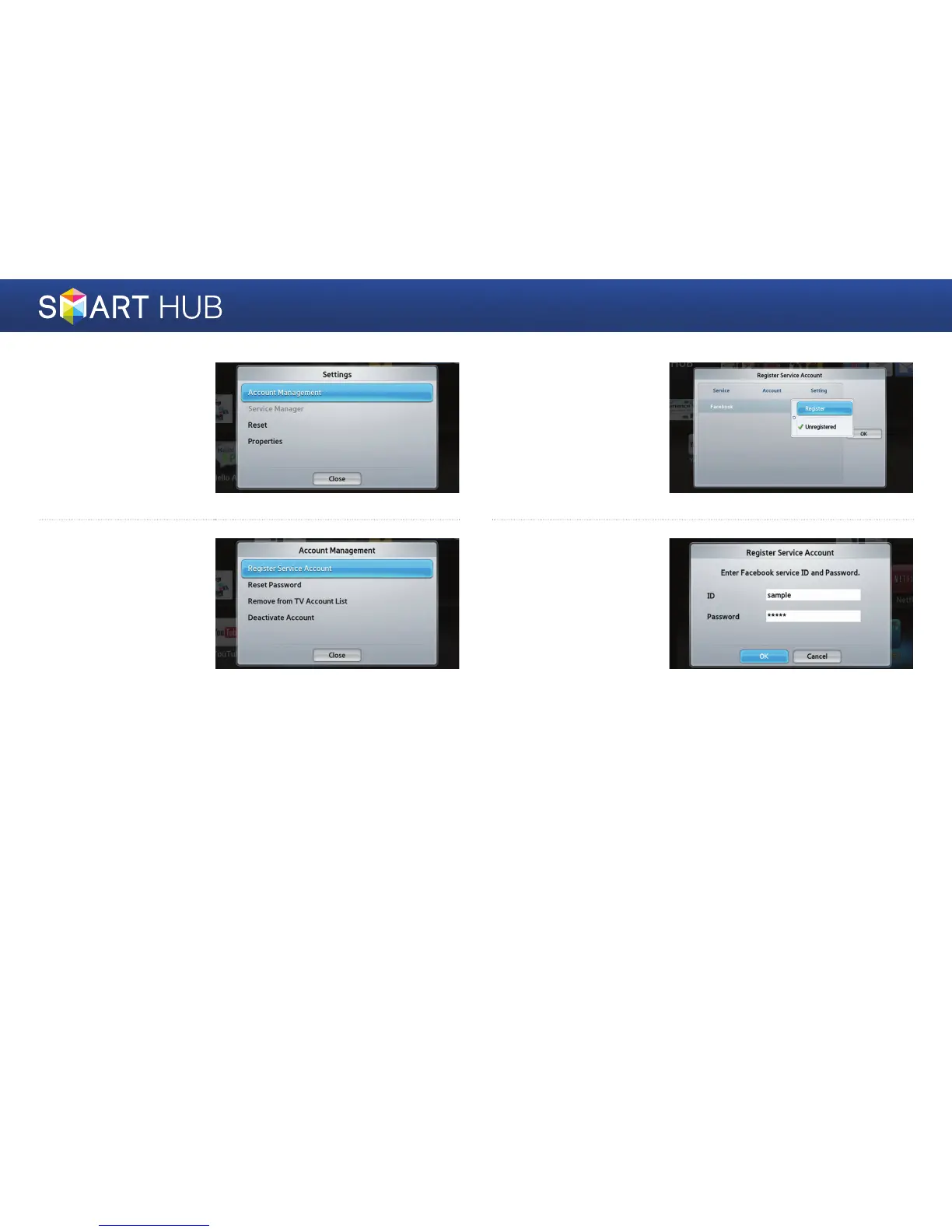
Move to the <Account
Management> item,
and then press the
e
button.
6
Move to the <Register
Service Account> item,
and then press the
e
button.
7
Press the
e
button on
the Samsung Apps item
to change its subscription
settings. Select the
<Register> item, and
then press
e
.
8
Enter the account ID
and password you
created on “http://www.
samsung.com/”, move
to the <OK> button, and
then press
e
. When
registered service is run,
you will be logged into
the registered Service
using the entered
account information.

Other manuals for Samsung BD-E5700

Related product manuals