Settings 297
Wi-Fi is enabled. You will see the names and security settings of in-range Wi-Fi networks.
To disable Wi-Fi, tap ON/OFF again.
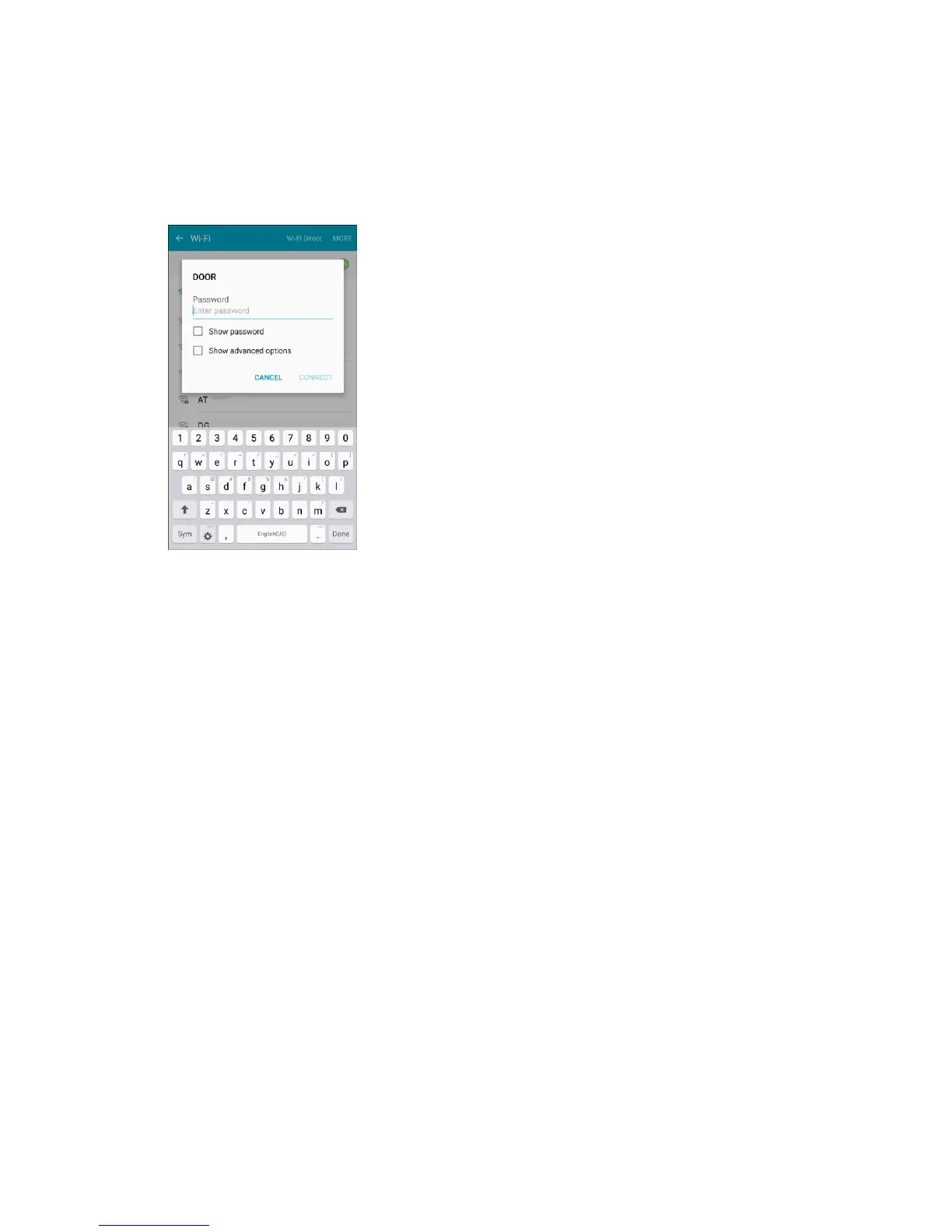
3. Tap a Wi-Fi network, enter the password, and tap Connect.
Your phone is connected to the selected Wi-Fi network.
The password, for a household wireless LAN router, is sometimes found on a sticker on the
router (WEP, WPA, KEY, etc.). Contact the router manufacturer for information. For
password for a public wireless LAN, check with user's service provider.
Entering a password is not required if an access point is not security protected.
Connect to a Wi-Fi Network via WPS
Wi-Fi Protected Setup (WPS) is a network security standard that allows you to easily secure a wireless
network connection between your phone and a router.
To connect using a WPS button:
1. From Wi-Fi settings, tap More > WPS push button.
2. Tap the WPS button on your router.
3. Follow the prompts to complete the connection.
To connect using a Personal Identification Number (PIN):
1. From Wi-Fi settings, tap More > WPS PIN entry.
2. Enter the PIN displayed on your router.
3. Follow the prompts to complete the connection.














 To Next Page