Settings 335
S Pen alerts: Tap the check box to set your device to sound an alert and show a pop-up if
you forget to attach the S Pen and walk away from it with your device.
Turn off pen detection: Turning off pen detection when the pen is attached can extend
battery life.
S Pen sound: Tap the check box to enable sounds when writing with the S Pen.
S Pen vibration: Activate vibration feedback when writing with the S Pen.
Motions and Gestures
Enable or disable motions and gestures, which provide phone controls by moving the phone or by
gesturing.
Access Motions and Gestures Settings
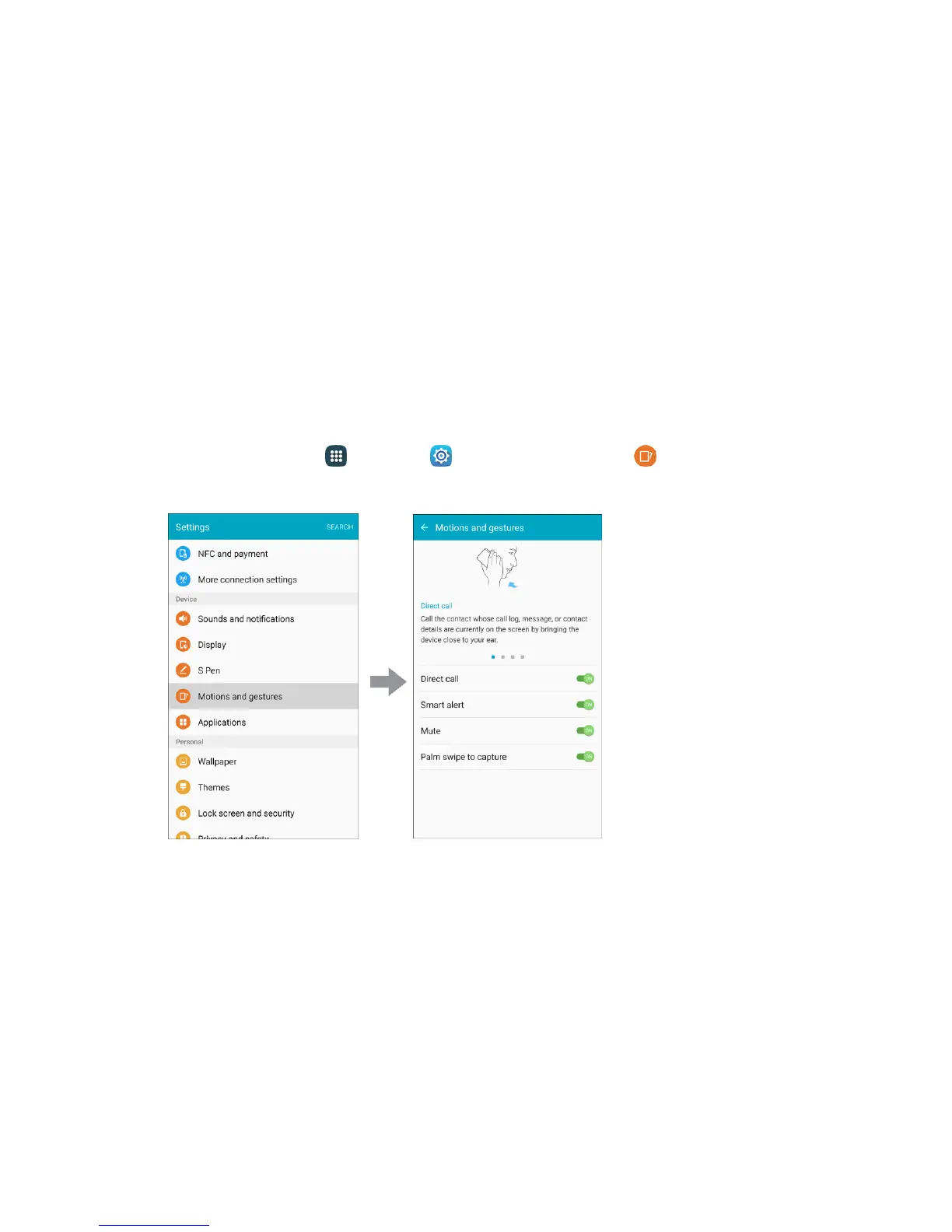
1. From home, tap Apps > Settings > Motions and gestures . You can swipe through
the screens at the top to read about each motion and gesture.
2. Tap ON/OFF to turn a feature on.
Direct call: Call the contact whose call log, message, or contact details are currently on the
screen by bringing the device close to your ear.
Smart alert: The phone will vibrate when picked up to notify you about missed calls and
messages.
Mute: Mute incoming calls and alarms by placing your hand on the screen or turning the
phone over.
Palm swipe to capture: Capture the screen by swiping the edge of your hand across the
screen, from side to side, keeping in contact with the screen.














 To Next Page