3-9
Chapter 3.Using The Computer
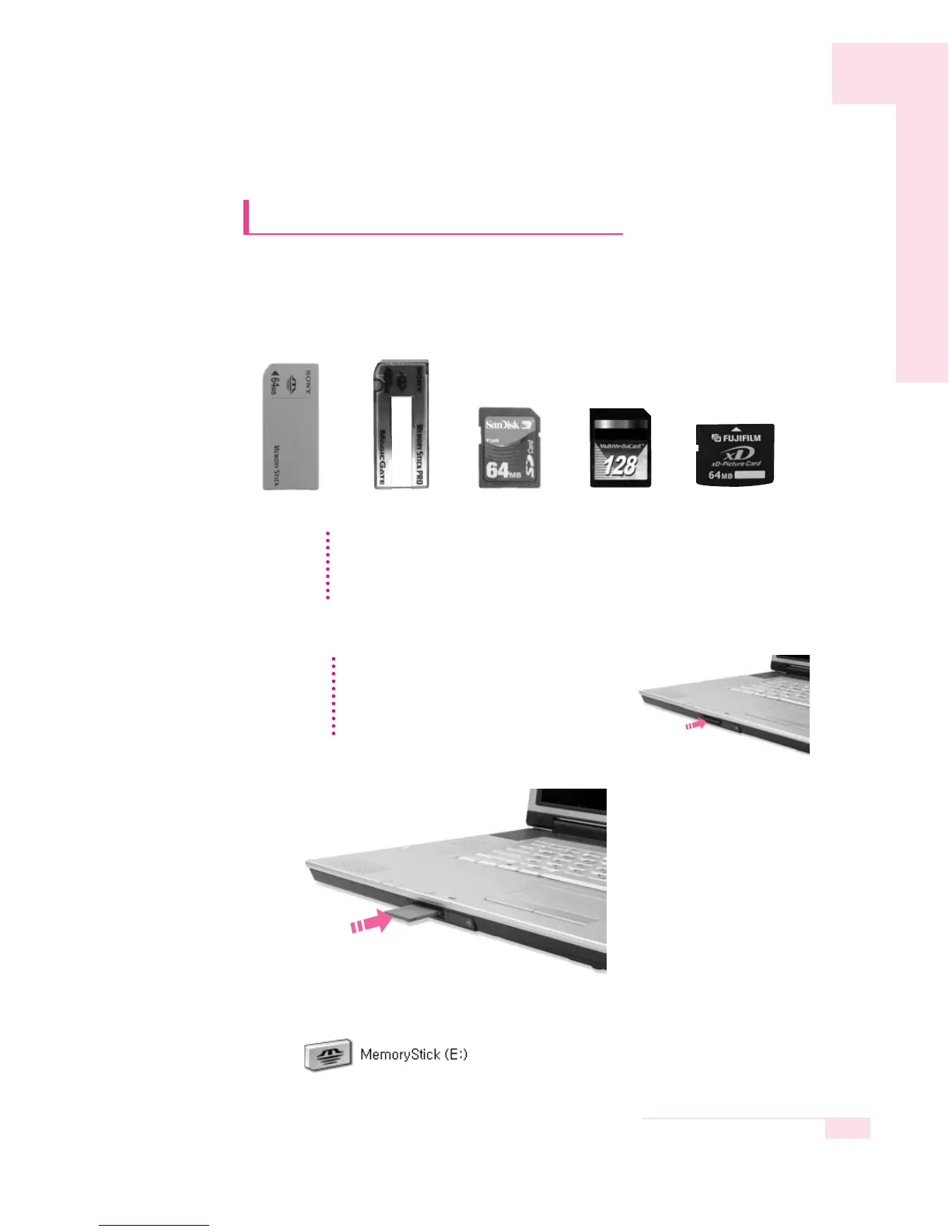
Using the Multi Card Slot
Using the Multi Card Slot, you can use memory cards such as a Memory
Stick, Memory Stick Pro, SD Card, MMC, or xD Card. A memory card is
used as a removable disk and is useful for exchanging data between a
computer and a digital device such as a digital camera.
■
To insert and use a memory card
1. Insert a memory card into the Multi Card Slot.
2. Click Start > My Computer. The inserted memory card is displayed.
CC
CC
aa
aa
uu
uu
tt
tt
ii
ii
oo
oo
nn
nn
Restrictions on Using Memory Cards
You can use memory cards for storing data only. Copyright protection function is not
supported.
Memory Stick Memory Stick Pro
SD Cord MMC xD Cord
CC
CC
aa
aa
uu
uu
tt
tt
ii
ii
oo
oo
nn
nn
Remove the Slot Protector first, before using
the Multi Card Slot.
Press the end of the Slot Protector lightly, and
remove the Slot Protector when it pops up.
( ex :
Memory Stick
)
( ex :
Memory Stick
)



 To Next Page