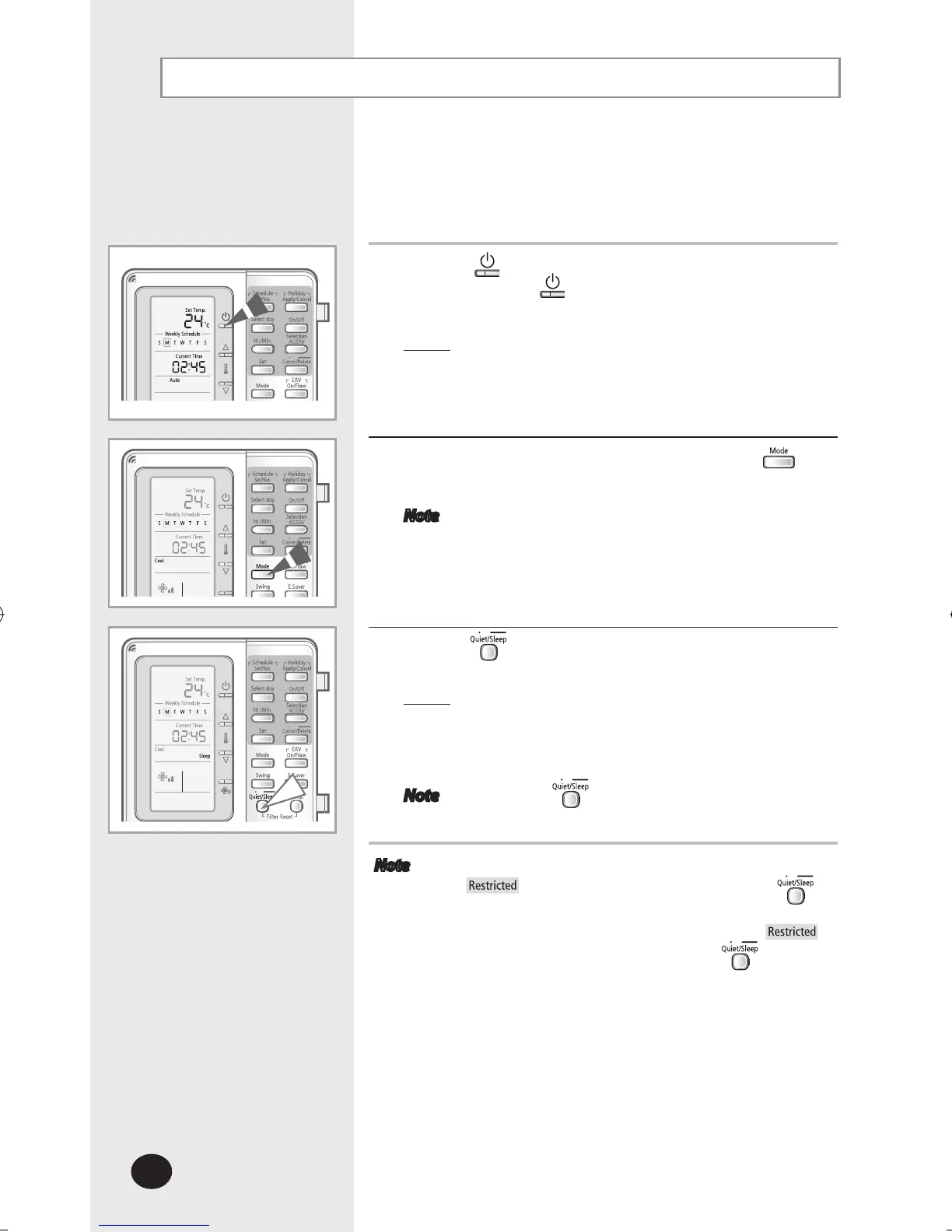
Selecting the Sleep Mode
Select the sleep mode to sleep in comfort without worrying to
urn off the air conditioner in the middle of the night.
The air conditioner will turn off automatically after 6 hours.
1
Press the (ON/OFF) button to turn on the indoor unit.
- Do not press the
(ON/OFF) button if the remote
controller is on.
Result
: The air conditioner will be turned on with the
most recently used mode.
2
Select the desired operation mode by pressing the
button.
Note
Only cooling and heating mode support the sleep
mode.
3
Press the button for 3 seconds to select the Sleep
mode.
Result: The air conditioner will operate in sleep mode.
The air conditioner will gradually raise or
lower the set temperature internally and
eventually turn off automatically after 6 hours.
Note Press the button for 3 seconds again to exit
the sleep mode.
Note If the indoor unit does not support Sleep mode,
will be displayed when you press the
button for 3 seconds.
If the indoor unit is not in Cool/Heat mode,
will be displayed when you press the
button for
3 seconds.



 To Next Page