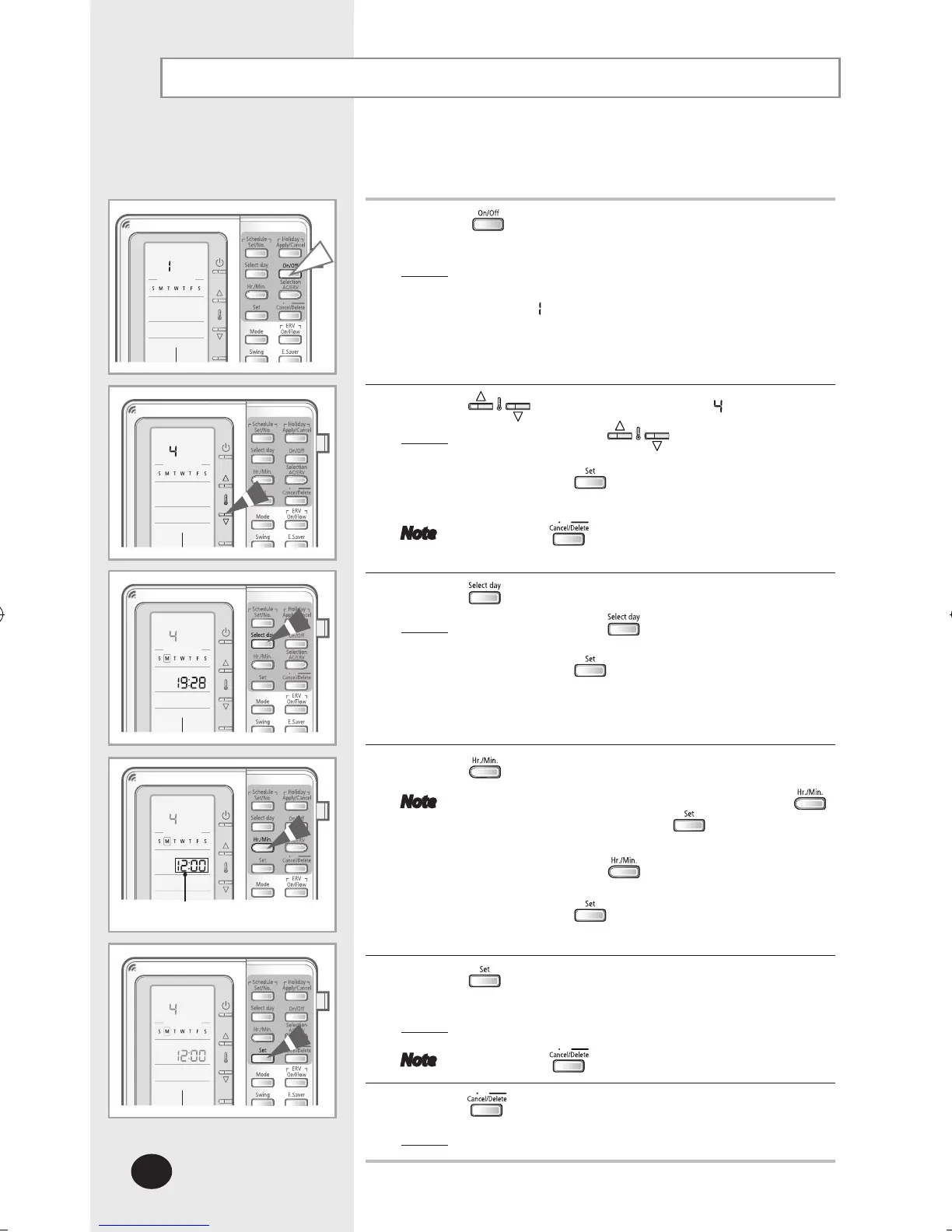
Setting the Current Time and Day
You can set the current time and day.
1
Press the button for 3 seconds to enter the setup
mode.
Result
: The multi function wired remote controller will
enter the setup mode and the menu will
display
.
2
Press the buttons and select menu .
Result
: Each time the buttons are pressed,
menu number increases by 1.
Press the button to enter the time and
day setting mode.
Note Press the button to cancel the setting.
3
Press the button to select current day.
Result: Each time the button is pressed,
the selected day will be changed.
Press the button to select the day.
4
Press the button to set hour and minute.
Note Set the current hour first by pressing the
button followed by the
button and set
the current minute.
Each time the button is pressed,
the hour/minute is increased by 1.
Press the button after setting.
5
Press the button to complete the current time and day
settings.
Result
: The set time and day will be applied.
Note Press the button to cancel the setting.
6
Press the button.
Result
: Menu selection display will end.
Set current time



 To Next Page