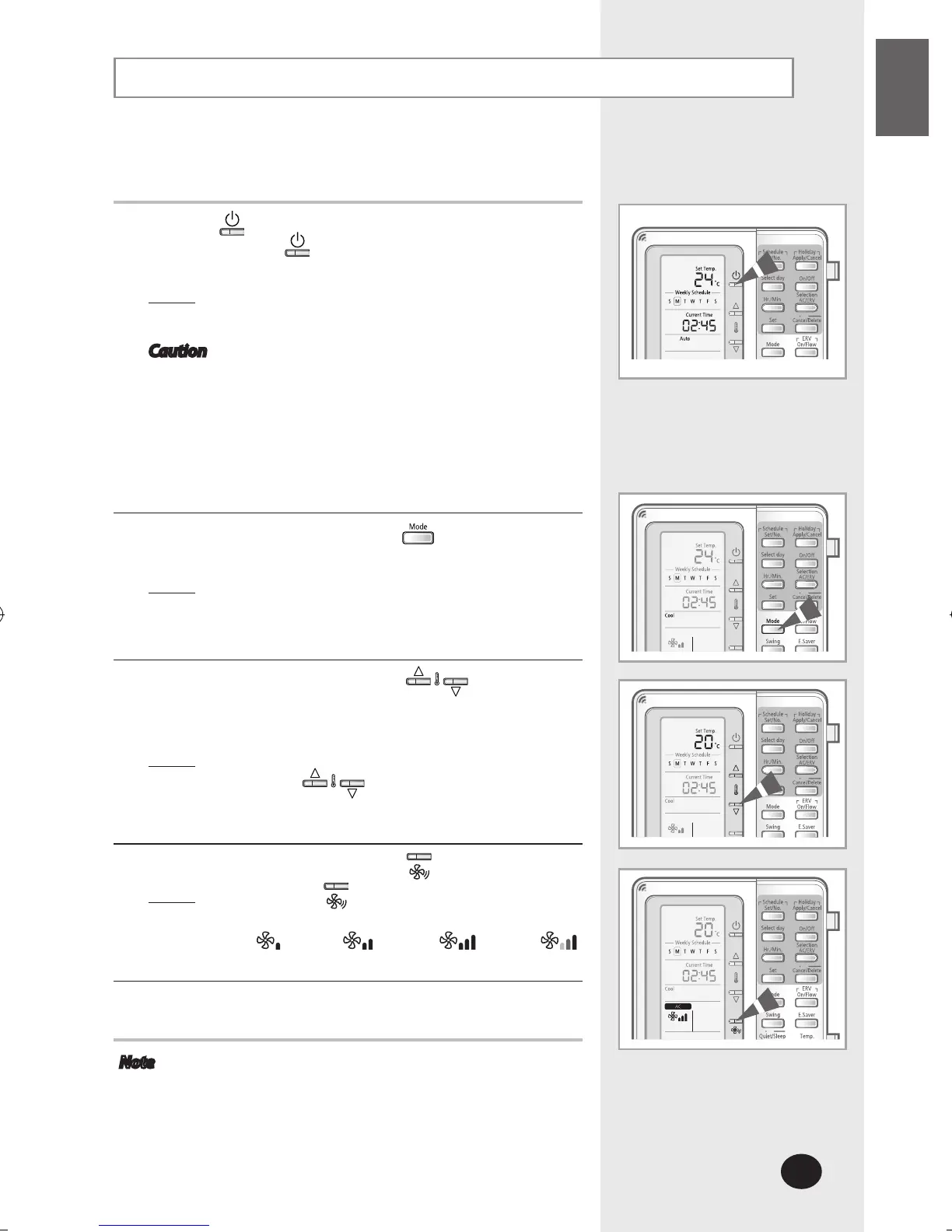
Selecting the Cooling Mode
Select the cooling mode to lower the room temperature.
1
Press the (ON/OFF) button to turn on the indoor unit.
- Do not press the
(ON/OFF) button if the remote
controller is on.
Result
: The air conditioner will be turned on with the
most recently used mode.
Caution The air conditioner has a built-in protection
mechanism to prevent the unit from being
damaged when it is started immediately after
being:
Plugged in
Stopped
The air conditioner will start up after 3 minutes.
2
To select the COOL mode, press the button until Cool is
displayed on the remote controller.
Result
: The air conditioner will operate in cooling mode.
3
To adjust the temperature, press the buttons.
The temperature can be set between 18°C(65°F) and
30°C(86°F).
Result
: The temperature will be adjusted by 1°C(1°F)
when the buttons are pressed.
4
Select the fan speed by pressing the button.
Result
: Each time the button is pressed, fan speed will
change in the following order:
Low
Med
High
Auto
5
To adjust the air swing direction, refer to page 13.
Note If you select heating mode while the cooling mode is in
operation, cooling mode will be canceled.



 To Next Page