4-53
4. Troubleshooting
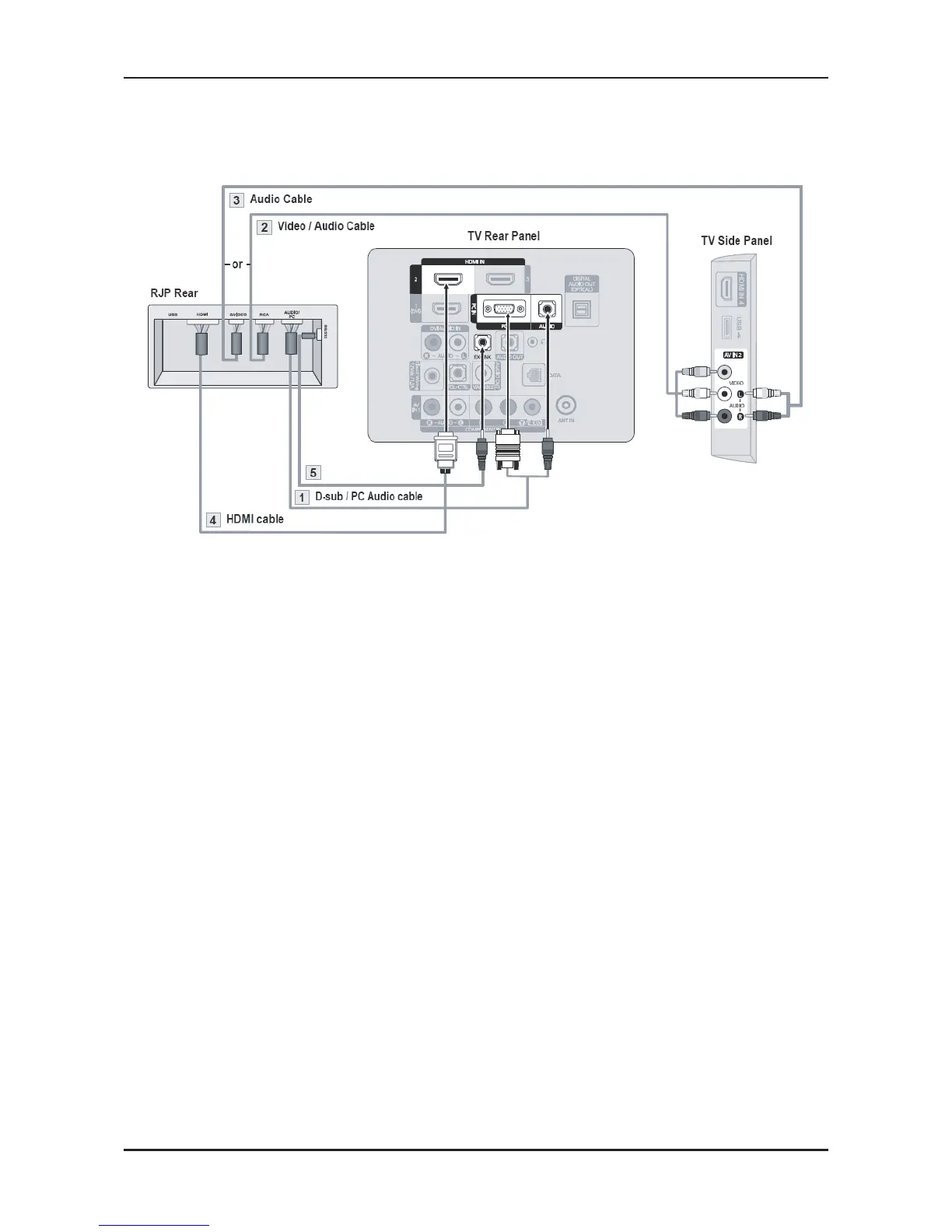
Connecting the RJP(Remote Jack Pack)
Output of any external source connected to RJP on user desk.
Connect the PC IN [PC] / [AUDIO] port of the TV to the PC/AUDIO port of the RJP.
Connect the AV IN [VIDEO]/[R-AUDIO-L] port of the TV to the RCA port of the RJP.
Connect the S-VIDEO / AV IN[R-AUDIO-L] port of the TV to the S-VIDEO port of the RJP.
- You cannot connect and use the AV and S-VIDEO ports at the same time.
Connect the [HDMI] port of the TV and the HDMI port of the RJP.
Connect the EX-LINK port of the TV and the RS/232 port of the RJP.
- The RJP (Remote Jack Pack) compatible with this Samsung TV is TeleAdapt TA-7610.
1.
2.
3.
4.
5.






 To Next Page