4-4
4. Troubleshooting
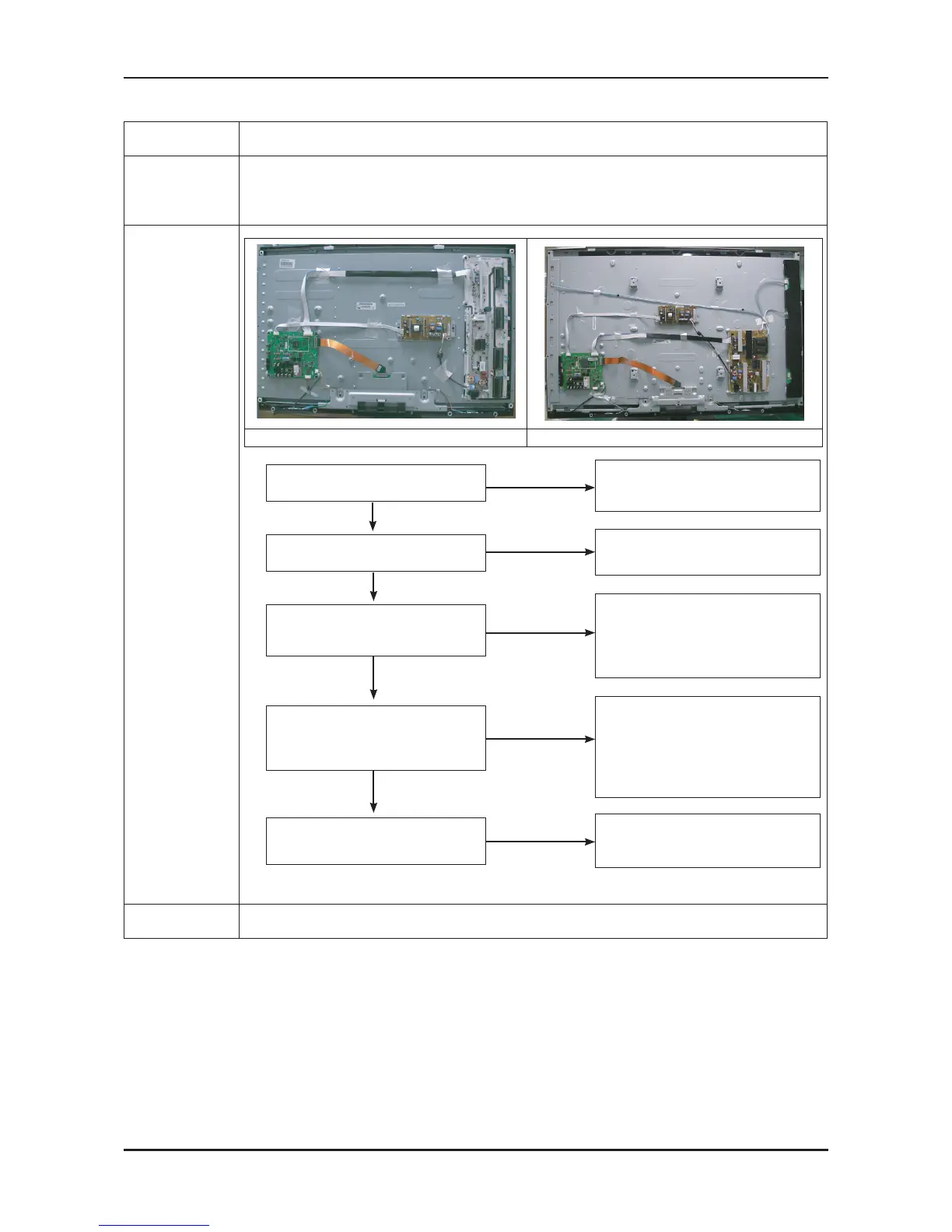
4-1-2. No Video (Analog PC signal)
Symptom No video with PC source.-
Major
checkpoints
Check your source on the TV.
Check your source content.
Check all connections.
-
-
-
Diagnostics
40” 52”
No
Check C903, PC cable.
Change the Main PCB
40” : BN94-02945D
52” : BN94-02945E
Yes
Does the digital data appear at
Pin #16,17,34,35 (LVDS Data clk)
of LVDS connector?
No
No
Check the PC source and
check the connection of D-SUB
Yes
Power indicator LED is off.
Lamp(Backlight) on, no video
Yes
Does the signal appear at
TP - 67,69,71,70,72
(R, G, B, H, V) of IC201?
Input the analog
PC signal properly.
Yes
Check IC201 (Saturn4)
Change the Main PCB
40” : BN94-02945D
52” : BN94-02945E
Check the LVDS cable?
Replace the LCD panel?
Please, Contact Tech support.
No
1
2
No
Check a set in the
‘Stand-by mode’ or ‘DPMS mode’.
Caution Make sure to disconnect the power before working on the IP board.






 To Next Page