4-2
4. Troubleshooting
4-1-1. No Power
Symptom The unit is dead. No led’s on the front cover light up.-
Major
checkpoints
Check the following:
Check the internal cable connection status inside the unit.
Check the fuses of each part.
Check the output voltage of SMPS.
-
-
-
Diagnostics
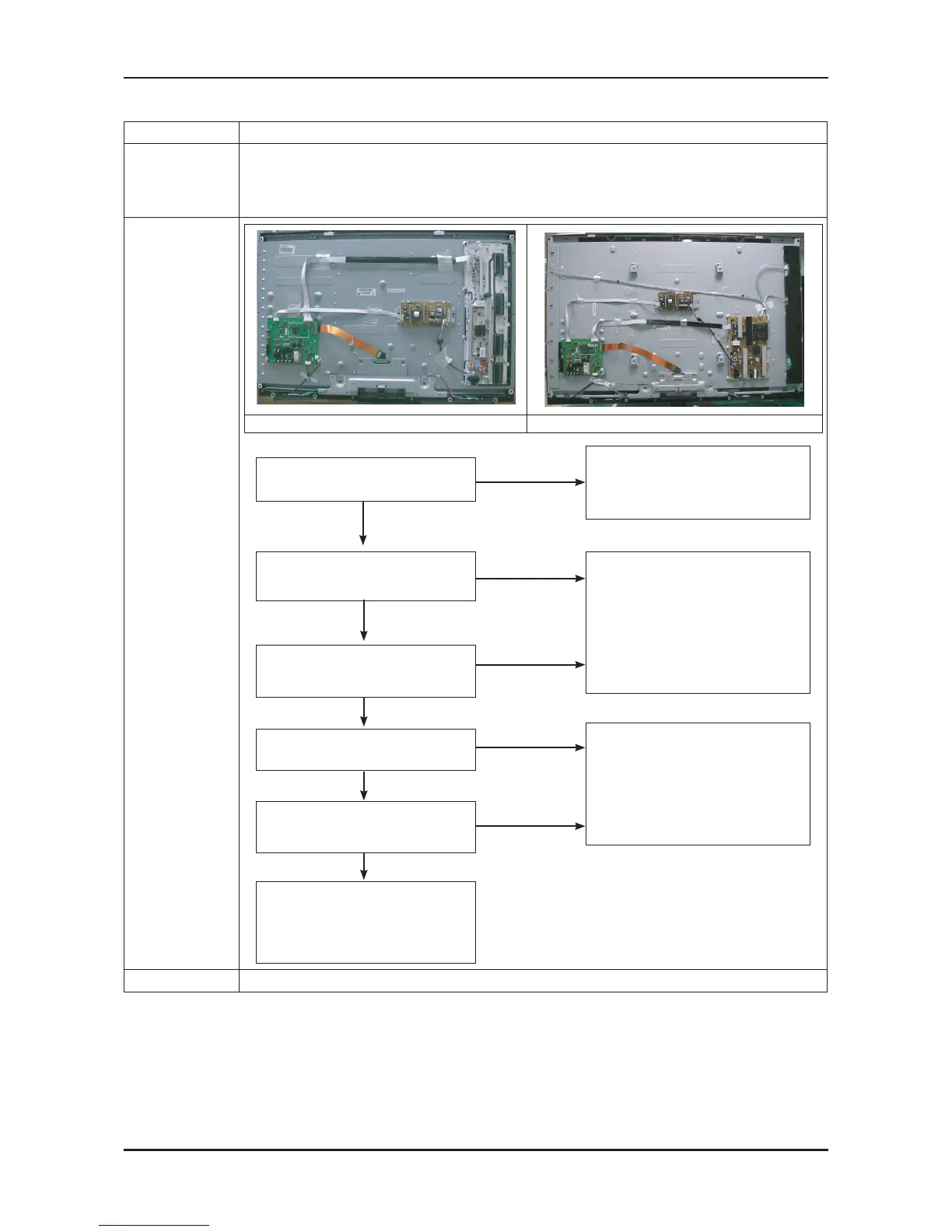
40” 52”
Does proper Stand-By DC
A5V appear at TP - A5V?
Does proper DC A3.3V
appear at TP - A3.3V?
No
No
Does proper DC B3.3V, B9V, DDR1.9V,
A1.2V, appear at
TP - B3.3V, B9V, 1.9V, L101?
Lamp(Backlight) Off,
power indicator LED on
Change the Main PCB
40” : BN94-02945D
52” : BN94-02945E
No
No
Does proper Main
DC B12V, B13V, B5V appear at
TP - B12V, B13V, B5V?
Yes
Change the LVDS Cable
40” : BN96-10076A
52” : BN96-10074A
Lamp(Backlight) on, no video
No
Yes
Yes
Change 30p power cable
40” : BN39-01099V
52” : BN39-01099U
Replace the IP board.
40” : BN44-00264A
52” : BN44-00267A
Yes
Yes
Caution Make sure to disconnect the power before working on the IP board.






 To Next Page