4-7
4. Troubleshooting
4-1-3. No video (HDMI - Digital signal)
Symptom No video with HDMI input.-
Major
checkpoints
Check your source on the TV.
Check your source content.
Check all connections.
-
-
-
Diagnostics
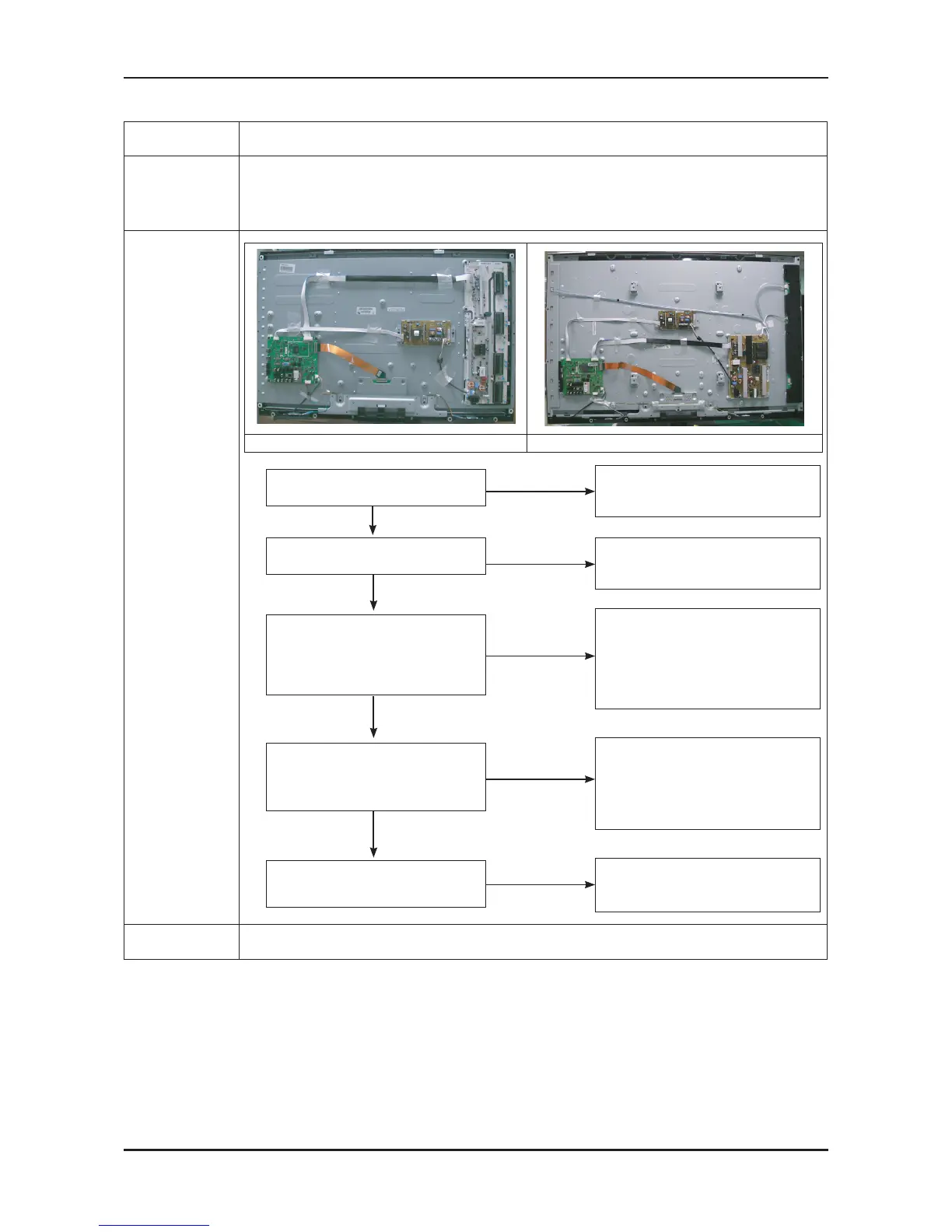
40” 52”
No
Check CN802, CN901, CN902
Check HDMI cable
Change the Main PCB
40” : BN94-02945D
52” : BN94-02945E
No
Does the digital data appear at
Pin #19,20,34,35 (LVDS Data clk)
of LVDS connector?
Power indicator LED is off.
Lamp(Backlight) on, no video
No
Check the HDMI source and
check the connection of HDMI cable
Does the signal appear at
CN803 (Pin#12 , #7 )(HDMI1)
CN801 (Pin#12 , #7 )(HDMI2)
(HDMI RX_Clk , RX_Data)?
No
No
Please, Contact Tech support
Check the LVDS cable?
Replace the LCD panel?
Check IC201 (Saturn4)
Change the Main PCB
40” : BN94-02945D
52” : BN94-02945E
Yes
Yes
Yes
Input the HDMI signal properly
Yes
3
2
Check a set
in the ‘Stand-by mode’.
Caution Make sure to disconnect the power before working on the IP board.






 To Next Page