70
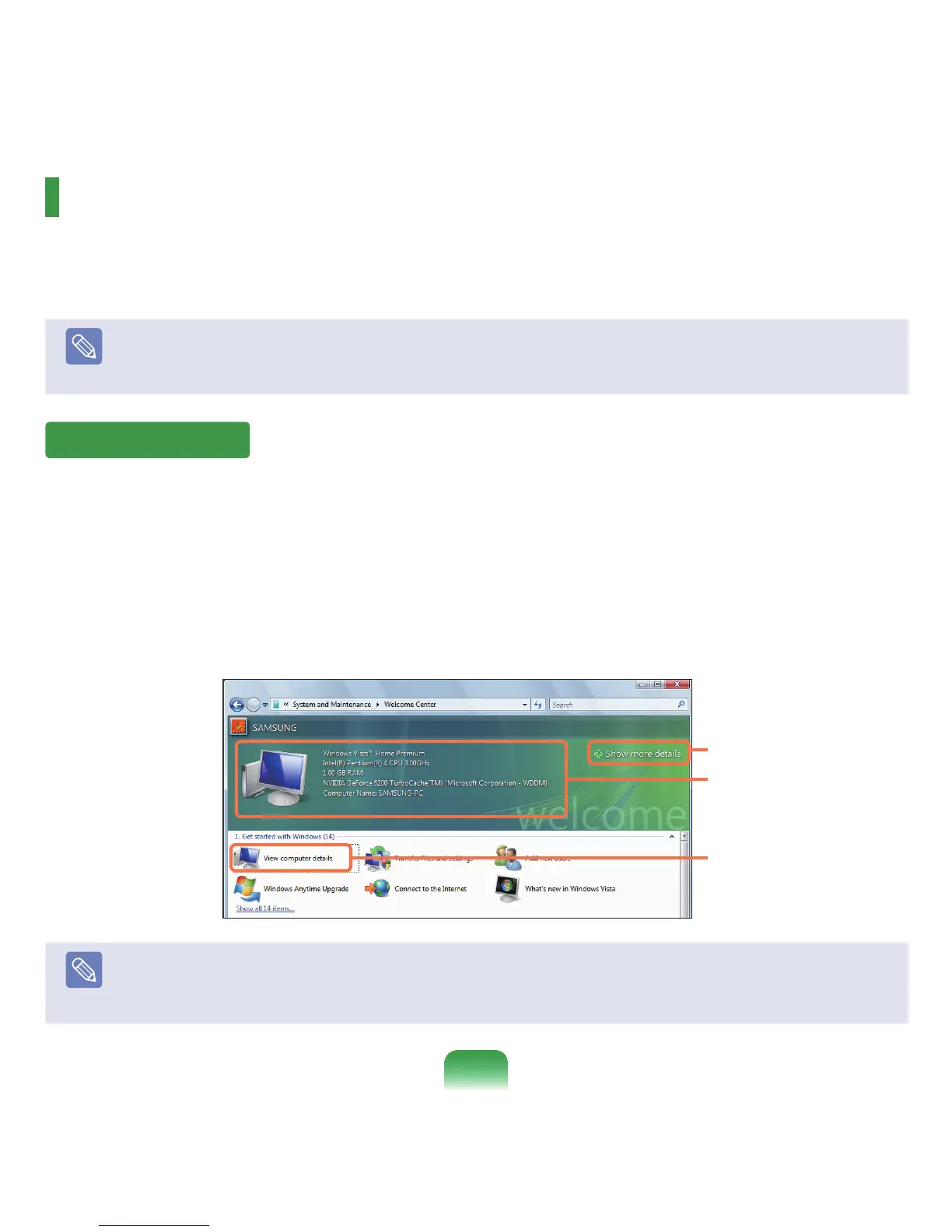
IntheWelcomeCenter,youcanviewbriefdescriptionsofWindowsVistafunctionsandrunthefunctionsdirectly.
1
Click Start > Welcome Center.
2
Ifyouclickonanitem,informationonthefunctionisdisplayedinthedescriptionwindow.
Forexample,ifyouclickView computer details,yourcomputerinformationisdisplayedinthedescriptionwindow.
Inaddition,clickonShow More details,formoredetailedinformation.
Note
Windows Vista Demo
IfyouclickStart > Welcome Center > Show all X items > Windows Vista Demo,youcanwatchtheWindowsVista
introduction movie.
About Microsoft Windows Vista
Microsoft Windows Vista(hereafterWindows)isacomputeroperatingsystem.Sinceyouhavetolearnhowtouse
itinordertousethecomputerefcientlyandeffectively,usetheWelcome Center and Windows Help and Support
tolearnaboutWindowsVista.
Note
Thescreenlayoutmaydifferdependingonthecomputermodelandtheoperatingsystem.
Welcome Center
1
Description Window
2



 To Next Page