Removing User Accounts
Note
■
Ifthereisonlyoneadministrator account for the
computer,youcannotdeletethe
administrator
account.
■
Youcanonlydeleteanotheraccountwhenyou
areloggedinasanadministrator.
1
ClickStart > Control Panel > User Accounts and
Family Safety > User Accounts.
2
ClickManage Another Account.
3
Clickontheuseraccounttobedeleted.
4
ClickDelete the AccountintheMakechangesto
user’saccountmenu.
5
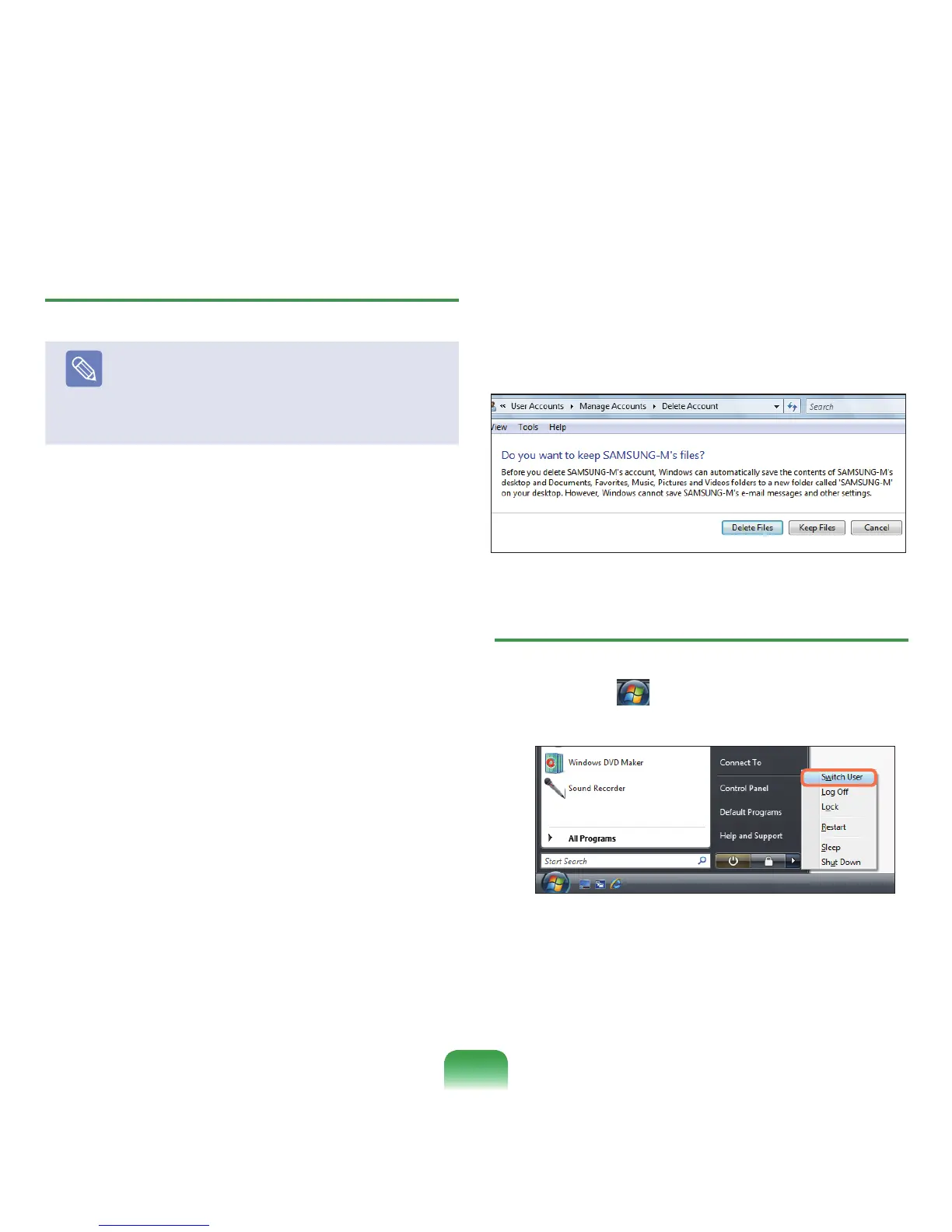
Awindowappearsaskingwhetheryouwantto
savethedesktop,documents,favorites,musicles,
picturesandvideofoldersasnewfoldersonthe
Desktopbeforedeletingtheaccount.
IfyouclickDelete les,theaccountandallles
belongingtotheaccountaredeleted.
Ifyouclick
Keep les,onlytheaccountisdeleted
andthelesbelongingtotheuseraresavedonthe
Desktop.
Switching User Accounts
1
ClickStart( )onthetaskbarandselectSwitch
User.
2
Ifyouclickonanotherusernameinthestartscreen,
youcanloginwiththatuseraccount.
85



 To Next Page