Changing the screen resolution and the color
Theresolutionreferstothenumberofpixelsdisplayedonthescreen.Whenincreasingtheresolution,theitemsonthe
Desktopbecomesmallerandmoreitemscanbedisplayedonthescreen.Thehigherthecolorquality,themorecolors
aredisplayedonthescreen.
1
ClickStart > Control Panel > Appearance and Personalization > Personalization > Display Settings.
Alternatively,right-clickontheDesktopandselectPersonalization > Display Settingsfromthepop-upmenu.
2
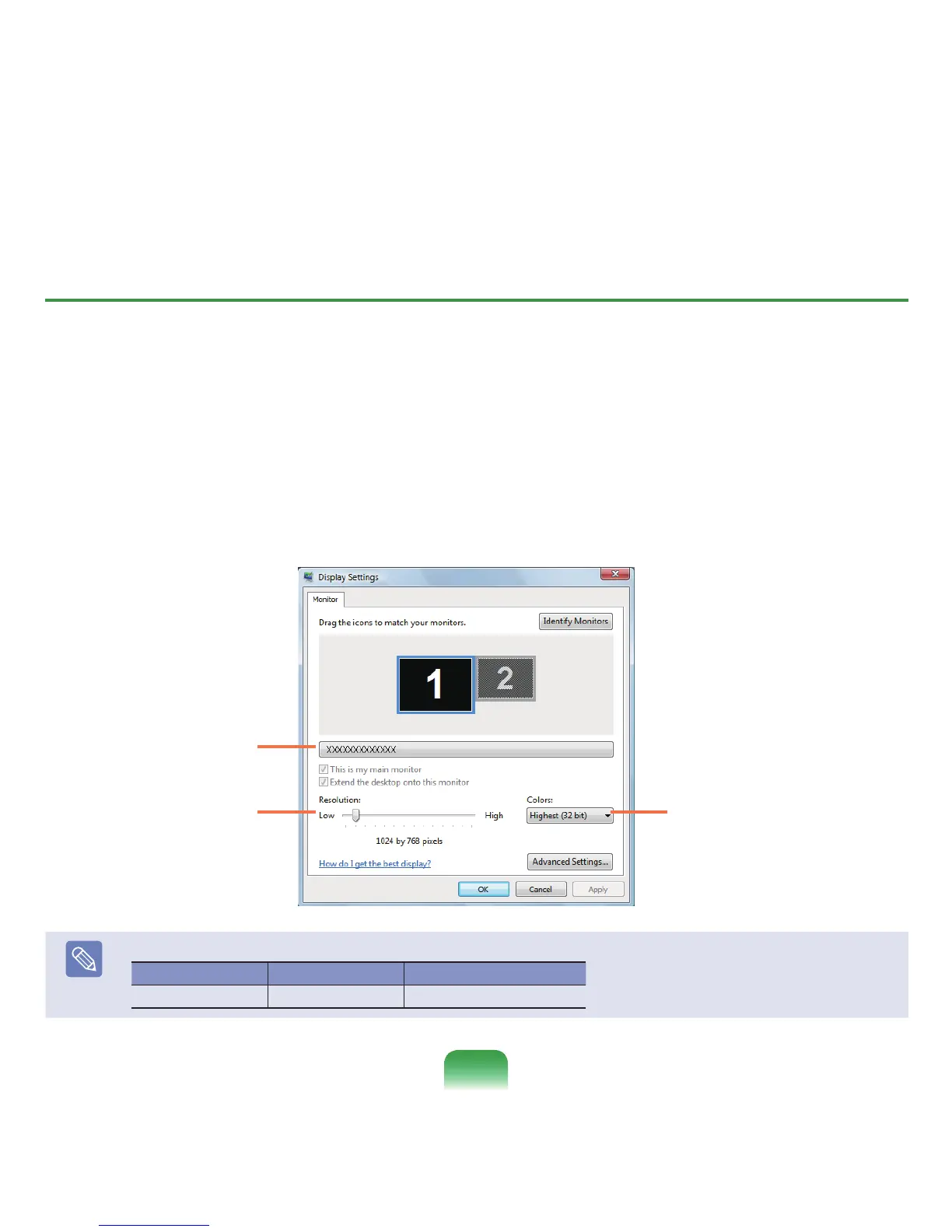
TheDisplaySettingsscreenappears.
ChangetheresolutionandcolorsettingsandclicktheOKbutton.
Tochangethecolorquality,click
thisbuttonandselectaparticular
quality.
Tochangetheresolution,
slidetheresolutionslidingbar
toaparticularresolution.
You can check the
graphics chipset.
Note
ThefollowingresolutionsandcolorqualitiesarerecommendedaccordingtothecomputerLCDpaneltype.
LCDType Resolution ColorQuality
WXGA 1280x800 VeryHigh(32bit)
86



 To Next Page