32_ network connection and setup
network connection and setup
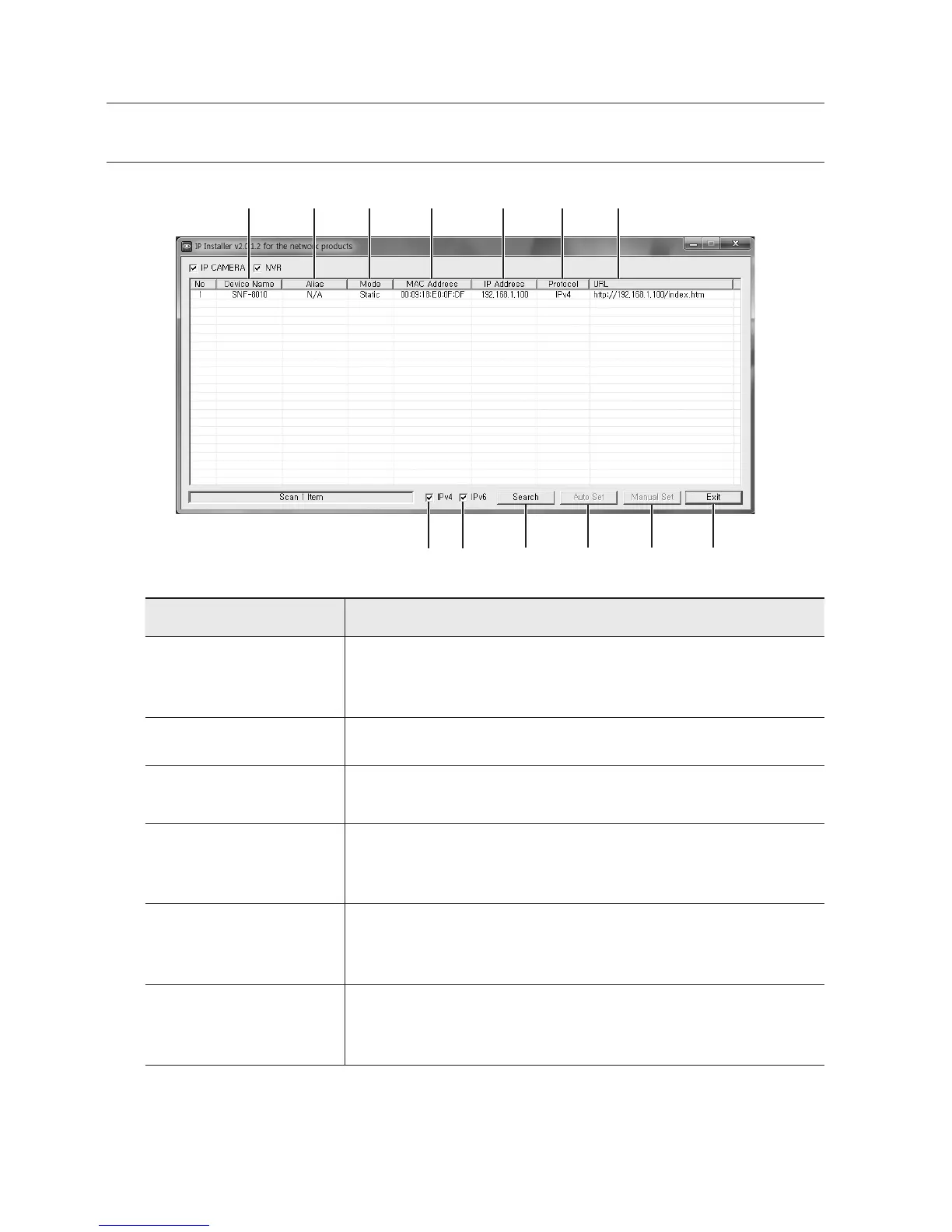
BUTTONS USED IN IP INSTALLER
Item Description
a
Device Name
Model name of the connected camera.
Click the column to sort the list by model name.
However, search will be stopped if clicked during the search.
b
Alias This function is not currently implemented.
c
Mode
Displays either <Static>, <Dynamic> or <PPPoE> for the current network
connection status.
d
MAC(Ethernet)
Address
Ethernet address for the connected camera.
Click the column to sort the list by Ethernet address.
However, search will be stopped if clicked during the search.
e
IP Address
IP address.
Click the column to sort the list by IP address.
However, search will be stopped if clicked during the search.
f
Protocol
Network setting for the camera.
The factory default is “IPv4”.
Cameras with the IPv6 setting will be displayed “IPv6”.
a b c d e f g
h i
j k l m


 To Next Page