setup screen
70_ setup screen
VIDEO & AUDIO SETUP
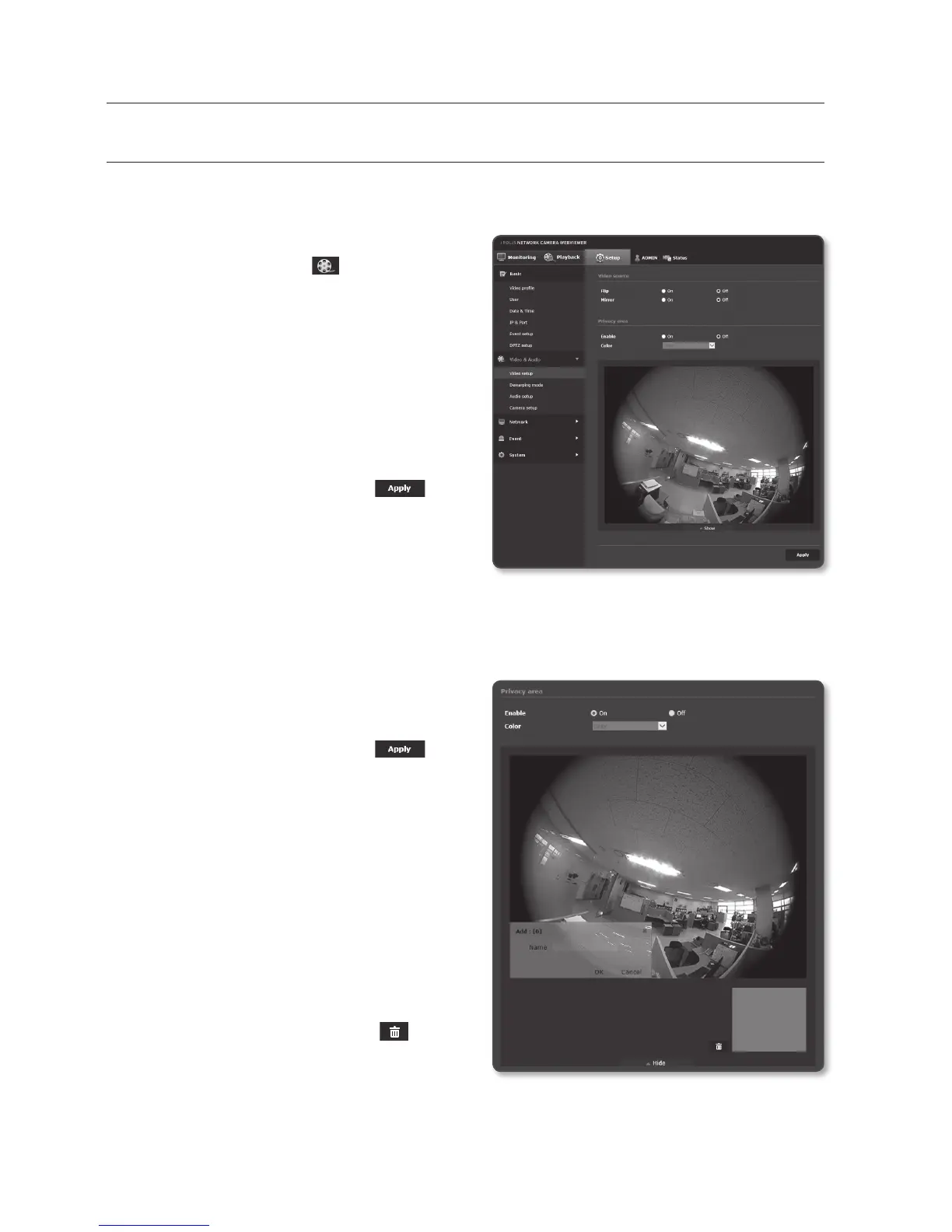
Video setup
1. From the Setup menu, select the
<Video & Audio ( )> tab.
2. Click <Video setup>.
3. Select a <Video source> mode.
• Flip : Turns the camera images
upside down.
• Mirror : Interchanges the left and the
right of the camera images.
4. Specify the privacy zone.
5. When done, click [Apply (
)].
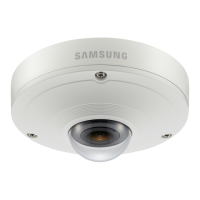
To set the privacy zone
You can specify a certain area of the camera video to be protected for your privacy.
1. Set it to <On>.
2. Select the color masking of desired
privacy area.
3. When done, click [Apply (
)].
4. Click [▼ Show].
5. Place the cursor at a point in the video
and drag it to whatever you need.
6. Check if the area shown on the screen
matches with the target area, type the
name, and click the [OK] button.
If the displayed area does not match
with the set area, click [Cancel] and
reset the area.
7. If you want to delete a name in the list,
select it and click [Delete (
)].


 To Next Page