setup screen
78_ setup screen
OSD Setup
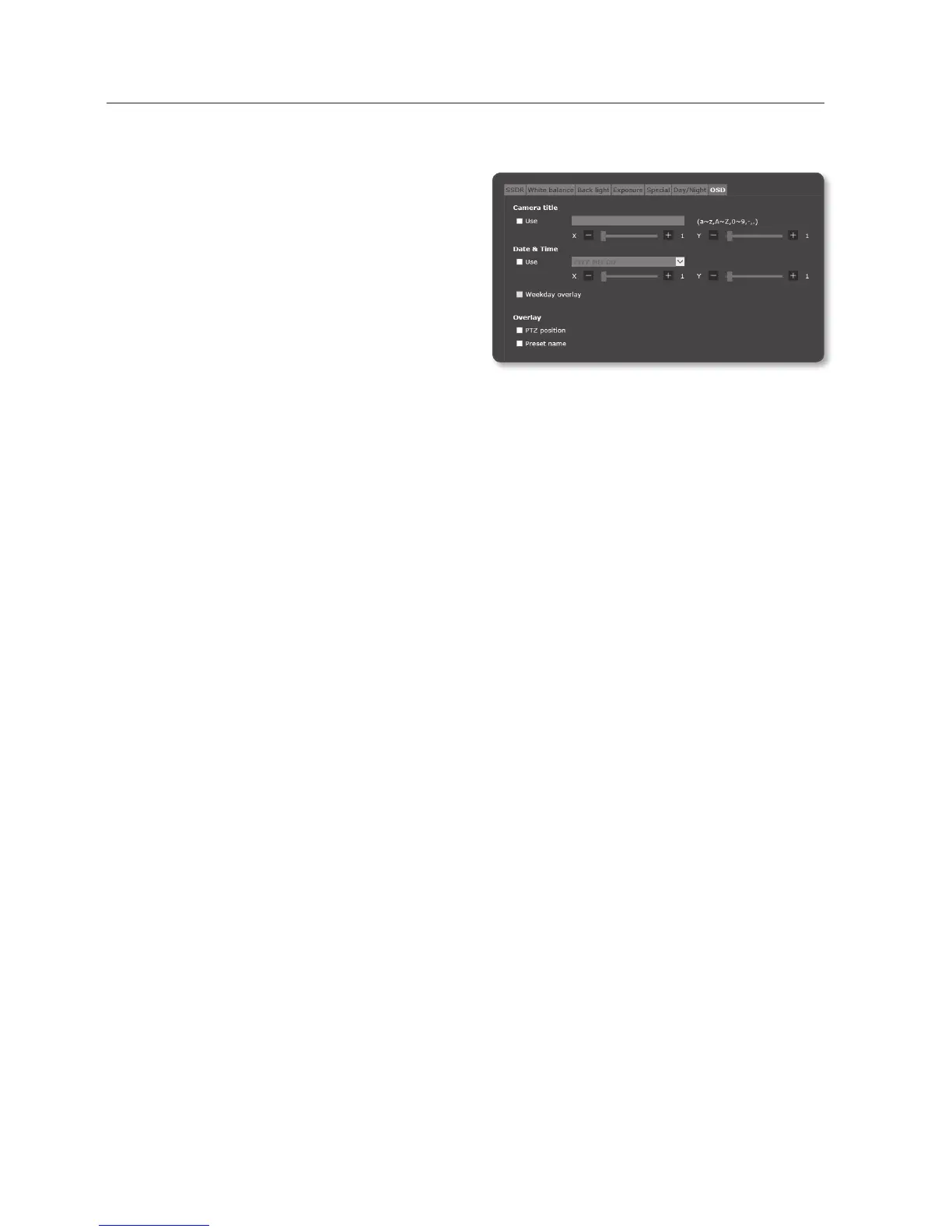
1. Select <OSD>.
2. Select each item and set it properly.
• Camera title : Specify whether or
not to display the camera title on the
screen.
`
You can enter up to 15 characters for the
title.
• Camera title X, Y : Specify the
coordinates where the camera title is displayed on the screen.
• Date & Time : You can set the date and time, and if they should be displayed on
the screen.
• Date & Time X, Y : Set the position of time to be displayed on the screen.
• Weekday overlay : You can display the day on the screen.
• PTZ position : Set the PTZ location on the screen.
• Preset name : Specify whether or not to display preset name on the screen.
J
`
A position-adjustable item (Camera title, Date & Time) may not be displayed normally if it overlaps
with another fixed OSD item.
`
PTZ position appears on the bottom left of the screen and it cannot move to other area. Use this
information when placing other items on the screen.


 To Next Page