56_ web viewer
web viewer
(2) NAS (Network-Attached Storage)
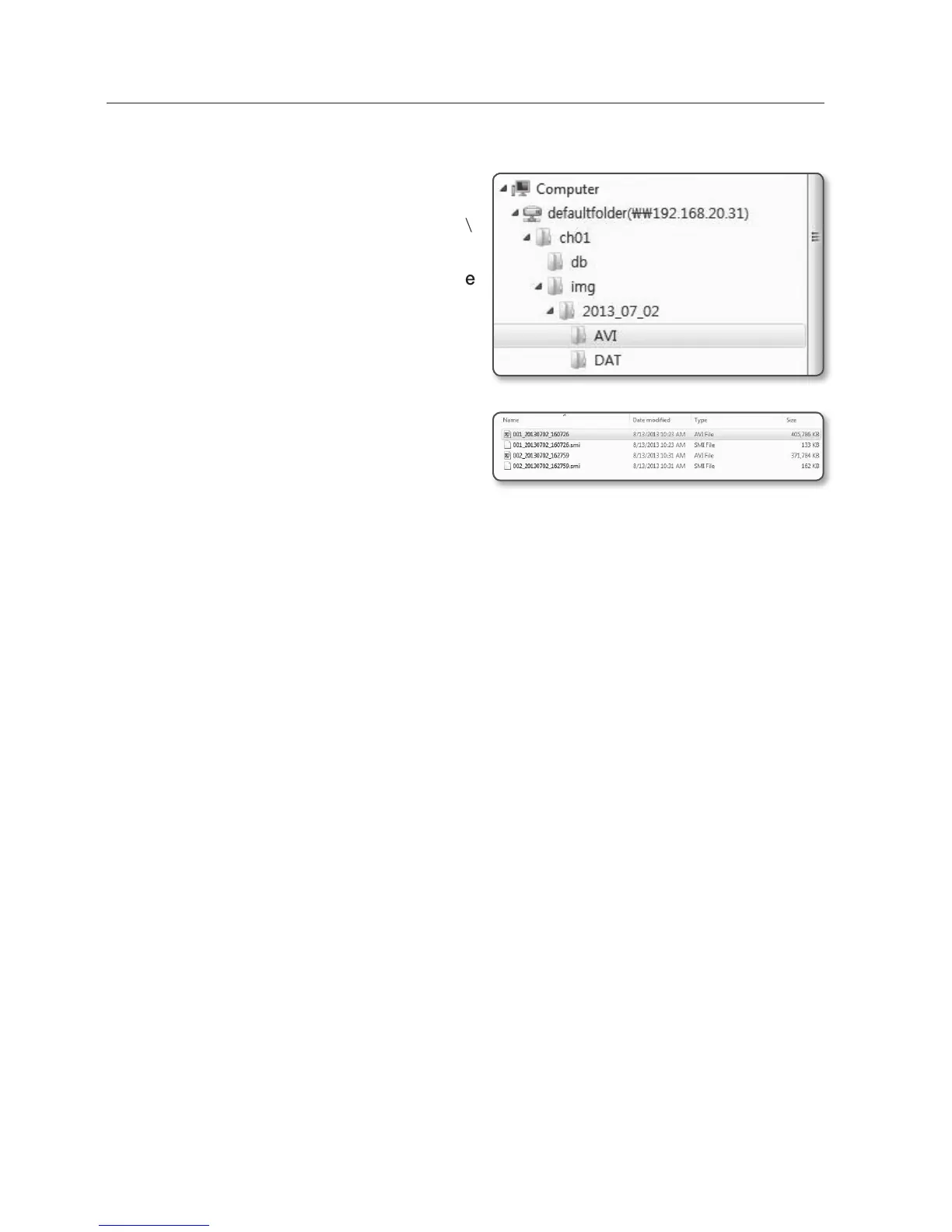
1. In Windows browser, use \\<ip
address>\ to access.
ex)\\192.168.20.31\defaultfolder\ch01\
img\2013_07_02\AVI
2. Go to <Computer>
<Network drive
connection>
Enter 1.
3. Connected to the NAS.
The directory structure is same as
the directory structure for a Micro SD
memory card.
M
`
A filename starts with the format “001_
YYYYMMDD_HHMMSS.avi” and the file
number is incremented by one.
YYYYMMDD_HHMMSS indicates the start time of data saving.
`
“001_YYYYMMDD_HHMMSS.smi” file is a caption file, and you can view it if it exists in the
same directory as its related AVI file.
`
The max recording time per AVI file is 30 minutes.
`
If you change or damage the saved data on your own, it will not play back or save properly.


 To Next Page