English _67
● SETUP SCREEN
DPTZ setup
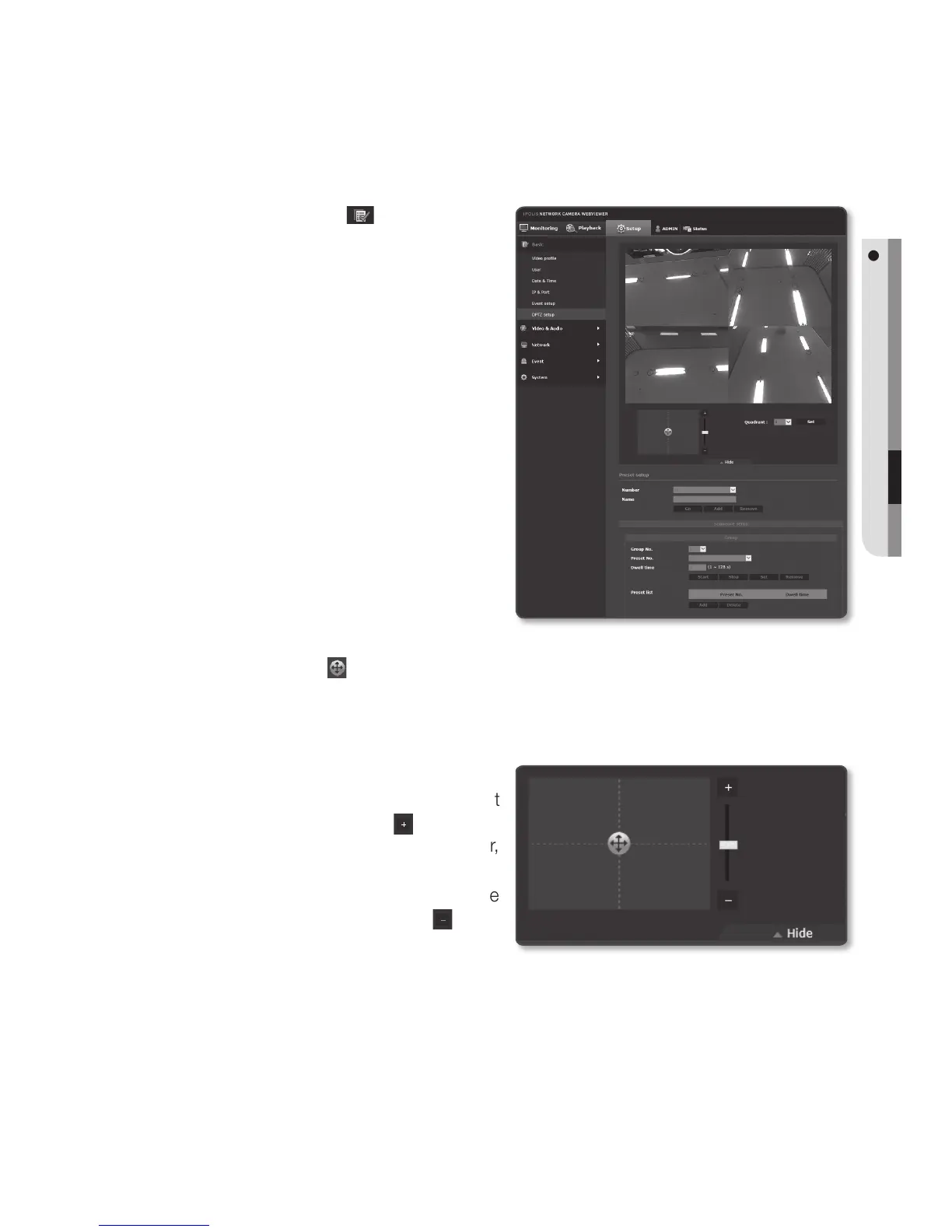
Use this settings page to move the camera view and perform the digital zoom.
1. Select the <Basic (
)> tab from
Setup menu.
2. Click <DPTZ setup>.
3. Click [▼ Show].
• Quadrant : In the Distortion
Compensation view, select locations
where you want to place split-
screens.
M
`
To use Preset and Grouping in <DPTZ
setup> function, select the <Single
Rectangle> view, at <Dewarping
mode>.
`
DPTZ methods can vary depending on
<Dewarping mode> and <Dewarp
View> in <Video profile>.
To see how to use the function, refer to
“Dewarping mode”. (page 71)
4. Click the cursor [
] on the screen moving pad to control movement of the screen.
• Move screen: Scroll the cursor in the direction desired.
• Control screen movement rate: The farther the cursor is from the center of the
screen, the faster the screen moves.
5. Control zoom movement.
• Zoom In: Move up the bar in the right
of the UI, or press the [
] button.
The farther the bar is from the center,
the faster the screen expands.
• Zoom Out: Move down the bar in the
right of the UI, or press the [
]
button. The farther the bar is from
the center, the faster the screen reduces in size.
J
`
When performing the sequence action at a high or low temperature, the system may respond
slower than the set rate for accurate sequence action.


 To Next Page