CHAPTER TWO: INSTALLATION 2.4
4
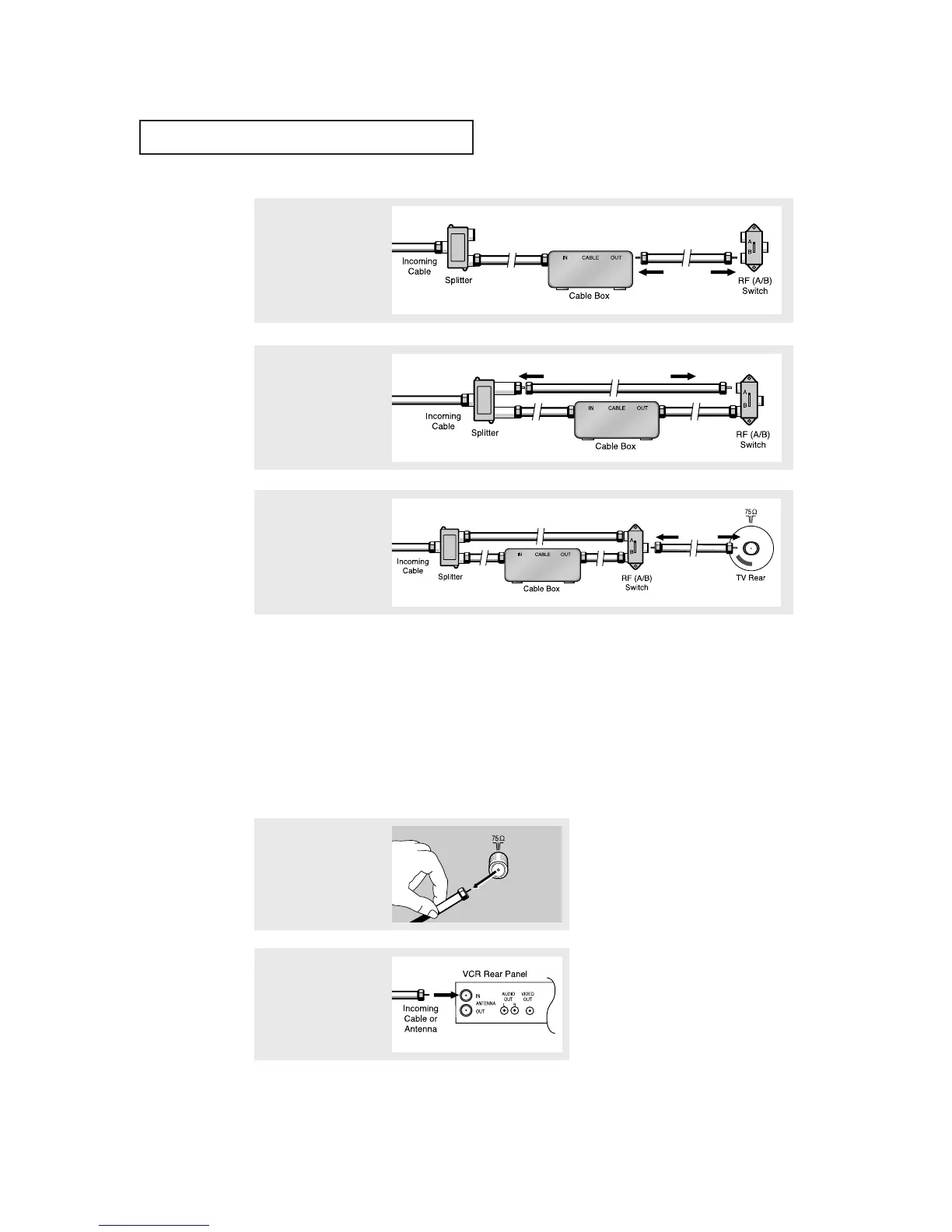
Connect a coaxial cable
between the ANTENNA
OUT terminal on the cable
box and the B–IN terminal
on the A/B switch.
5
Connect another cable
between the other OUT
terminal on the splitter
and the A–IN terminal on
the RF (A/B) switch.
6
Connect the last coaxial
cable between the OUT
terminal on the RF (A/B)
switch and the VHF/UHF
terminal on the rear of the
TV.
INSTALLATION
Connecting a VCR
These instructions assume that you have already connected your TV to an antenna or a cable
TV system (according to the instructions on pages 2.1-2.3). Skip step 1 if you have not yet
connected to an antenna or a cable system.
After you’ve made this connection, set the A/B switch to the “A” position for normal view-
ing. Set the A/B switch to the “B” position to view scrambled channels. (When you set the
A/B switch to “B”, you will need to tune your TV to the cable box’s output channel, which is
usually channel 3 or 4.)
1
Unplug the cable or
antenna from the back of
the TV.
2
Connect the cable or
antenna to the
ANTENNA IN terminal on
the back of the VCR.



 To Next Page