EasyManua.ls Logo

Samsung TXM2792F - Fine Tuning Channels

Samsung TXM2792F
58 pages
Print Icon
To Next Page IconTo Next Page
To Previous Page IconTo Previous Page
Loading...
4.4 C
HAPTER FOUR:SPECIAL FEATURES
Fine Tuning Channels
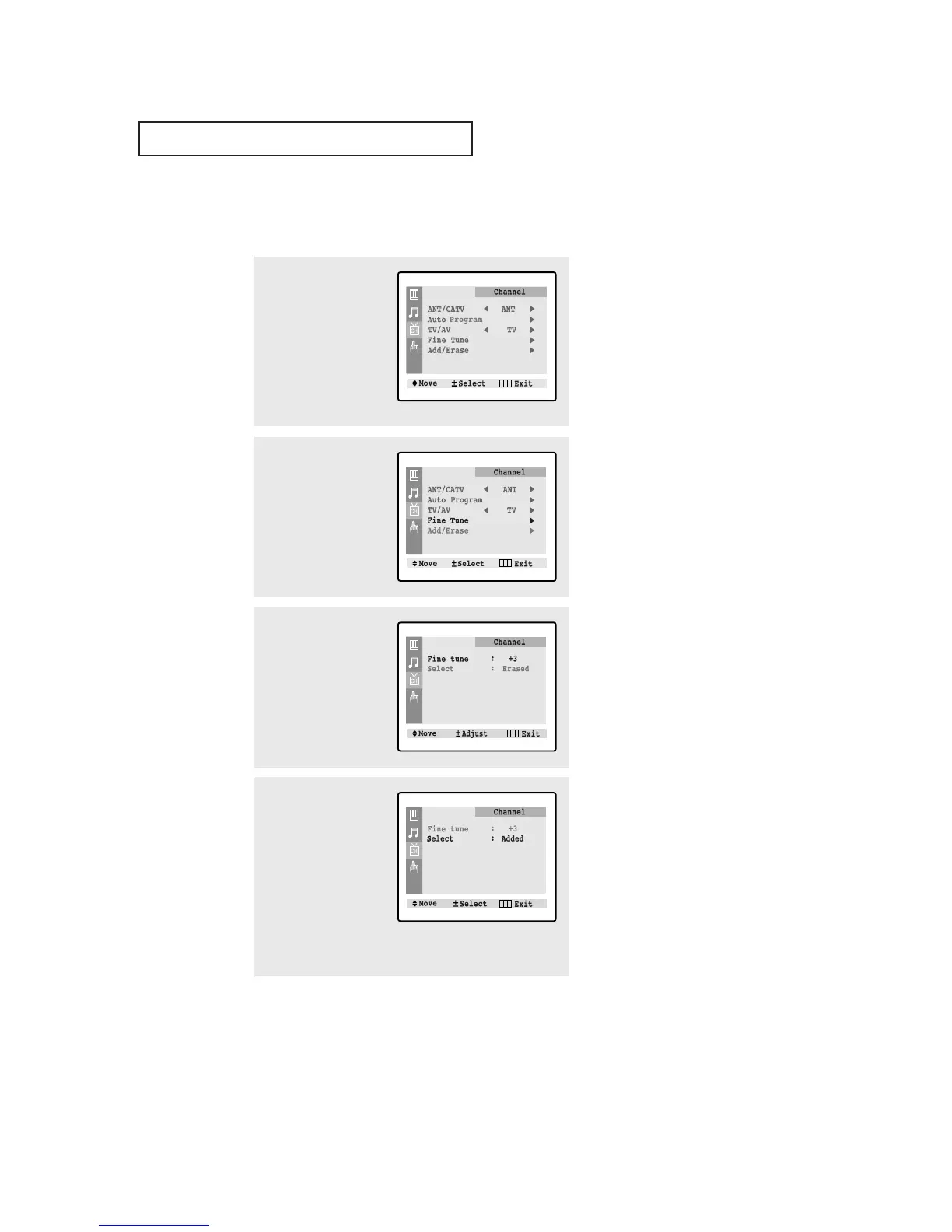
Use fine tuning to manually adjust a particular channel for optimal reception.
1
Select the appropriate
channel.
Press the MENU button to
display the menu.
Press the CH button
twice to select “Channel”
menu, then press the
VOL+ button.
Labeling : ----
2
Press the CH button
three times to select “Fine
tune”, then press the
VOL+ button.
Labeling : ----
3
Press the VOL+ and VOL-
buttons to adjust the fine
tuning.
Press the MENU button to
resume normal viewing.
4
To store the fine tuning
setting in the TV’s memo-
ry, press the CH button
to select “Select”.
Press the VOL+ or VOL-
button to select “Added”.
To reset the fine tuning to
“0”, press the VOL+ or
VOL- button to select
“Erased”.
SPECIAL FEATURES

Table of Contents

Related product manuals