CHAPTER TWO: INSTALLATION 2.6
INSTALLATION
3
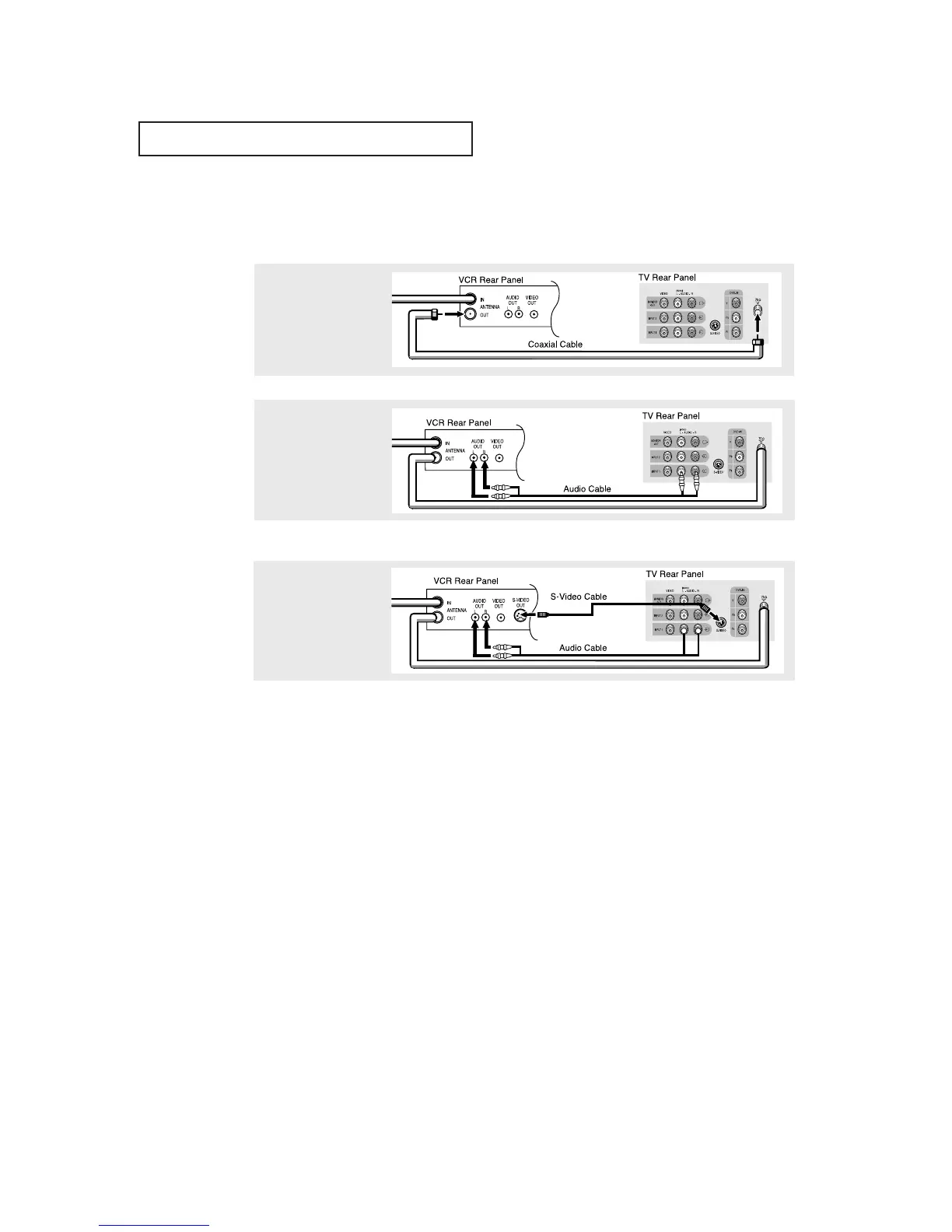
Connect an S-video cable
between the
S-VIDEO OUT jack on the
VCR and the
S-VIDEO INPUT
jack on the TV.
An S-video cable is usually included with an S-VHS VCR. (If not, check your local
electronics store.)
Make sure the jacks you are using are underneath the number “2”.
2
Connect a set of audio
cables between the
AUDIO OUT jacks on the
VCR and the 2 AUDIO
INPUT jacks on the TV.
1
To begin, follow steps
1–3 in the previous
section to connect the
antenna or cable to your
VCR and your TV.
Connecting an S-VHS VCR
Your Samsung TV can be connected to an S-Video signal from an S-VHS VCR.
(This connection delivers a better picture as compared to a standard VHS VCR.)



 To Next Page