OPERATION
C
HAPTER THREE: TV OPERATION
3.9
Labeling the Channels
Use this feature to assign an easy-to-remember label to any channel (i.e., “CBS”, “ESPN”,
“PBS2”, CNN1”, etc.) A label consists of four fields, where each field is a letter, a num-
ber, “*”, or a blank. When the DISPLAY button is pressed, the channel label will appear
next to the channel number.
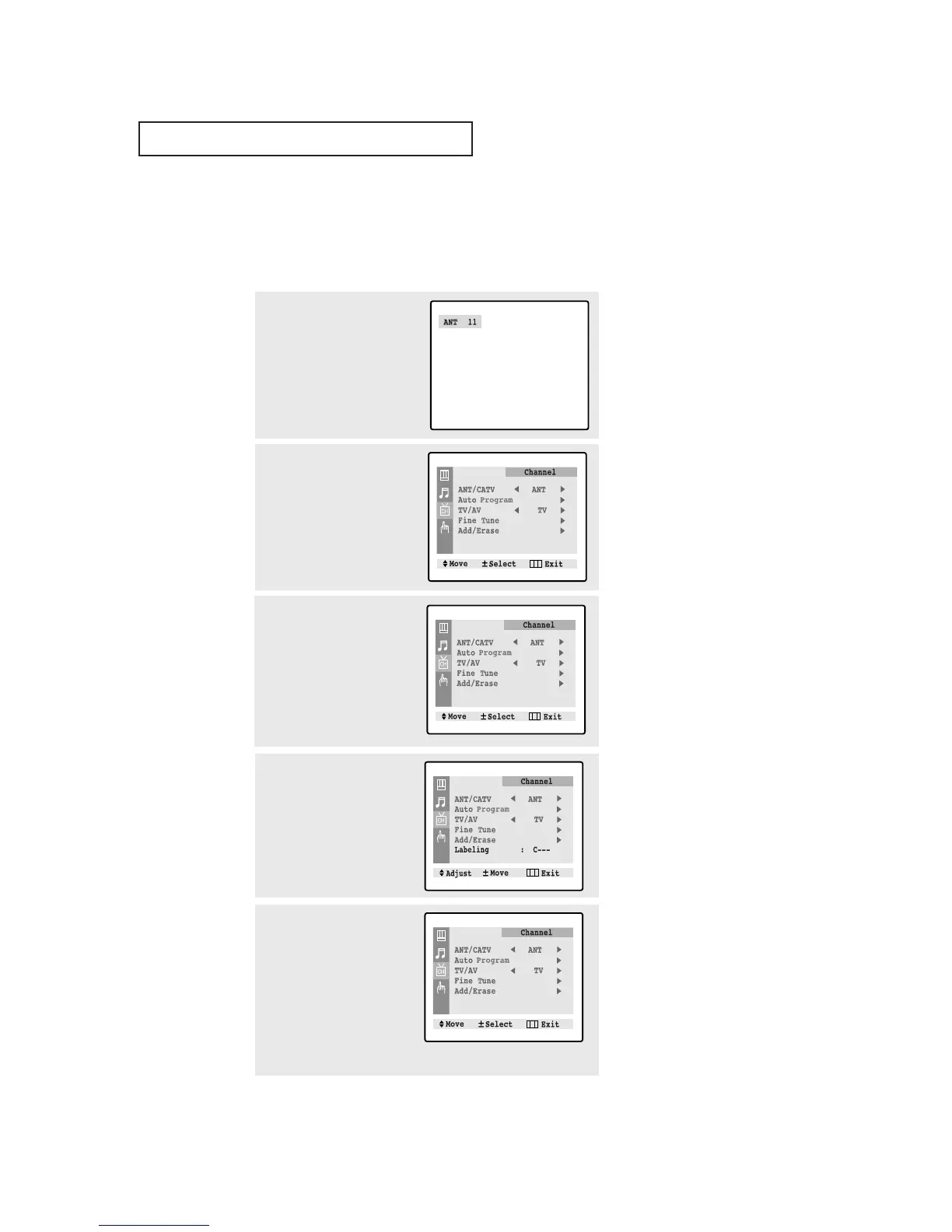
1
Press the CH ▲ or CH ▼ button
to tune to the channel that will
be labeled.
2
Press the MENU button to dis-
play the menu, then press the
CH ▼ button to select
“Channel”.
Press the VOL + button.
3
Press the CH ▼ button to select
“Labeling”.
Press the VOL + button to begin
labeling. The left-most field will
be highlighted.
(Each label has four fields.
See top paragraph.)
4
Press the CH ▲ or CH ▼ button
to select a letter, a number, “*”,
or a blank. (Pressing the CH ▲
button results in this sequence:
A,B,...Z,*, blank,0,1,...9).
▼
Note: You cannot select
“Labeling” in the A/V mode.
5
Press the VOL+ button to
switch to the next field, which
will be highlighted. Select a
second letter or digit using the
CH ▲ and CH ▼ buttons, as
above. Repeat the process to
select the last two digits.
Press the MENU button to set the label and clear the menus from
the screen.



 To Next Page