EasyManua.ls Logo

Samsung TXM2792F - Page 24

Samsung TXM2792F
58 pages
Print Icon
To Next Page IconTo Next Page
To Previous Page IconTo Previous Page
Loading...
OPERATION
3.2 C
HAPTER THREE: TV OPERATION
4
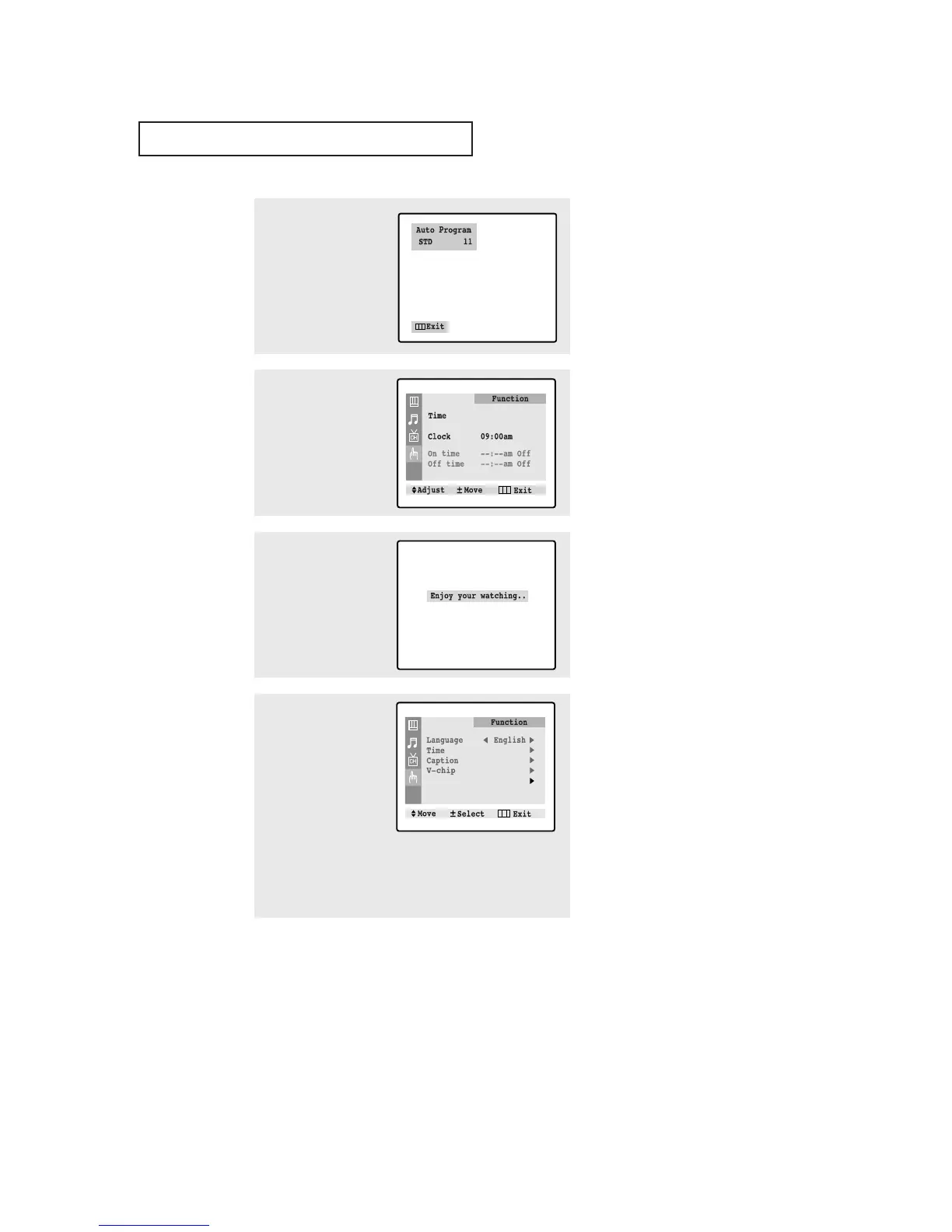
Make sure that the
antenna is connected to
the TV. And then press the
VOL+ or VOL- button to
activate "Auto Program" or
press the MENU button to
skip. (refer to “Auto
program” on page 3.6.)
5
Press the VOL+ or VOL-
button to move to the hour
or minute. Set the hour or
minute by pressing the
CH or CHbutton.
(refer to “Setting the
clock” on page 3.10.)
6
When you have finished,
press the MENU button.
The message “Enjoy your
watching..” is displayed.
Plug & Play
7
If you want to reset this
feature
(1)Press the MENU button.
(2)Press the CH button
three times to select the
Function menu and
press the VOL+ button.
(3)Press the CH button
to select Plug & Play
and press the VOL+ but-
ton.
The message “Plug &
Play” is displayed.
Note: Plug & Play feature doesn’t work when the V-chip is
on or when in the A/V mode.

Table of Contents

Related product manuals