18
1
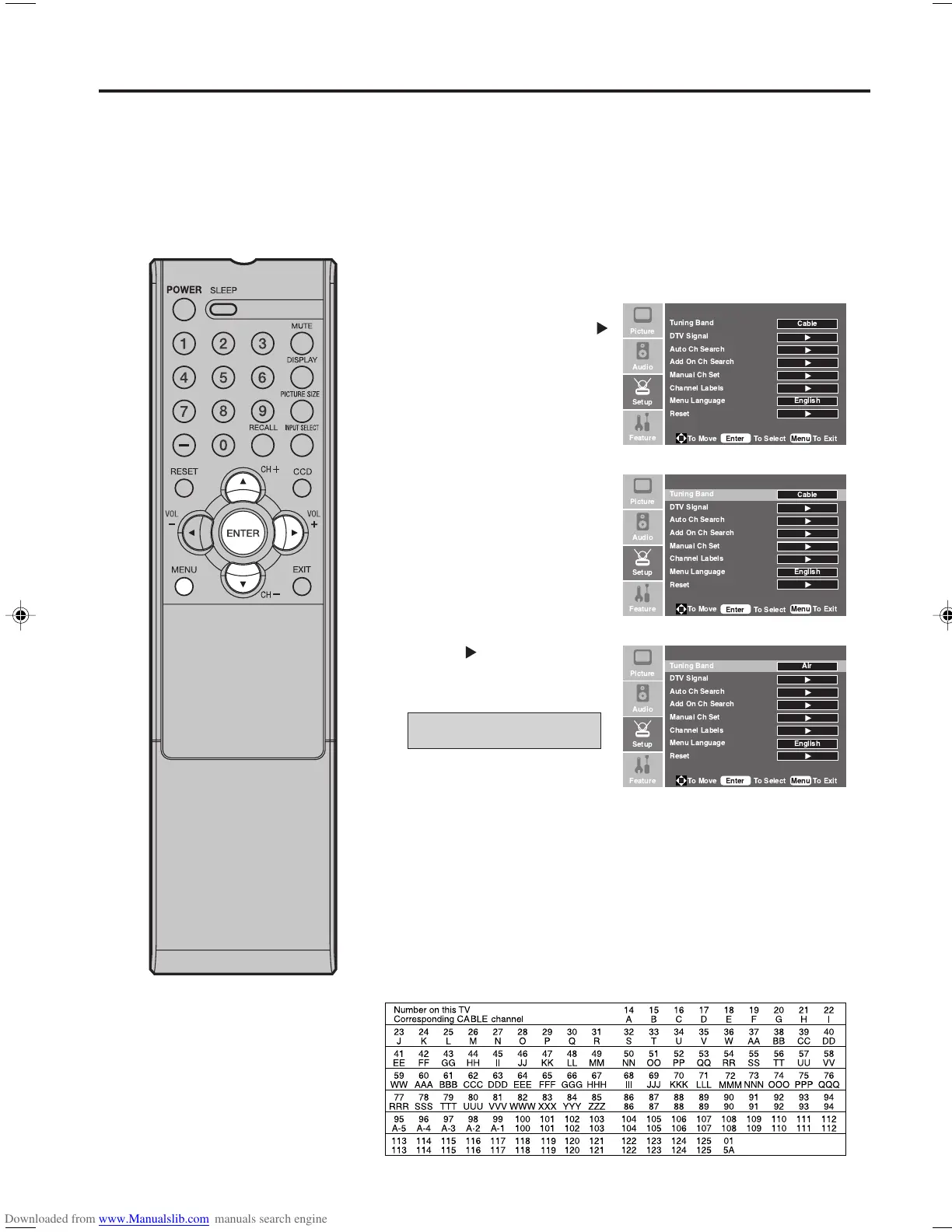
Press MENU. The menu screen will appear.
2
Press ▲ or ▼ to select
“Setup” menu, then press
.
3
Press ▲ or ▼ to select
“Tuning Band”.
4
Press or ENTER to select
“Air” or “Cable”.
5
Press MENU to return to the normal screen.
This TV is equipped with a channel memory feature which allows channels to skip up or down to the
next channel set into memory, skipping over unwanted channels. Before selecting channels, they must
be programmed into the TV’s memory. To use this TV with an antenna, set the Tuning Band menu option
to the Air mode. When shipped from the factory, this menu option is in the Cable mode.
Air/Cable selection
Air - VHF/UHF channels
Cable - CABLE TV channels
CABLE CHART
The chart below is typical of many cable system channel allocations.
Memorizing channels
NOTE:
• It may take a few seconds for a
digital channel picture to appear
on screen after being selected.
!
"
!
"
!
"
33F0201A_En_p18-24 7/5/07, 3:29 PM18



 To Next Page