24
Labeling channels
1
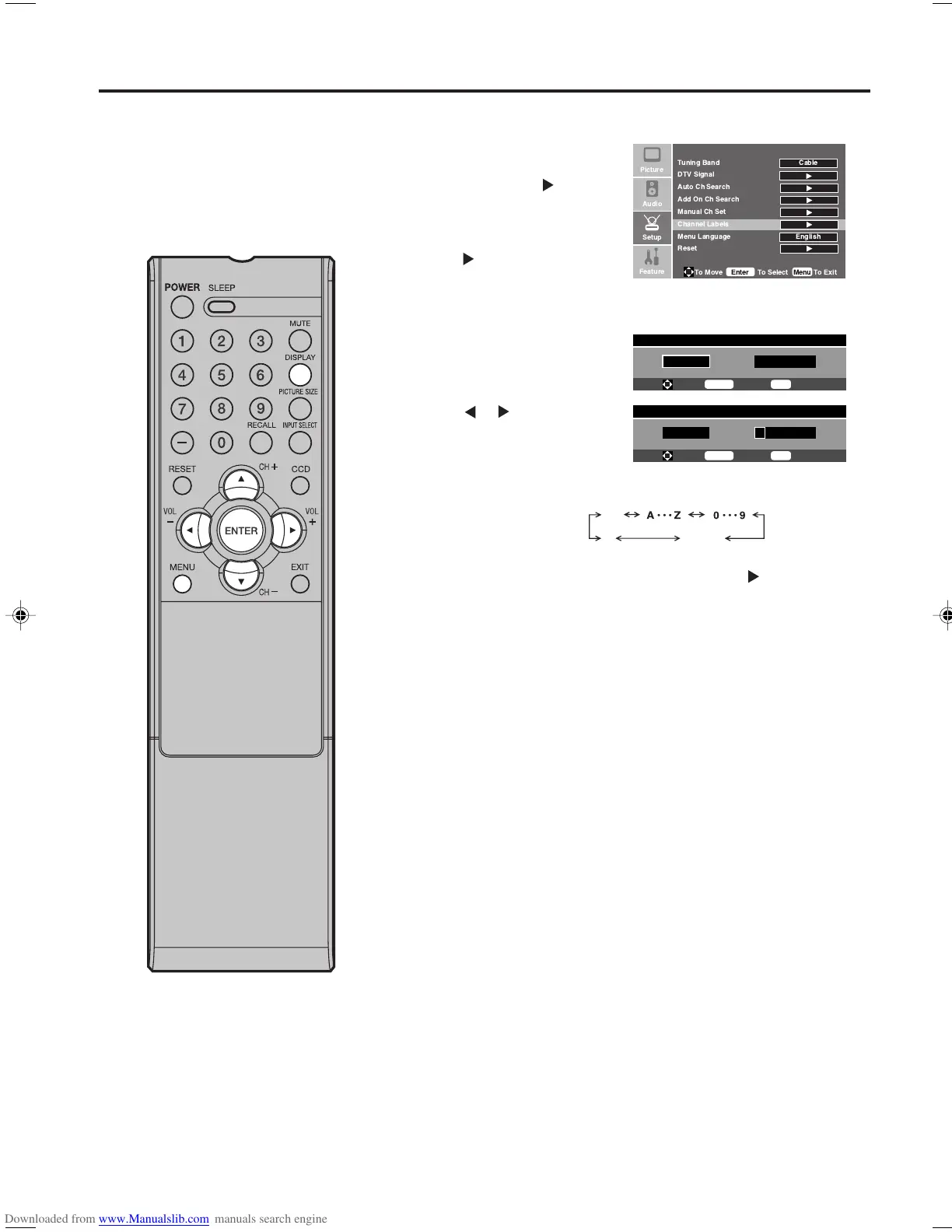
Press MENU, then press
▲ or ▼ to select “Setup”
menu, then press .
2
Press ▲ or ▼ to select
“Channel Labels”, then
press
or ENTER.
The “Channel Labels” menu
will appear.
3
Press ▲ or ▼ to select a
channel you want to label.
4
Press or to enter a
character in the first space.
Press ▲ or ▼ repeatedly
until the character you want
appears on the screen.
Channel labels appear over the
channel number display each time
you turn on the TV, select a
channel, or press DISPLAY.
You can choose any seven
characters to identify a channel.
To create channel labels
If the character which you desire appears, press .
Repeat this step to enter the rest of the characters.
If you would like a blank space in the label name, you must
choose the empty space from the list of characters.
5
When you finish inputting the label name, press MENU to
return to the normal screen.
6
Repeat steps 1-5 for other channel. You can assign a label to
each channel.
The characters rotation
as follows:
Channel Labels Menu
Ch 23-0
- - - - - - -
To Move
To Select
To Exit
Enter
Menu
SPACE
-
*
Channel Labels Menu
Ch 23-0
- - - - - - -
To Move
To Select
To Exit
Enter
Menu
!
"
33F0201A_En_p18-24 7/5/07, 3:29 PM24



 To Next Page