EasyManua.ls Logo

Sansui HDLCD1900 - Checking the Digital-signal strength; Resetting your settings

Sansui HDLCD1900
44 pages
Print Icon
To Next Page IconTo Next Page
To Previous Page IconTo Previous Page
Loading...
38
1
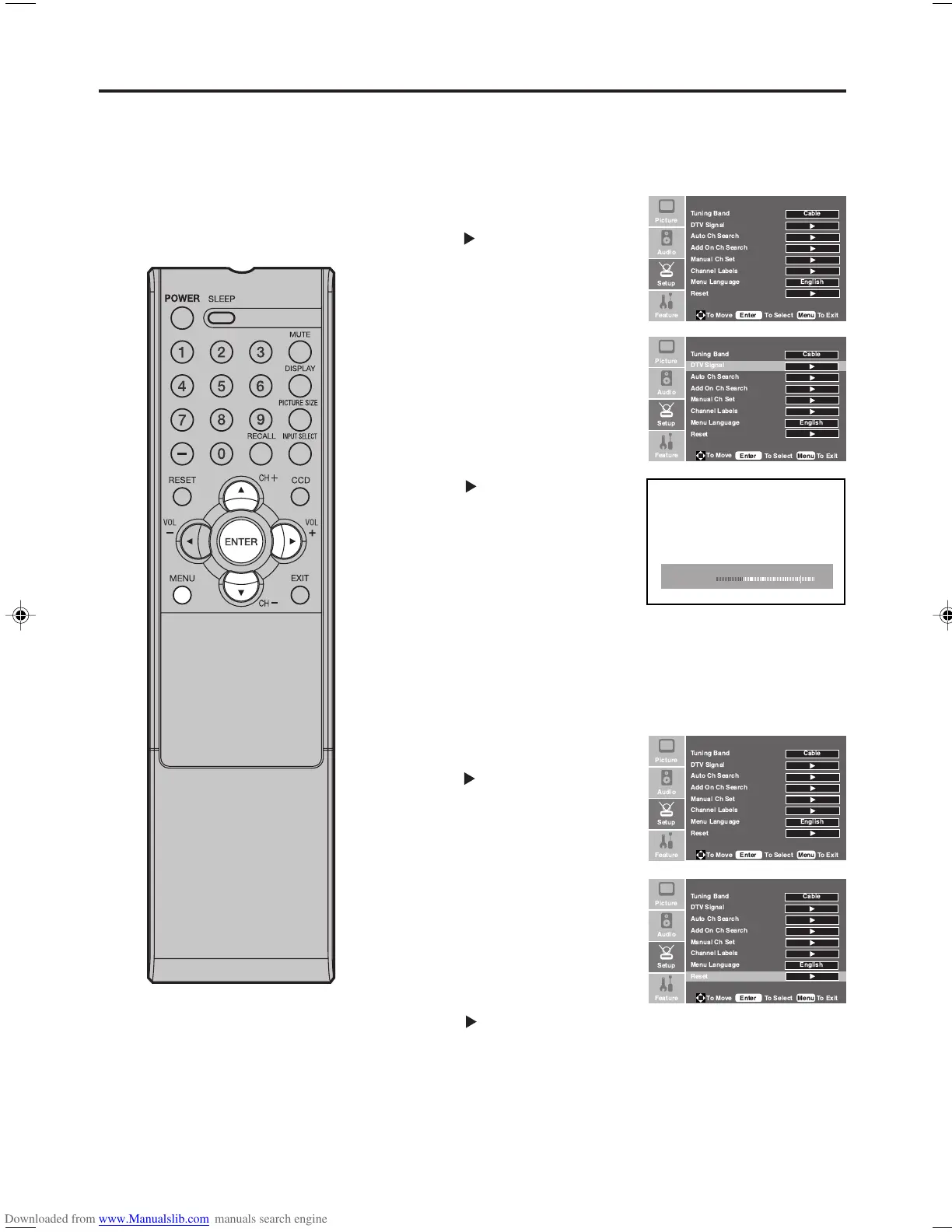
Press MENU. Then press or
to select “Setup” menu, then
press .
2
Press or to select “Reset”.
3
Press or ENTER to return your settings to the factory
settings.
4
Press MENU to return to the normal screen.
NOTE:
Signal meter feature is not
available for analog channels.
After 180 seconds, SIGNAL
METER screen will return to
normal TV-operation automatically.
Checking the Digital-signal strength
This TV will allow you to view the digital signal meter for
digital channels.
1
Press MENU. Then press or
to select “Setup” menu, then
press
.
2
Press or to select “DTV
Signal”.
3
Press or ENTER to check the
Digital-signal strength.
4
Press MENU to return to the normal screen.
Signal Level 85
Weak Normal Good
Checking the Digital-signal strength/
Resetting your settings
The Reset function returns your settings to the factory set-
tings.




 
 
  
   
  
 
 



 !
 
 "




 
 
 





 
 
  
   
  
 
 
!
"




 
 
  
   
  
 
 



 !
 
 "






 
 
  
   
  
 
 



 !
 
 "


33F0201A_En_p36-39 7/5/07, 3:29 PM38

Other manuals for Sansui HDLCD1900

Related product manuals