31
Setting the picture size
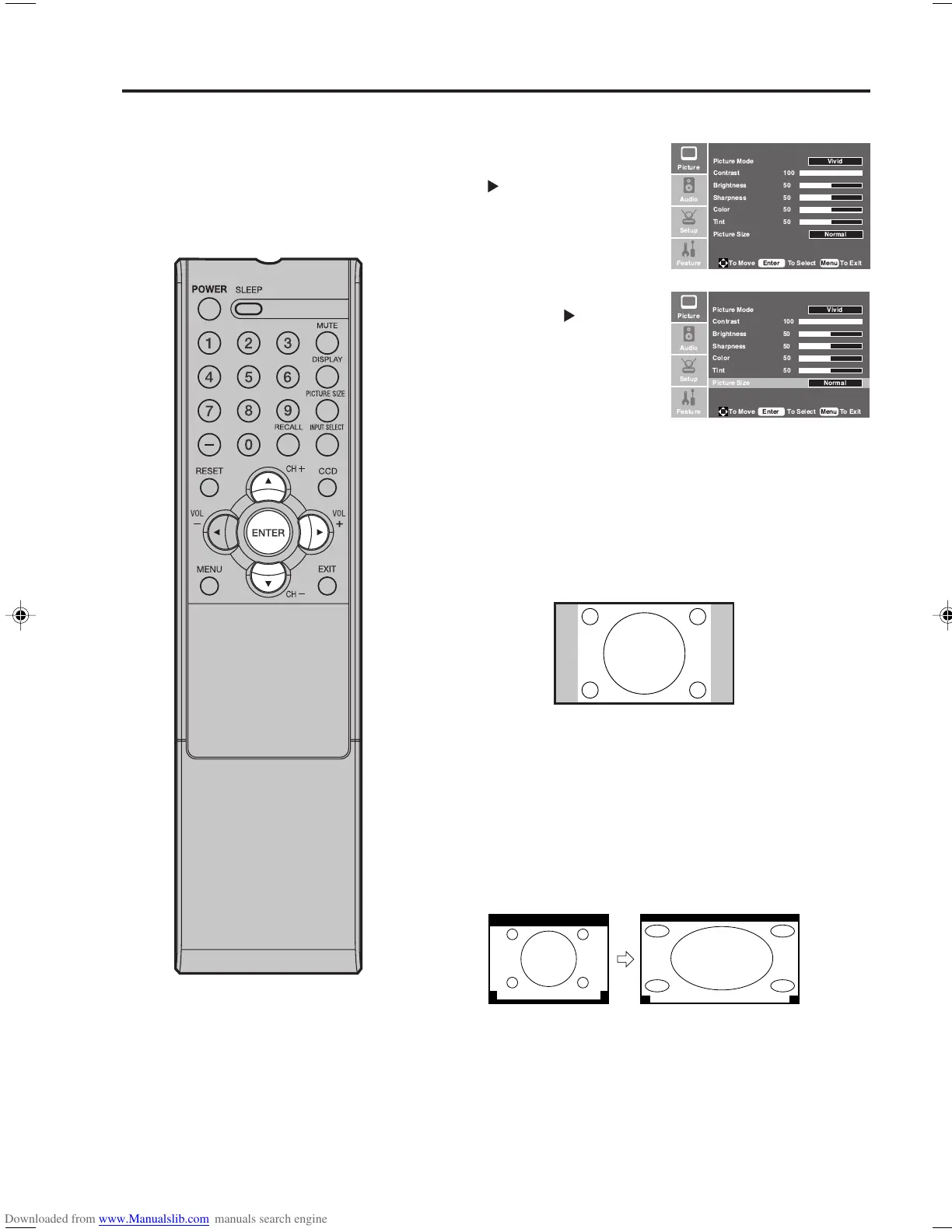
Normal picture size
In some cases, this image will display the size of standard 4:3 with
a gray side bar.
1
Press MENU. Press ▲ or ▼ to
select “Picture” menu, then
press
.
2
Press ▲ or ▼ to select “Picture
Size”, then press
or ENTER
to select the desired picture size,
as described below and on the
next page.
3
Press MENU to return to the normal screen.
Selecting the picture size
You can view 480i and 480p format
programs in a variety of picture
sizes— Normal, Zoom, Wide and
Cinema.
NOTE:
• Some High Definition and/or Digital
broadcasts may not allow you to
change the picture size.
A B C D E F G - - - - - - - - - - - - - - - -
A B C D E F G - - - - - - - - - - - - - - - - - - - - - - - - - -
Zoom picture size (for letter box programs with
subtitles)
To fill the width of the screen, it is extended horizontally. However; it
is only slightly extended at the top and the bottom.
The top and bottom edges of the picture may be hidden.
!
!
"#
"
!
!
"#
"
33F0201A_En_p30-35 7/5/07, 3:29 PM31



 To Next Page