EasyManua.ls Logo

Sansui HDLCD1900 - Selecting the audio language; Selecting the digital output

Sansui HDLCD1900
44 pages
Print Icon
To Next Page IconTo Next Page
To Previous Page IconTo Previous Page
Loading...
37
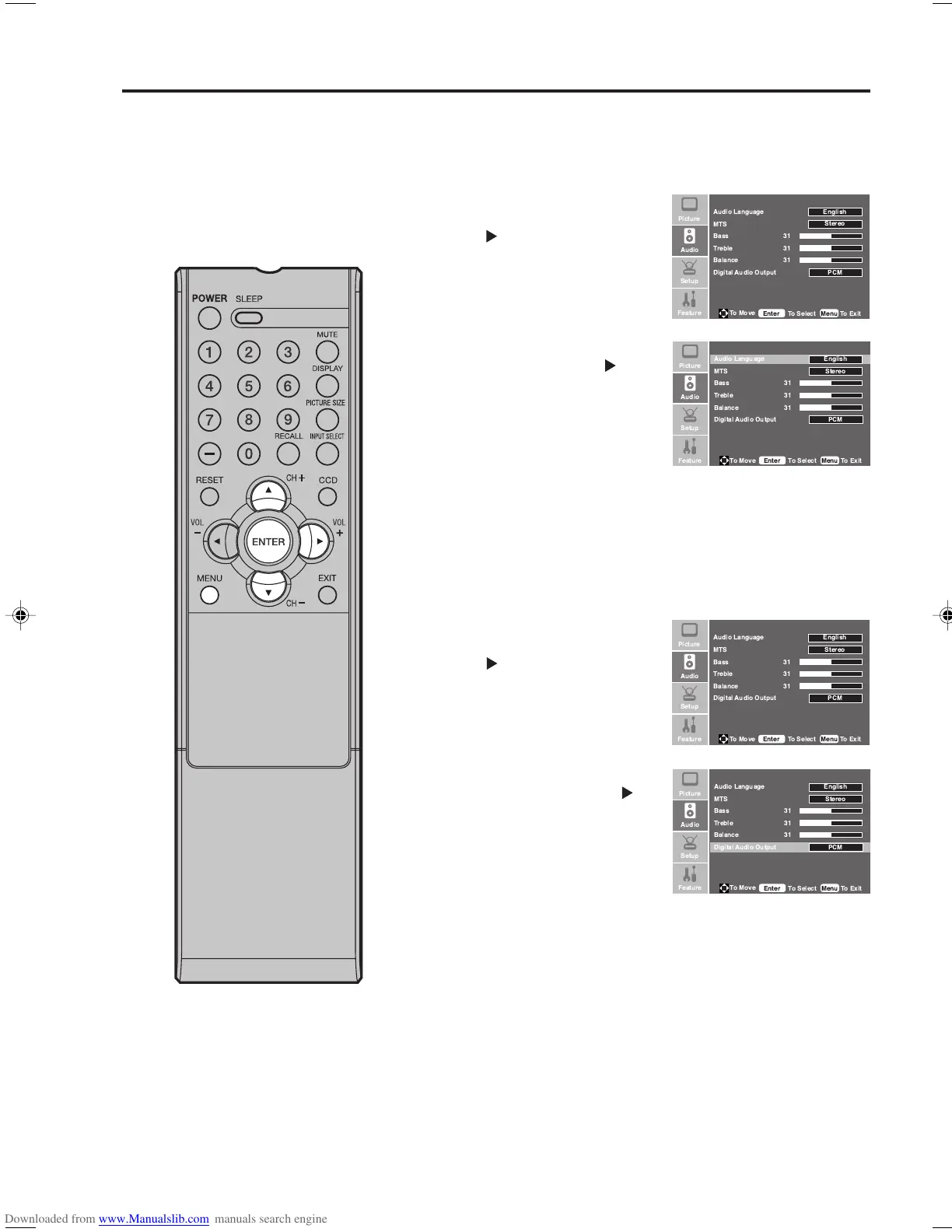
Selecting the audio language
When two or more audio languages are included in a digital
signal, you can select one of the audio language.
1
Press MENU. Then press or
to select “Audio” menu, then
press
.
2
Press or to select “Audio
Language”. Then press or
ENTER to select your desired
language.
3
Press MENU to return to the normal screen.
Selecting the audio language/
Selecting the digital output
You can choose the format of the digital audio output signal.
1
Press MENU. Then press or
to select “Audio” menu, then
press
.
2
Press or to select “Digital
Audio Output”, then press or
ENTER to select “PCM” or
“RAW”.
3
Press MENU to return to the normal screen.
 

 
 
 
  





 

 !
 
 "


 

 
 
 
  




 
 
 


!

"
 

 
 
 
  





 

 !
 
 "


 

 
 
 
  




 
 
 


!

"
33F0201A_En_p36-39 7/5/07, 3:29 PM37

Other manuals for Sansui HDLCD1900

Related product manuals